
RAG Data Ingestion Best Practices: 10 Practices for Production LLM Apps
The demo answered every question well. In production, the same RAG app cites a policy that was replaced in March, reads a pricing table as a paragraph of loose numbers, and misses the update your team published last week. None of that is the model's fault. It happened before the model saw anything, when the data was ingested.
The risk is well documented. Gartner predicted in February 2025 that through 2026, organizations will abandon 60% of AI projects that are not supported by AI-ready data. Ingestion is where data becomes AI-ready or does not.
Below are 10 RAG data ingestion best practices across three stages: getting documents in cleanly, making chunks easy to retrieve, and keeping the index trustworthy over time. Each one starts with the failure it prevents and ends with a check you can run.
- Parsing first: most retrieval failures start with badly parsed documents, so test your parser on your worst files before you tune anything else.
- No default chunk size: the best chunking strategy depends on your documents and your questions, so test two or three on a real question set.
- Ingestion never finishes: detect changes, handle deletions and re-embed into a new index when your embedding model changes.
- Secure at the source: carry permissions into every chunk and vet what you ingest, because a few planted documents can steer answers.
What does data ingestion mean for a RAG app?
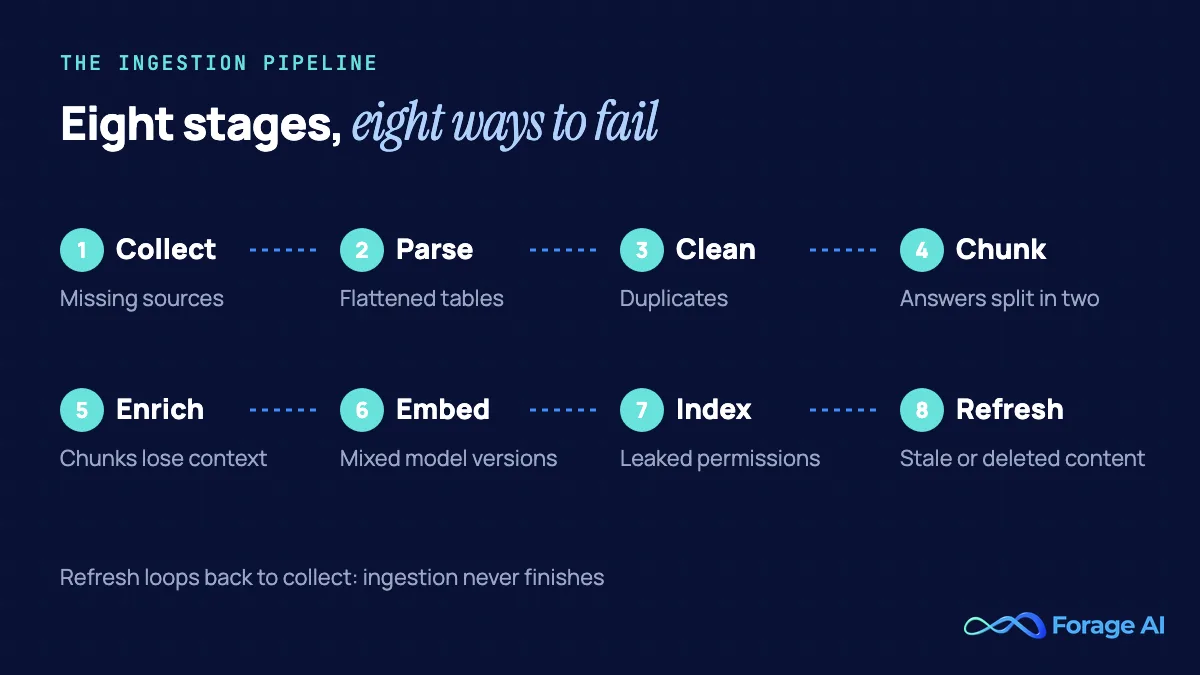
Data ingestion is everything that happens between a source and the index your retriever searches. For a RAG app it usually runs in eight stages: collect, parse, clean, chunk, enrich, embed, index and refresh. Retrieval can only return what ingestion stored, in the shape ingestion stored it.
That is why RAG failures that look like model failures usually turn out to be data failures. A widely cited 2024 study of RAG engineering named seven failure points, and two of them happen before the model runs: the answer was never ingested, or it was ingested but ranked too low to be retrieved. Our diagnosis of why RAG pipelines fail in production traces that pattern in detail. This article is the other half: the fix. If you are new to the architecture, start with our introduction to retrieval-augmented generation.
Get documents in cleanly
The first four practices decide what your index contains and whether it can be trusted. Mistakes here are the hardest to see later, because everything downstream works on the damaged version.
1. Start from the questions, not the files
| Attribute | Detail |
|---|---|
| The failure it prevents | Indexing everything and answering nothing well. |
| How to do it | Before ingesting, build a golden dataset: real user questions paired with the document that answers each one. |
| How to check it works | Every question maps to a source that is in scope and in the index. |
The instinct is to connect every drive and wiki and sort it out later. In practice, more documents can make answers worse. In a June 2026 University of Wyoming study of a deployed transportation-agency corpus, growing the collection from 54 to 1,128 documents cut accuracy from 75% to below 40%, even with hybrid search. A golden dataset of 50 to 100 real questions with their answering sources tells you which sources belong and which versions are authoritative. Seed it with questions from support tickets and subject experts, then generate more from your own documents. It becomes the test set for practices 4, 5 and 10.
2. Treat parsing as the first quality gate
| Attribute | Detail |
|---|---|
| The failure it prevents | Tables flattened into loose numbers, scrambled reading order, OCR noise in scanned files. |
| How to do it | Use layout-aware parsing, turn tables into Markdown (HTML when cells are merged), describe charts and figures, keep page references, and route scans through OCR with confidence scores. |
| How to check it works | Run automated checks on parsed output, such as line items summing to the printed total, and compare a sample of your hardest documents with the source. |
Parsing errors do not stay in parsing. The OHRBench study (ICCV 2025) built 8,561 document images across seven domains, with 8,498 question-answer pairs, and found that no current OCR tool could yet build a high-quality RAG knowledge base; performance fell as semantic and formatting noise rose.
Tables deserve special care, because a single shifted cell changes every value in its row. Start simple. A NAACL 2024 study of table-heavy technical documents found plain Markdown performed close to LLM-written table descriptions, so Markdown is a sound default.
Format alone will not save you. In a July 2026 benchmark of look-alike tables, question-answering F1 fell from 0.755 when the model had the right table to 0.330 when it relied on the top five retrieved ones. The fix is context: repeat the header row when you split a table, and put the company, period and table title in every chunk. Charts are harder still. A chart nobody described is invisible to search. Our guide to table extraction in document processing covers the mechanics. As a bar to hold any parser to, Forage AI's in-house model detects tables with 95% accuracy across table types and handles documents over 2,000 pages.
3. Keep provenance on every chunk
| Attribute | Detail |
|---|---|
| The failure it prevents | Answers you cannot cite, content you cannot delete, and permissions you cannot filter on. |
| How to do it | Store the source, version, last-modified date, page, heading path, a fingerprint, access groups and embedding model with every chunk. |
| How to check it works | Pick 10 random chunks and trace each one back to its source page. |
A chunk without metadata is a sentence with no address. You cannot show users where an answer came from, you cannot remove it when the source is deleted, and you cannot stop the wrong person from retrieving it. NIST's Generative AI Profile (July 2024) lists source and versioning among the provenance information to track. The record below carries everything the later practices need. The sync function makes re-ingestion idempotent: unchanged documents are skipped, documents whose text, version or permissions changed are replaced, and deleted ones are removed.
Python: chunk records with provenance, and an idempotent, deletion-aware sync
import hashlib
from datetime import datetime, timezone

EMBEDDING_MODEL = "embed-v3"  # bump this and re-embed into a new index version

def fingerprint(doc: dict) -> str:
    """Changes when the text, the version or the permissions change."""
    key = "|".join([doc["text"], doc["version"], ",".join(sorted(doc["acl_groups"]))])
    return hashlib.sha256(key.encode()).hexdigest()

def build_records(doc: dict, chunks: list[dict]) -> list[dict]:
    """One record per chunk, carrying everything needed to cite, filter, refresh and delete it."""
    fp = fingerprint(doc)
    return [
        {
            "id": f"{doc['source_id']}:{doc['version']}:{i}",
            "text": chunk["text"],
            "heading_path": chunk["heading_path"],  # e.g. "Policies > Refunds"
            "page": chunk.get("page"),
            "source_id": doc["source_id"],
            "source_url": doc["url"],
            "doc_version": doc["version"],
            "last_modified": doc["last_modified"],
            "fingerprint": fp,
            "acl_groups": doc["acl_groups"],
            "ingested_at": datetime.now(timezone.utc).isoformat(),
            "embedding_model": EMBEDDING_MODEL,
        }
        for i, chunk in enumerate(chunks)
    ]

def sync(doc: dict, chunks: list[dict], index: dict) -> str:
    """Idempotent: unchanged documents are skipped; changed text, versions or permissions
    are replaced; deleted documents are removed."""
    old = [r for r in index.values() if r["source_id"] == doc["source_id"]]
    if doc.get("deleted"):
        for r in old:
            index.pop(r["id"])
        return "deleted"
    if old and old[0]["fingerprint"] == fingerprint(doc):
        return "unchanged"
    for r in old:
        index.pop(r["id"])
    for r in build_records(doc, chunks):
        index[r["id"]] = r
    return "upserted"
4. Pick a chunking strategy from your questions, not a default
| Attribute | Detail |
|---|---|
| The failure it prevents | A default splitter cutting the answer across two chunks, or burying it in one oversized chunk. |
| How to do it | Split on document structure (headings, pages, table rows), keep tables and code blocks whole, carry the heading path into each chunk, then test two or three strategies against your question set. |
| How to check it works | Compare recall at your top-k for each strategy before you pick one. |
There is no universal chunk size, and the research says so. A July 2024 Chroma technical report tested chunking strategies across five corpora and 472 queries and found recall differed by up to 9% between strategies. NVIDIA's June 2025 study across five datasets found page-level chunking had the highest average end-to-end accuracy (0.648) with the least variance. Factoid questions did best with 256- to 512-token chunks, and analytical questions with larger chunks or whole pages.
Chroma researchers Brandon Smith and Anton Troynikov warn that "default settings for certain popular chunking strategies can lead to relatively poor performance." The fashionable upgrade is not automatically better either: a 2024 study found the extra computation of semantic chunking was not justified by consistent gains over fixed-size chunks. Overlap and parent-child retrieval are settings to test, not defaults to copy.
Source: Chroma technical report, July 2024; "Is Semantic Chunking Worth the Computational Cost?", 2024
The chunking trap is one of the three failure patterns in our RAG pipeline diagnosis. The fix is to let your own questions pick the strategy.
Make chunks easy to retrieve
With clean, well-cut chunks in the index, the next job is making sure the right one surfaces. The next two practices make the right chunk stand out when a question arrives.
5. Add context to chunks and index keywords too
| Attribute | Detail |
|---|---|
| The failure it prevents | A chunk that has lost its subject, such as "revenue grew 3% over the previous quarter" with no company or period attached. |
| How to do it | Prepend short document and section context to each chunk before embedding, index a keyword (BM25) version alongside the vectors (hybrid search), and rerank the combined results. |
| How to check it works | Measure the share of golden-set questions whose answer chunk is missing from the top results, before and after. |
Anthropic's September 2024 Contextual Retrieval tests showed how much context matters. Prepending 50 to 100 tokens of chunk-specific context cut the top-20 retrieval failure rate by 35% (from 5.7% to 3.7%). Adding keyword search took the reduction to 49%, and adding a reranker took it to 67% (1.9%). The one-time cost they reported was $1.02 per million document tokens, using prompt caching. Measure before and after adding a reranker, because a reranker can hide chunking errors that will surface elsewhere.
6. Remove duplicates before they crowd the top results
| Attribute | Detail |
|---|---|
| The failure it prevents | Five copies of the same policy filling every top-k slot and pushing out the document with the real answer. |
| How to do it | Deduplicate exact and near-duplicate content at document and chunk level, keep one canonical version, and resolve records that describe the same entity. |
| How to check it works | Count distinct sources in the top-k results for your golden-set questions. |
More copies do not mean more knowledge. In an August 2026 University of Queensland and CSIRO study using fictional events, one retrieved document scored 0.532 on answer correctness for a small model, five diverse documents scored 0.772, and five copies of the same document scored 0.525. Use near-duplicate detection such as MinHash as well as exact matching, and keep the most recent version as canonical. Older versions of the same document are a freshness question, handled in practice 7. Our article on entity resolution for RAG explains why deduplication alone is not enough when records describe the same company or person differently.
How do you keep the index trustworthy over time?
An index is correct on the day you build it. After that it drifts into a degraded mode unless someone keeps it current. The last four practices keep it correct afterwards.
7. Make ingestion incremental, idempotent and deletion-aware
| Attribute | Detail |
|---|---|
| The failure it prevents | Stale answers, deleted documents that are still retrievable, and duplicates every time the job re-runs. |
| How to do it | Detect changes with fingerprints, change-data-capture or webhooks, upsert by a stable ID, mark then remove deleted sources, reconcile source and index regularly, and set a freshness target per source. |
| How to check it works | Track freshness lag and orphaned chunks per source, time how long a deletion takes to reach the index, and query a deleted document: it should return nothing. |
Stale content is not a cosmetic problem. In HoH, an ACL 2025 benchmark of about 96,000 question-answer pairs, outdated passages were retrieved at least as often as current ones, and their presence alone cut accuracy by at least 20% in mainstream models.
Deletions are the quietest version of it. Polling for changes cannot see a document that no longer exists, so a removed file keeps turning up as evidence, and the blast radius is every answer that cites it. Capture deletes at the source and reconcile source and index on a schedule. The sync function in practice 3 applies them once your pipeline knows about them.
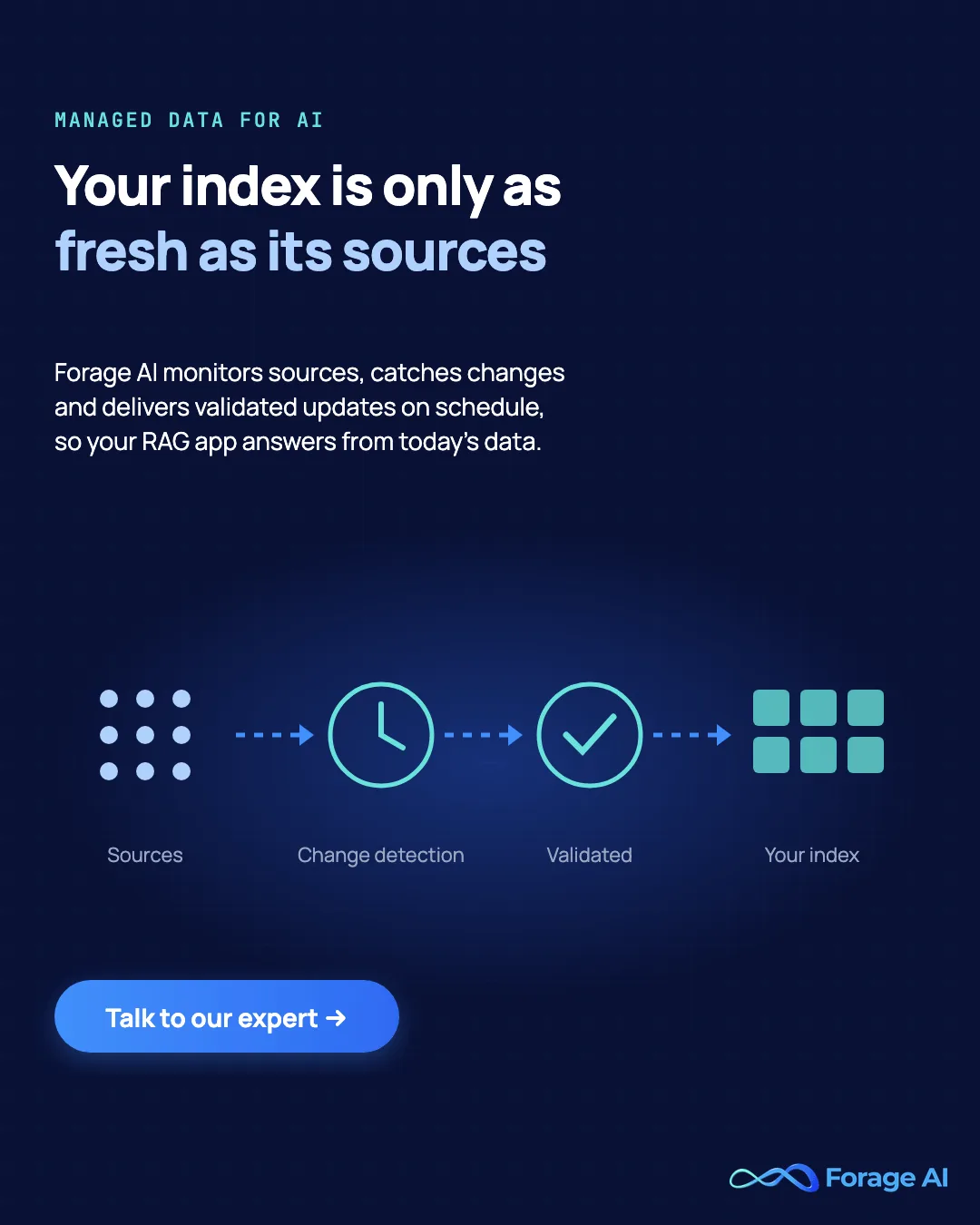
Two more rules. When you change embedding models, re-embed everything into a new, versioned index and switch over once it passes your golden set, because vectors from two models cannot be compared. External sources need the most attention: websites change layouts and access rules without notice, so pair web sources with website change monitoring.
8. Enforce permissions at ingestion, not in the prompt
| Attribute | Detail |
|---|---|
| The failure it prevents | A user retrieving chunks from a document they are not allowed to open. |
| How to do it | Copy access groups from the source into chunk metadata, filter on them at query time, and partition tenants into separate indexes or namespaces. |
| How to check it works | Log in as a restricted test user and confirm restricted chunks never appear. Then change a source's permissions without touching its text: access should drop at the next sync. |
Telling the model not to reveal something is not access control. The OWASP Top 10 for LLM Applications added "Vector and Embedding Weaknesses" (LLM08:2025) and recommends permission-aware vector stores with strict logical partitioning. Partitioning also helps retrieval: in the University of Wyoming study, the retriever pulled from the right source 84% to 90% of the time when search was scoped, and 59% of the time when everything sat in one index.
One more rule: keep sensitive fields out of the index altogether. Anything indexed can be read back out, which is why OWASP's guidance on sensitive information disclosure (LLM02:2025) is to detect and redact confidential content before processing.
9. Vet sources and watch for poisoned content
| Attribute | Detail |
|---|---|
| The failure it prevents | A handful of planted documents steering answers to an attacker's chosen response. |
| How to do it | Allow-list sources, record a trust level per source, quarantine new or unverified sources, and alert on sudden large content changes. |
| How to check it works | Keep an audit log of every source added and review alerts before re-indexing. |
Poisoning takes little effort. The PoisonedRAG study (USENIX Security 2025) reached a 90% attack success rate by injecting five malicious texts per target question into a knowledge database of millions of texts, and the defenses it tested were not enough. Poisoning is not only false facts. Research on indirect prompt injection showed that instructions hidden in ingested pages are retrieved like any other text, so strip hidden text and markup at parse time. OWASP's guidance is to accept data only from trusted, verified sources.
More sources are not the same as better sources. Every source you add is also a way in, so treat a new source like new code: reviewed before it ships.
10. Measure retrieval separately from answers
| Attribute | Detail |
|---|---|
| The failure it prevents | Blaming the model for faults that ingestion introduced, and shipping changes that make retrieval worse. |
| How to do it | Run the golden set from practice 1 on every ingestion change and track recall at top-k and source attribution by source and index version. |
| How to check it works | A dashboard shows retrieval metrics per source, and a drop blocks the release. |
If the answer chunk is not in the retrieved set, no prompt can fix it. Worse, strong models rarely say so. Google researchers found at ICLR 2025 that large models often give incorrect answers instead of declining when the retrieved context is insufficient. So measure retrieval on its own, with recall at k and mean reciprocal rank on your golden dataset, and you will know which layer failed. Watch the sources too. A source that starts returning empty or malformed content should raise an alert before its chunks reach users. Our data quality framework for external sources sets out the checks.
Jason Liu, who built retrieval and recommendation systems at Stitch Fix and Facebook, puts it bluntly: when retrieval pulls the wrong chunk entirely, "no model version will fix that." Teams that swap models to fix wrong answers are usually tuning the wrong layer. Fix what the retriever can find first, then judge the model.
Source: Jason Liu, "Systematically Improving RAG Applications", January 2025
RAG data ingestion best practices at a glance
| # | Practice | The failure it prevents | Quick check |
|---|---|---|---|
| 1 | Start from the questions | Indexing everything, answering nothing well | Every golden question maps to an in-scope source |
| 2 | Parsing as a quality gate | Flattened tables, OCR noise | Parsed output matches source on hard documents |
| 3 | Provenance on every chunk | Uncitable, undeletable content | 10 random chunks trace to source pages |
| 4 | Chunking strategy from your questions | Answers split or buried | Recall at top-k per strategy |
| 5 | Context plus keyword search | Chunks that lost their subject | Retrieval failure rate before and after |
| 6 | Deduplicate before indexing | Copies crowding out answers | Distinct sources per top-k |
| 7 | Incremental, deletion-aware sync | Stale and deleted content | Freshness lag; deletion reaches index; deleted-doc query |
| 8 | Permissions at ingestion | Leaked restricted content | Restricted user test; permission-change test |
| 9 | Vetted sources | Poisoned answers | Source audit log and change alerts |
| 10 | Measure retrieval separately | Wrong layer blamed | Recall and attribution per release |
When should you hand off ingestion?
Most teams should own their retrieval layer. Keep ingestion in-house when your sources are a handful of internal systems with stable APIs and your platform team has time to run it.
Hand off the collection and extraction part when the sources are the hard part: dozens of external websites, portals that change without notice, scanned and table-heavy documents, or freshness targets your team cannot staff. That is the work Forage AI does. We extract and validate data from websites and documents, including charts and images, put human quality checks on it, and deliver structured, retrieval-ready datasets that plug directly into vector databases, typically one to two weeks from brief to a live pipeline. Our guide to managed web data extraction explains how that model works.
The demo that answered every question well was working on a clean, current, well-parsed corpus. Production can too. Whichever way you go, these practices do not stay done. Re-run your golden set on every release, add one practice at a time and measure what it changes, and when one source keeps breaking your index, bring it to us and we will show you how we would ingest it.
Frequently asked questions
What is data ingestion in RAG?
Data ingestion in RAG is the process of collecting source content, parsing it, cleaning it, splitting it into chunks, adding metadata, embedding it and loading it into the index the retriever searches. It also includes keeping that index current as sources change.
What chunk size should I use for RAG?
There is no single right size. Studies show the best choice depends on the documents and the questions: short factual questions often suit 256 to 512 tokens, while analytical questions suit larger chunks or whole pages. Test two or three strategies on your own question set.
How often should a RAG index be refreshed?
As often as the sources change and the use case needs. Set a freshness target per source, detect changes incrementally rather than rebuilding everything, and track the lag between a source update and the index update.
How do you handle deleted documents in RAG?
Capture deletions at the source through change-data-capture or webhooks, because polling cannot see a document that no longer exists. Remove every chunk from that document by its source ID, reconcile source and index on a schedule, and test it: a query that used to return the deleted document should now return nothing from it.
How do you evaluate a RAG pipeline's retrieval?
Build a golden dataset of real questions paired with the documents that answer them, then measure recall at k and mean reciprocal rank on every ingestion change. Open-source frameworks such as RAGAS score retrieval separately from the generated answer. Evaluate retrieval before you tune prompts or change models.
Do you need a vector database for RAG ingestion?
You need an index that supports vector search, and most production systems add keyword search too. Whether that is a dedicated vector database or a search engine with vector support depends on your scale. Our guide to data storage for LLMs and RAGs compares the options.
Related articles
- Why RAG Pipelines Fail in Production: the data-quality diagnosis behind failing RAG apps.
- Entity Resolution for RAG: why duplicates hurt retrieval and how to resolve them.
- Data Quality Framework for External Sources: checks for the data you ingest.
- Data Storage for LLMs and RAGs: choosing where your index lives.
Sai is a data infrastructure enthusiast who has spent the past two to three years following the AI space closely, from the infrastructure layer to the fast-growing world of data for AI. He is genuinely curious about how modern data pipelines get built and where the data industry is heading, and he writes insightful pieces on the core topics that shape this niche.