
Document Workflow Automation – Guide for Operations Leaders
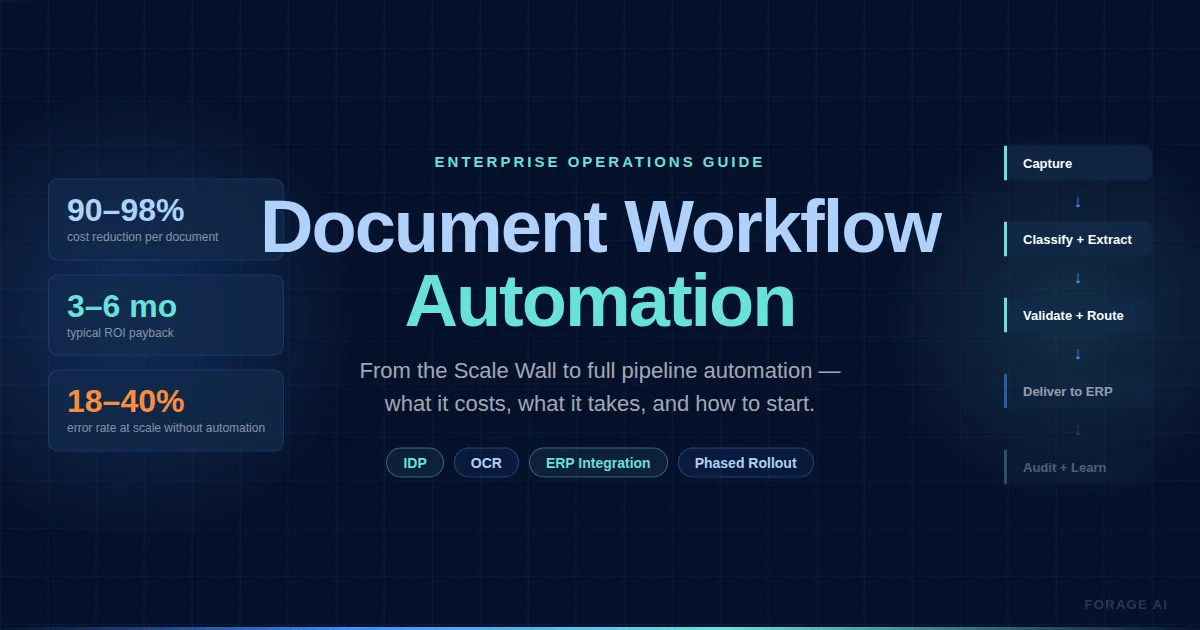
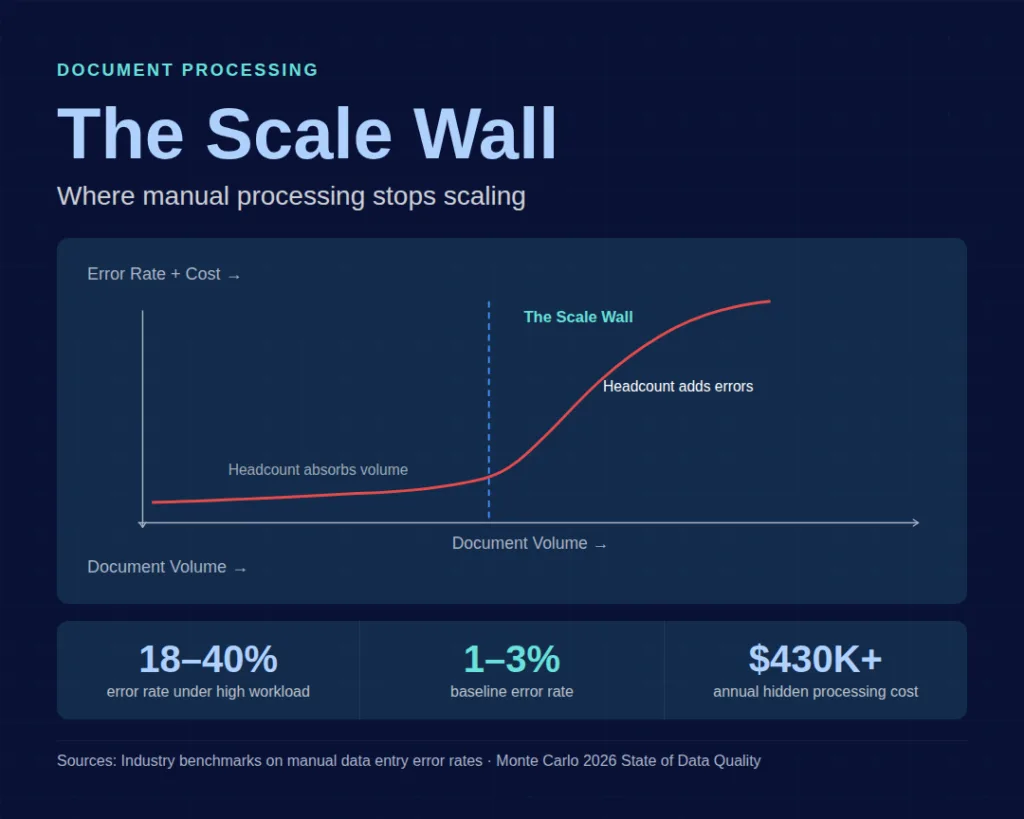
Your team processes hundreds of documents a day. Invoices, onboarding forms, compliance filings, and purchase orders. Each one is touched by a person who reads it, keys data into a system, and moves on to the next. At 50 documents a day, this works. At 200, cracks show. At 500, your team is working overtime, your error rate is climbing, and the data your downstream systems depend on arrives late or wrong. This is the Scale Wall.
Most operations leaders don’t recognize it until the damage is already compounding: employees spend 20-40% of their time searching for, verifying, or correcting document-related issues. For every $1 of visible processing cost, there’s $2-$3 in hidden costs that never hit a line item.
The question isn’t whether your team is working hard enough. They are. The question is whether the process itself can survive the next 12 months of volume growth.
This guide is built for the operations director or VP who manages document-heavy teams and is weighing whether, when, and how to automate. Here’s what we’ll cover:
Quick Digest
- The Scale Wall: manual data entry holds a 1-3% error rate until workload spikes, then jumps to 18-40%, and each error costs $25-$150 to remediate.
- The hidden bill: organisations with 100+ employees spend $430,000 to $850,000 a year on manual document processing once every cost is counted.
- Unit economics: manual handling runs $5-$25 per document fully loaded, and AI-powered automation brings that to $0.10-$0.50.
- Timing: automate once volume passes 500 documents a month and is growing, error rates climb, or downstream systems stop getting the data on time.
- Failure modes: roughly 40% of automation projects miss their expected ROI and 23% are abandoned inside a year, for five preventable reasons.
The Scale Wall: When Do Manual Document Processes Break?
Every manual document operation has an invisible threshold, below which adding headcount absorbs the volume. Above it, adding headcount just adds errors. This inflection point is the Scale Wall, and it’s driven by three accelerating forces:
- document volume
- document complexity
- the frequency with which downstream systems need the data.
The signals are predictable. Error rates that held steady at 1-3% start spiking. Under high workloads, manual data entry errors jump to 18-40%, and each error costs $25-$150 to remediate. Data arrives late for the systems that depend on it. Your team logs overtime, and 56% of employees in repetitive data roles report burnout.
The economics are worse than they look. Organizations with 100+ employees spend $430,000-$850,000 annually on manual document processing when you account for all costs. Not just salaries, but error correction, delayed decisions, compliance exposure, and the strategic work your team isn’t doing because they’re keying data. Each manual data entry employee costs roughly $28,500 per year in task-specific labor alone, and they spend 9+ hours per week on manual data tasks.
The false economy of “just add headcount” is the most common response, and the most expensive. It scales linearly while the problems it creates scale exponentially.
Scale Wall Diagnostic: Are You There Yet?
If three or more of these apply, you’ve likely hit the wall:
- Error rates have increased over the last 6 months despite no process changes.
- Downstream teams complain about data timeliness or accuracy.
- You’ve requested (or considered requesting) additional headcount for data entry.
- Your team regularly works overtime to meet processing deadlines.
- A single employee’s absence creates a visible backlog.
- You’ve had a compliance or quality incident tied to manual data errors.
- Client or stakeholder complaints reference data quality.
Expert Insights: Manual data entry carries a baseline error rate of 1-3% under normal conditions, but thiss pikes to 18-40% under high workloads. Meanwhile, 50.4% of employees report making errors related to manual work, and 80-90% of business data remains unstructured, growing at 55-65% annually. The Scale Wall isn’t a temporary spike. For most organizations, it’s a structural condition that worsens with every quarter of growth.
Quick Summary: “How do I know if my manual document processes are failing?”, Look for climbing error rates, late data, team burnout, and growing headcount requests. The diagnostic signals are consistent across industries: when adding people no longer proportionally reduces errors, you’ve hit the Scale Wall. The hidden costs (error remediation, delayed decisions, compliance exposure) typically run 2-3x the visible processing cost.
What Does Document Workflow Automation Actually Mean?
Before you evaluate solutions, get the terminology right. Three distinct categories are constantly conflated, leading to expensive misbuys.
Document management is the storage and retrieval of documents. Think filing cabinets, but digital: organizing, versioning, and finding documents. It doesn’t process them.
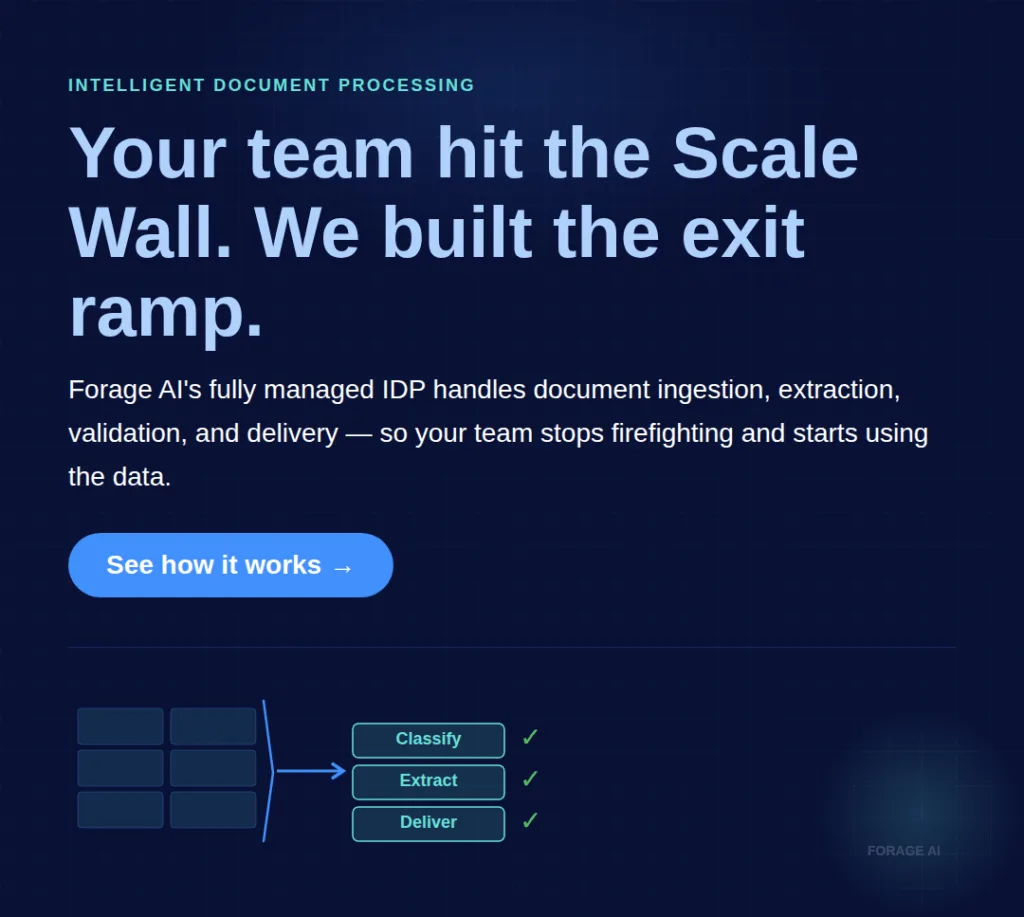
Document workflow automation encompasses the full processing chain: a document enters the system, is classified by type, key data is extracted, that data is validated against business rules, exceptions are routed to a human reviewer, and clean, structured data is delivered to your ERP, CRM, or downstream system. This is what most operations leaders actually need.
Intelligent Document Processing (IDP) is the AI layer that enables accurate extraction at scale. Modern IDP systems achieve 95-99.8% accuracy, compared to legacy OCR systems that top out at 70-85% on clean, printed documents. The difference matters: straight-through processing rates jump from40-70% with basic OCR to 82-96% with well-implemented IDP. That gap represents every document that either flows through automatically or gets stuck for manual handling.
The practical distinction for your buying decision: not every document needs AI. Standard, template-based invoices from a consistent supplier may only need rules-based extraction, which is why the best invoice data extraction tools are evaluated against your AP line-item complexity rather than a single accuracy headline. Complex, variable documents (contracts with non-standard layouts, handwritten forms, multi-page financial filings) need IDP with human-in-the-loop review for the 5-15% that automation can’t confidently handle.
A common misconception: general-purpose AI tools like ChatGPT can handle document processing. They can’t. Not at production scale. They lack the workflow orchestration, validation layers, compliance controls, and integration pipelines that enterprise document processing requires. As Petr Baudis, Co-founder and CTO of Rossum,notes: “Many tasks don’t require large language models, just speed and low cost.” Match the technology to the document complexity, not the hype cycle.
For a deeper dive on how intelligent document processing compares to traditional OCR, see OCR vs IDP: Understanding the Key Differences. For a comprehensive look at IDP capabilities, see Intelligent Document Processing: A Complete Guide.
Expert Insights: The IDP market is valued at $3.0-$10.6 billion in 2025 and projected to reach $17.8-$66 billion by 2032-2035.63% of Fortune 250 companies have already implemented IDP solutions. Yet 54.2% of finance leaders still rely on legacy OCR despite the performance gap. The window for competitive advantage through better document processing is narrowing, but it hasn’t closed.
Quick Summary: “What’s the difference between document management and document workflow automation?”, Document management stores and retrieves files. Document workflow automation processes them end-to-end: classification, extraction, validation, exception routing, and delivery into your business systems. IDP adds AI-powered accuracy (95-99.8%) on top. The most common buying mistake is purchasing document management when you need workflow automation.
The Business Case: ROI Numbers Your CFO Will Actually Believe
Generic ROI claims don’t survive a CFO meeting. Here’s a framework that does.
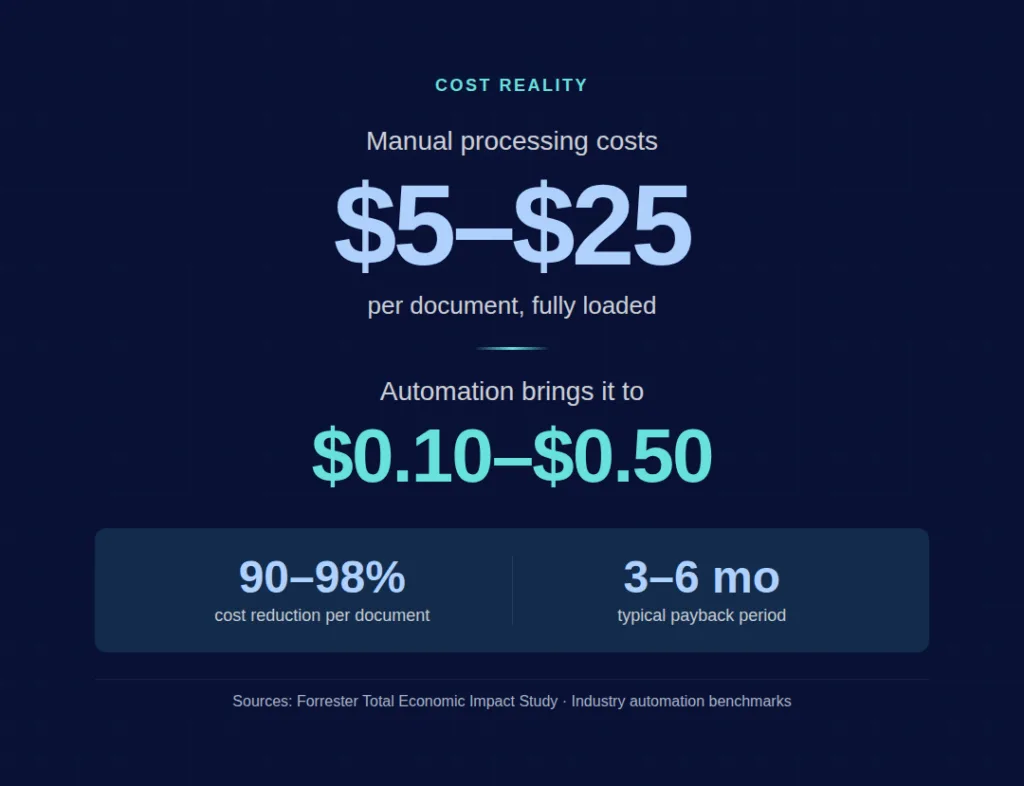
Start with your baseline. Manual document processing costs $5-$25 per document when fully loaded. That includes the employee’s time, error correction, supervision, and the downstream delays caused by manual bottlenecks. AI-powered automation brings this to $0.10-$0.50 per document. That’s a 90-98% reduction in per-document cost.
The compound math matters more than the unit economics. A finance team of 40 FTEs processing documents manually can save 25,000 hours of avoidable work annually, which is approximately $878,000. One financial services company saved $2.9 million annually after adopting IDP. Organizations implementing document workflow automation broadly report 200-400% ROI in the first year, with payback periods of 3-6 months.
For enterprise-scale proof: a Forrester Total Economic Impact study found a 3-year ROI of 248% and a net present value of $39.85 million, with payback in under 6 months.
The business case your CFO needs has three lines:
| Line | Manual (Current) | Automated (Projected) |
| Cost per document | $5-$25 | $0.10-$0.50 |
| Error rate | 1-3% (normal), 18-40% (high workload) | <1% |
| Processing time per document | 10-15 minutes | 1-2 minutes |
But the numbers that actually close the deal are the hidden costs you’re paying now: error remediation at $25-$150 per error, compliance risk from inconsistent processing, employee turnover from repetitive work, and the opportunity cost of your team doing data entry instead of exception handling, analysis, or process improvement.
Don’t forget the cost of inaction. Every quarter you delay, the manual costs compound. Volume grows, error rates climb, and the gap between what your team can handle and what the business needs widens. Frame the comparison as the cost of automating versus the cost of 12 more months of manual processing at the current trajectory.
For teams evaluating how IDP creates competitive advantage, see How IDP Gives You a Competitive Edge.
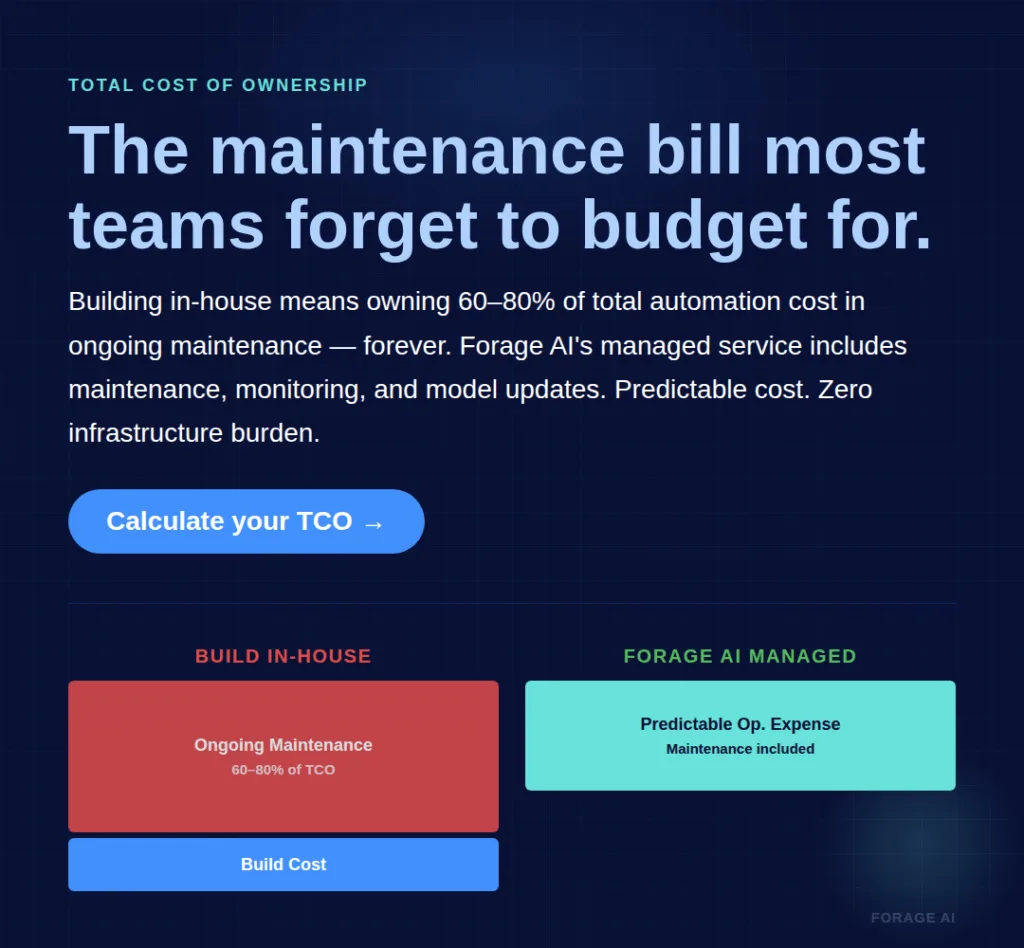
For organizations where the internal build and maintenance burden is the bottleneck, a fully managed document processing partner can shift extraction from a capital project to an operational expense. Forage AI’s managed IDP service handles the entire pipeline, from document ingestion through QA and delivery, so your team focuses on using the data, not extracting it. The total cost is typically lower than building and maintaining in-house, because the ongoing maintenance (the 80% of total cost most teams don’t budget for) is included.
Expert Insights: McKinsey reports that companies adopting AI and automation reduce operational costs by 20-30% and improve efficiency by over 40%.Mitratech’s analysis finds that labor costs represent 70-85% of total automation benefits. The ROI case for document automation has moved past “potential” into “measurable mandate.” Boards increasingly demand fiscal-year proof with specific KPIs: processing times down 50-70%, exception rates under 5%, cost per document halved.
Quick Summary: “How do I justify document automation to my CFO?”, Build the case on three numbers: current fully loaded cost per document ($5-$25), projected automated cost ($0.10-$0.50), and net annual savings with a 3-6 month payback period. Include hidden costs (error remediation, compliance risk, opportunity cost) that most manual-process budgets miss. The strongest business cases show both the cost of automation AND the cost of doing nothing for another year.
When Should You Not Automate?
Having established the business case, it’s equally important to understand when automation is not the right move, and when urgency is required.
Not every document workflow should be automated. Getting this wrong wastes budget and erodes internal trust in automation projects.
Keep it manual if: your document volume is under 500 per month, the documents are low-complexity and consistent, there’s no downstream system integration requirement, and there’s no compliance pressure for audit trails or accuracy guarantees. In these conditions, the setup and integration cost of automation won’t pay back quickly enough to justify.
Automate now if: volume is growing more than 20% annually, error rates exceed 3%, data is consistently late for downstream systems, you’ve requested additional headcount just to keep up, or regulatory requirements (like EU ViDA e-invoicing mandates) are tightening.
Expert Insights
External deadlines can settle the timing question for you. In memorandum M-23-07, “Update to Transition to Electronic Records” (23 December 2022), the Office of Management and Budget and the National Archives and Records Administration told federal agencies that “After June 30, 2024, NARA will no longer accept transfers of permanent or temporary records in analog formats and will accept records only in an electronic format with appropriate metadata.” When a counterparty or a regulator fixes a date like that, the readiness assessment stops being a judgment call and becomes a schedule.
A critical mistake that people make is they automate a broken process. If your current workflow has unnecessary steps, unclear routing rules, or inconsistent document formats from suppliers, automation will execute the broken process faster. It won’t fix it. Fix the workflow first, then automate it.
As Alan Pelz-Sharpe, Founder of Deep Analysis, warns: “Most enterprise AI is a solution in search of a problem.” Automation deployed without clear operational KPIs becomes shelfware.
Automation Readiness Assessment:
| Factor | Not Ready | Ready | Urgent |
| Monthly document volume | <500 | 500-5,000 | >5,000 |
| Error rate trend | Stable <2% | Rising, 2-5% | >5% or spiking |
| Downstream dependency | None | Some systems | Critical path |
| Compliance pressure | Low | Moderate | High or tightening |
| Team capacity | Comfortable | Stretched | Overtime / turnover |
| Document complexity | Uniform, simple | Mixed types | Highly variable |
If you score “Urgent” on three or more factors, the cost of waiting likely exceeds the cost of a phased pilot.
Expert Insights: 52% of RPA customers struggle with scaling their automation programs (Forrester). The primary barriers aren’t technical. They’re governance gaps, scope creep, and the absence of clear success criteria. 93% of organizations have or are developing AI governance frameworks (Tori Liu, AIIM), but governance built after deployment is repair work. Build it into the project plan from day one.
Quick Summary: “Should we automate our document processes, or is it too early?”, Automate when volume exceeds 500 documents per month and is growing, error rates are climbing, or compliance requirements demand audit trails. Don’t automate if volume is low, documents are simple, and there’s no downstream integration need. Most importantly, never automate a broken process. Fix the workflow first, then automate.
Five Ways Automation Projects Fail
Roughly 40% of automation projects fail to deliver expected ROI, and 23% are abandoned within the first year. That statistic should inform your approach, not discourage it. Every failure mode is preventable if you know what to watch for.
1. Automating a broken process. If your current workflow has redundant approval steps, unclear routing logic, or inconsistent document formats from suppliers, automation won’t make those problems go away; it will only make them faster. Prevention: audit and simplify the manual workflow before automating it. Eliminate steps that exist because “we’ve always done it this way.”
2. Scope creep from pilot to everything at once. A successful pilot on invoices, typically the first wedge into AP automation, generates enthusiasm. The next request: “Can we add contracts? And purchase orders? And onboarding forms?” But contract data extraction is a different beast than invoices, clause-level parsing, non-standard layouts, and legal-review handoffs all change the operating model. Each document type has different structures, validation rules, and exception patterns. Expanding too fast before the first implementation is stable is the most common path to project failure. Prevention: define the Phase 1 scope before launch and stick to it.
3. Vague success criteria. “We want to be more efficient” isn’t measurable. Without baseline measurements (current processing time, current error rate, current cost per document), you can’t prove ROI, and you can’t identify when something is going wrong. One financial services firm’s automation failed on 40% of real applications because testing used clean sample data that didn’t reflect production reality. Prevention: measure the baseline before automating. Define specific KPIs with targets.
4. Inadequate testing on real documents. Demo data is clean. Production data is messy: inconsistent formats, poor scans, handwritten annotations, edge cases that never appear in a test environment. Prevention: test on a representative sample of your actual documents, including the worst cases. If accuracy drops below your threshold on real data, adjust before scaling.
5. No post-launch governance. Automation isn’t set-and-forget. Document formats change, suppliers update their templates, and extraction models drift. Without monitoring and maintenance, accuracy degrades silently. Prevention: build monitoring into the project plan from day one. Define who owns accuracy, who reviews exceptions, and what triggers a model update.
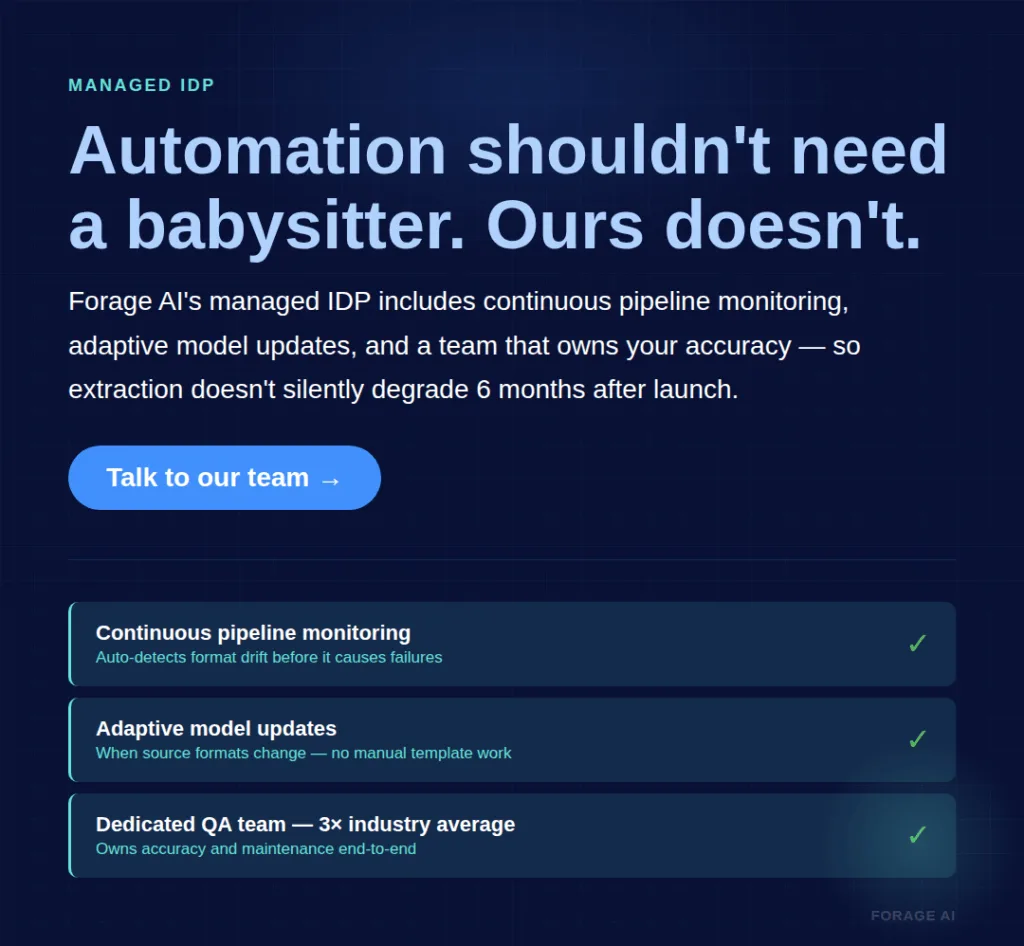
Forage AI’s managed approach addresses the governance gap directly, applying the operating discipline set out in our enterprise guide to pipeline automation: continuous pipeline monitoring, adaptive model updates when source formats change, and a dedicated team that owns accuracy and maintenance. For organizations without the internal capacity to build a governance layer, a managed partner eliminates the most common long-term failure mode.
Expert Insights: 70%+ of change programs fail to meet their goals (McKinsey). The pattern in document automation mirrors this: the technical implementation succeeds, but the organizational change (new roles, new workflows, new quality standards) isn’t adequately planned.Tori Liu (AIIM) reports that 93% of organizations have or are developing AI governance, signaling that the industry is learning this lesson. The question is whether you build governance before your project launches or after it struggles.
Quick Summary: “What’s the biggest risk in a document automation project?”, The ~40% failure rate traces to five preventable causes: automating broken processes, expanding scope too fast, measuring without baselines, testing on clean data instead of real documents, and skipping post-launch governance. The single most impactful prevention: establish clear success criteria and baselines before you automate anything.
Build, Buy, or Partner: Choosing the Right Automation Approach
Three distinct paths exist. Most content assumes you’ll buy software. That’s one option. Here’s the full decision space.
Build in-house if your engineering team has capacity, your documents are standard and consistent, you want full control over the pipeline, and you can budget for ongoing maintenance. The upside: complete customization and no vendor dependency. The cost: engineering time for the build (typically 2-4 months for a basic pipeline), ongoing maintenance that consumes 60-80% of total automation cost over time, and key-person risk when the builder moves on.
Buy a software platform if you have moderate document volume, mostly standard document types, an IT team that can handle integration, and you need faster time-to-value than a custom build. The upside: faster deployment, vendor-maintained updates, and no need to build infrastructure. The cost: licensing fees, integration effort, customization limits for complex document types, and scaling costs as volume grows.
Partner with a managed service if you process high volumes of complex or variable documents, don’t have (or don’t want to allocate) specialized engineering staff, need guaranteed accuracy with SLAs, or operate in compliance-heavy environments. The upside: no build, no maintenance, no key-person risk, no infrastructure management. The cost: less direct control over the pipeline, and a dependency on the partner’s reliability.
| Criterion | Build In-House | Buy Platform | Managed Partner |
| Time to first value | 2-4 months | 2-6 weeks | 1-2 weeks |
| Engineering required | High (ongoing) | Moderate (integration) | Low (onboarding only) |
| Customization depth | Unlimited | Template-limited | High (partner builds custom) |
| Maintenance burden | You own it (60-80% of TCO) | Vendor updates, you integrate | Partner owns it completely |
| Key-person risk | High | Low | None |
| Document complexity handling | Depends on team skill | Standard types best | Complex + variable |
| Compliance/SLA | You build it | Varies by vendor | Built-in with contractual guarantees |
| Cost profile | High upfront + high ongoing | Moderate subscription | Operational expense, predictable |
The hidden cost most teams miss in the “build” column: maintenance.Integrated approaches deploy 5-10x faster than fragmented ones, and the ongoing cost gap widens over time. When the engineer who built your pipeline gets pulled to a product priority (and they will), the maintenance burden doesn’t disappear. It transfers to someone who doesn’t understand the original architecture.
Expert Insights
The maintenance line in the build column has a research pedigree. D. Sculley and nine co-authors at Google, in “Hidden Technical Debt in Machine Learning Systems” (NeurIPS, 2015), found that “it is common to incur massive ongoing maintenance costs in real-world ML systems.” An extraction pipeline is an ML system by another name. A build estimate that stops at the first working version is the one that goes wrong.
For a comparison of IDP solutions across these categories, see Top 10 Intelligent Document Processing Solutions.
Forage AI operates in the managed partner column. The model is end-to-end: document ingestion, classification, extraction with multi-method AI (XPath, NLP, and custom ML models), multi-layer QA with a team 3x the industry average, and structured data delivery into your systems. Typical onboarding: 1-2 weeks. The value proposition is direct. Your team stops spending engineering hours on extraction infrastructure and redirects that capacity to the work that differentiates your organization.
Expert Insights: The hyperautomation market is projected to exceed $270 billion by 2034, driven by organizations connecting end-to-end processes, enabling one person to supervise volumes that previously required full teams. Gartner predicts 40% of enterprise applications will feature task-specific AI agents by the end of 2026, up from less than 5% in 2025. The market is moving toward managed, AI-native document processing. The question is whether you invest now at a lower cost or later under competitive pressure.
Quick Summary: “Should we build document automation in-house or use a partner?”, Build if you have engineering capacity, standard documents, and can budget for ongoing maintenance (60-80% of total cost, often underestimated). Buy a platform for moderate volume with standard document types. Partner with a managed service for high-volume, complex documents where you need guaranteed accuracy without the maintenance burden. Underestimating maintenance is the main reason internal builds fail.
What Happens to Your Team: The FTE Reallocation Playbook
This is the question behind the question for every operations leader considering automation. Not “what does the technology do?” but “what happens to my people?”
89% of workers express concern about AI’s impact on job security. That concern is real, and ignoring it undermines adoption. But the data tells a different story from the fear.
Automation handles roughly 70% of repetitive document tasks: data entry, categorization, reconciliation, and routing. It doesn’t handle exceptions, quality judgment, process optimization, or the strategic analysis your team could be doing if they weren’t keying data. The net effect isn’t fewer people. It’s different work.
Montage Health provides a concrete example: automation created 13 FTEs of capacity from a staff of approximately 300 (3-6% labor efficiency). Staff weren’t let go. They were redeployed from transcription to patient communications. An insurance firm applying claims processing automation redeployed 80 employees who had been dedicated to document interpretation. Organizations broadly report a 25% increase in staff capacity for strategic analysis and client consultation after automation.
The roles that emerge post-automation: exception handlers (reviewing the 5-15% of documents automation flags for human review), quality analysts (monitoring accuracy, identifying drift), process optimizers (improving workflows based on automation data), and strategic analysts (using the now-reliable data for business intelligence).
The biggest change management mistake: announcing automation without a reallocation plan. 70%+ of change programs fail, and the primary driver is poor communication. Tell your team what their new roles will be before the automation launches, not after. As Kieran Gilmurray puts it: “AI agents aren’t employees; they’re tools. True leadership unleashes human potential while AI executes.”
For more on how human oversight and AI work together in document processing, see Human-in-the-Loop: Why AI Still Needs People.
Expert Insights: 55% of workers are proactively researching AI skills, and 42% have enrolled in AI training programs (Resume Now, 2025). Your team is already preparing for this shift. The organizations that manage it best are explicit about what changes: which tasks go to automation, which stay with humans, and what new responsibilities emerge. Automation deployed as a quiet efficiency play breeds distrust. Automation deployed as a team upgrade, with clear role definitions, builds buy-in.
Quick Summary: “Will document automation replace my team?”, No. It changes what they do. Automation handles roughly 70% of repetitive tasks (data entry, categorization, routing). Your team shifts to exception handling, quality oversight, and strategic analysis, higher-value work that manual processing never left time for. The key: communicate the reallocation plan before launching automation, not after. Montage Health created 13 FTEs of capacity without layoffs by redeploying staff to patient-facing work.
A Phased Rollout for Teams Starting from Zero
If your team currently processes everything manually, a phased approach is the only responsible path. Trying to automate everything at once is the number one scope-creep failure mode.
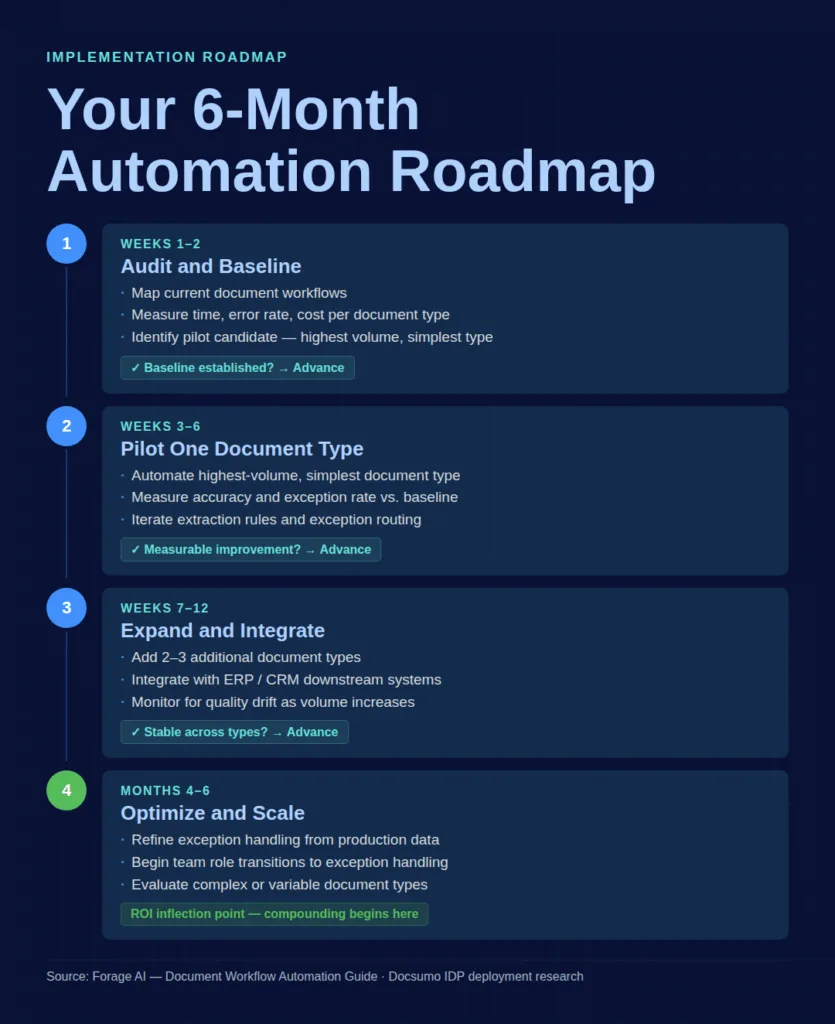
Phase 1: Audit and Baseline (Weeks 1-2). Map your current document workflows. Measure processing time per document type, error rate, and cost. Identify your highest-volume, lowest-complexity document type. This is your pilot candidate. Establish baseline KPIs you’ll measure against.
Phase 2: Pilot on One Document Type (Weeks 3-6). Automate that single document type. Measure accuracy, processing time, and exception rate against your baseline. Iterate: adjust extraction rules, refine exception routing, and calibrate the human review threshold. Most firms see measurable improvements within 2-4 weeks for simple automations.
Phase 3: Expand to 2-3 Additional Document Types (Weeks 7-12). Add the next highest-value document types. Each new type requires its own validation cycle. Integrate with downstream systems (ERP, CRM) during this phase. Monitor for quality drift as volume increases.
Phase 4: Optimize and Scale (Months 4-6). Refine exception handling rules based on production data. Begin team role transitions (some manual processors move to exception handling and quality review). Evaluate whether to expand to complex or variable document types. Expect the ROI inflection point here: the compounding effect of reliable automation starts showing up in downstream productivity, error reduction, and staff capacity.
Each phase has a decision gate. Don’t advance until the current phase proves value against your baseline KPIs. This discipline is what separates the 60% of projects that succeed from the 40% that don’t.
For guidance on connecting automated document processing to your existing systems, see IDP Integration: Connecting Document Processing to Your Systems.
Expert Insights: Integrated IDP tools deploy 5-10x faster than fragmented, multi-vendor approaches (Docsumo). The phased approach matters most for teams starting from zero, because the learning curve is steepest at the beginning. Starting with high-volume, low-complexity documents builds organizational confidence while delivering immediate, measurable ROI. This is the approach most consistently correlated with long-term automation success.
Quick Summary: “How should we start if we’ve never automated document processing?”, Start with a 4-phase approach over 6 months. Weeks 1-2: audit workflows and measure baselines. Weeks 3-6: pilot on your highest-volume, simplest document type. Weeks 7-12: expand to 2-3 more types and integrate with downstream systems. Months 4-6: optimize, scale, and transition team roles. Don’t advance phases until the current one proves value.
Frequently Asked Questions
What is the ROI of document workflow automation?
Organizations report 200-400% ROI in the first year with payback periods of 3-6 months. Per-document costs drop from $5- $25 (manual) to $0.10- $0.50 (automated). A Forrester study found 248% three-year ROI with a net present value of $39.85 million. Actual ROI depends on your document volume, complexity, and current error rate. Higher volumes and higher error rates mean faster payback.
How long does it take to implement document workflow automation?
Simple, high-volume document types (such as standard invoices) can be automated in 2-4 weeks, with measurable improvements in the first month. Complex multi-stage workflows take 4-8 weeks to optimize. Managed partners can begin processing in 1-2 weeks from kickoff. Plan for 4-6 months to reach full optimization across multiple document types.
What happens to my team when we automate document processing?
Automation handles roughly 70% of repetitive tasks. Roles shift to exception handling, quality oversight, and strategic analysis. Montage Health created 13 FTEs of capacity from 300 staff and redeployed them to patient-facing work. The net effect is reallocation, not replacement, but you need a clear communication and transition plan before launching.
How do I convince my CFO to invest in document automation?
Build the case on three lines: current fully loaded cost per document, projected automated cost, and net annual savings with payback timeline. Include hidden costs most budgets miss: error remediation ($25-$150 per error), compliance risk, and opportunity cost of staff doing data entry instead of analysis. Frame the comparison as the cost of automating versus the cost of 12 more months of manual processing at the current growth trajectory.
What are the biggest risks of document automation projects?
About 40% of projects fail to deliver the expected ROI. The top preventable risks: automating broken processes without fixing them, expanding scope too fast from a pilot, setting vague success criteria, testing on clean data instead of real documents, and skipping post-launch governance. Prevention starts with baseline measurement and phased rollout.
Conclusion
The Scale Wall doesn’t wait. Every quarter your team spends at or beyond that inflection point, the costs compound: rising error rates, growing overtime, declining data quality in the systems that depend on it, and the slow burnout of people doing work that should have been automated two years ago.
The decision in front of you isn’t whether automation works. The data on that is clear: 200-400% ROI, 90-98% cost reduction per document, 3-6 month payback. The decision is whether to invest the time to do it right. Fix the process before you automate it. Start with one document type. Measure everything. Protect your team with a reallocation plan they hear about before the automation launches, not after.
For a recap of next steps and resources, see the “Quick Digest” at the top of this guide.
The operations leaders who get this right don’t just reduce costs. They give their teams better work to do, their downstream systems better data to use, and their organizations a capacity for growth that manual processes never could.
The question isn’t whether you can afford to automate. It’s whether you can afford another quarter of not doing it.
Related Articles
- Intelligent Document Processing: A Complete Guide, End-to-end overview of how IDP works, key capabilities, and evaluation criteria
- How IDP Gives You a Competitive Edge, Strategic advantages of intelligent document processing for data-driven organizations
- Top 10 Intelligent Document Processing Solutions, Comparison of leading IDP platforms and services across key evaluation dimensions
- IDP Integration: Connecting Document Processing to Your Systems, Technical and strategic guide to connecting IDP with ERP, CRM, and downstream systems
- OCR vs IDP: Understanding the Key Differences, Clear breakdown of when traditional OCR is sufficient and when you need full IDP capabilities
S
Written by
Sai Subramaniam
Data Infrastructure Enthusiast, Forage AI
Sai is a data infrastructure enthusiast who has spent the past two to three years following the AI space closely, from the infrastructure layer to the fast-growing world of data for AI. He is genuinely curious about how modern data pipelines get built and where the data industry is heading, and he writes insightful pieces on the core topics that shape this niche.
Reviewed by the team of experts at Forage AI for accuracy and clarity.