
Invoice Automation: How Modern AP Teams Are Eliminating Manual Document Processing
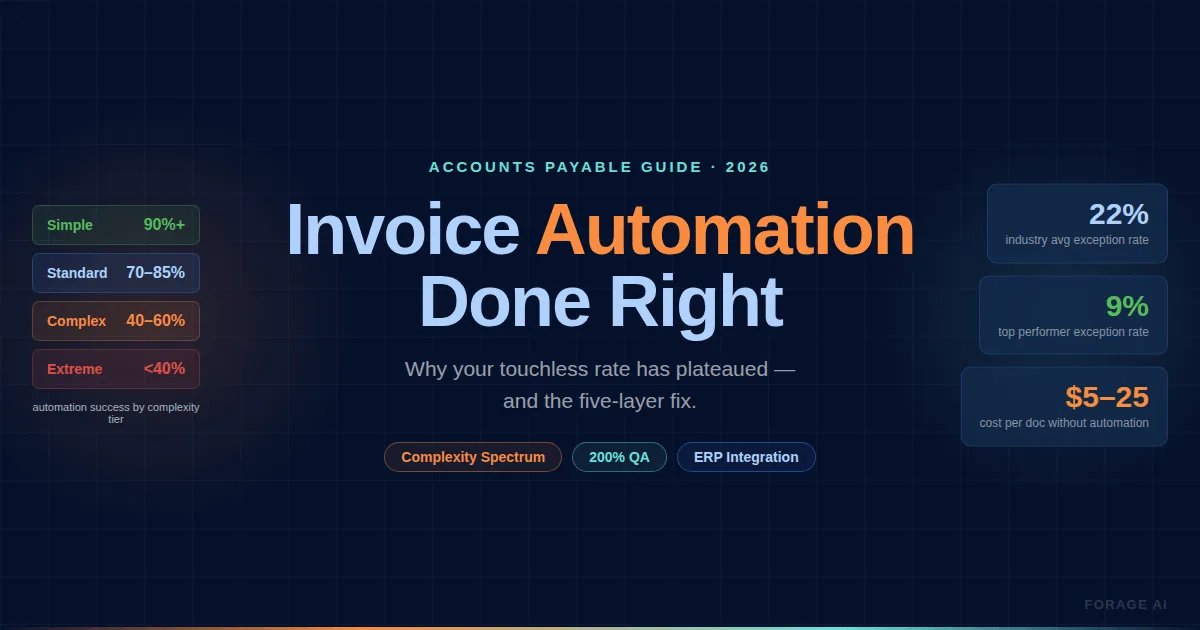
Your invoice automation reports 70% of processing as touchless. Your AP team still manually reviews every third invoice. The system flags exceptions on documents it should handle cleanly, and the correction queue grows faster than your team can clear it.
This gap between marketed automation and production reality is the norm, not the exception. Only 8% of finance teams are fully automated in 2026. 84% of AP practitioner time is still spent on manual tasks, despite a decade of automation tools being available. The problem isn’t that teams haven’t bought software. It’s that automation is routinely evaluated on the invoices it handles well, not on the ones it doesn’t.
Most implementations address the workflow layer while ignoring the three architectural gaps that actually determine whether invoices flow through or pile up: extraction accuracy, vendor data quality, and exception handling design.
This article is for the AP practitioner who has already automated and is diagnosing underperformance. We’ll break down where extraction breaks by invoice complexity, why your exception rate stays stubbornly high, what structurally keeps most teams’ touchless rates below 50%, and how to evaluate whether your extraction layer is the bottleneck.
Quick Digest
- The gap: only 8% of finance teams are fully automated in 2026, and 84% of AP practitioner time still goes on manual tasks.
- Where it breaks: OCR-only systems reach 85-95% accuracy on structured fields and fall away on multi-line, borderless and multi-page invoice tables.
- Exception rate: top-performing AP teams sit at 9%, everyone else averages 22%, and 20% of vendors generate 80% of the exceptions.
- The touchless ceiling: most teams plateau at 50-65% because vendor data, PO coverage, multi-entity routing and tax variation were never fixed first.
- The choice: OCR-only, an AI platform or a managed service, matched to how complex your invoice mix actually is rather than to a vendor accuracy claim.
What Does Invoice Automation Actually Automate?
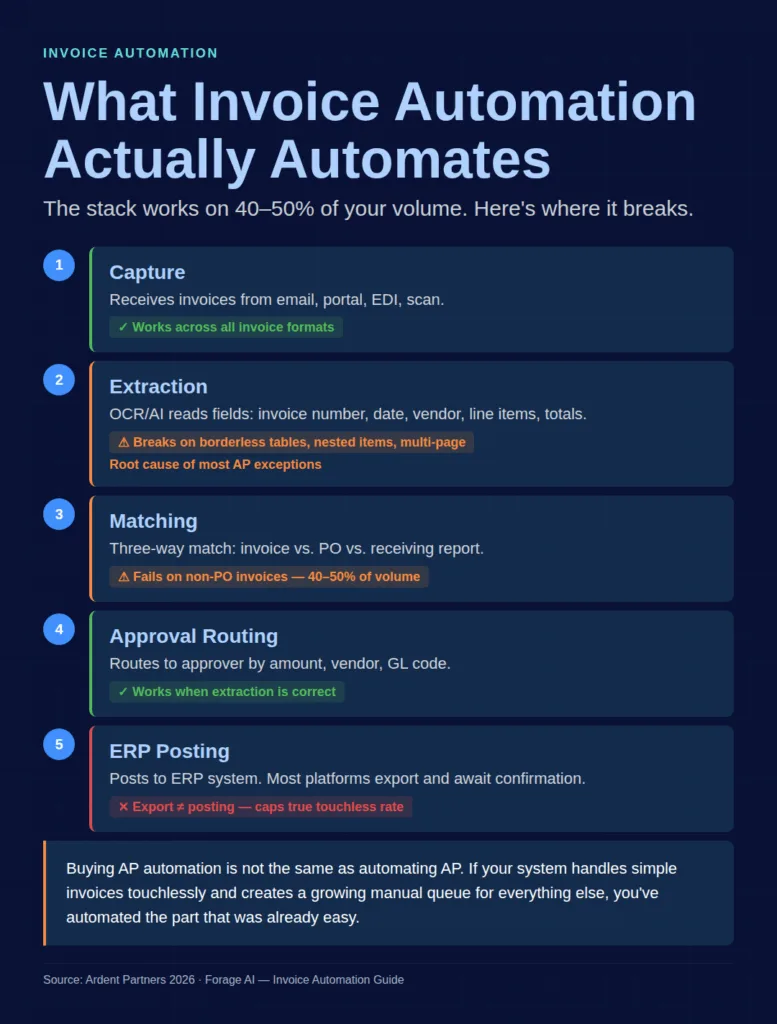
Invoice automation covers a stack of capabilities that get marketed as a single thing: capture, extraction, matching, approval routing, and posting. On a clean, PO-backed invoice from a vendor that submits the same PDF template every month, the full stack works. The invoice arrives, the document digitization step turns the paper or PDF into machine-readable data, OCR or AI extracts the fields, three-way matching validates against the purchase order and receiving report, the approval workflow routes it, and the system posts to your ERP. Touchless.
The problem is that this describes maybe 40-50% of your invoice volume. The other half (non-PO invoices requiring GL coding judgment, multi-line invoices with complex table structures, invoices from new vendors with unknown formats, credit notes, international invoices with currency and tax variations) all require some form of human intervention. And “some form” is doing heavy lifting in that sentence.
68% of organizations still manually key invoices into ERP systems. Not because they don’t have automation. Because their automation handles the easy invoices and routes everything else to a human queue. A 2025 survey found that 44% of organizations use manual entry alongside their automation systems. The automation isn’t replacing manual work. It’s running parallel to it.
Buying AP automation software is not the same as automating AP. If your system processes simple invoices touchlessly but creates a growing manual queue for everything else, you’ve automated the part that was already easy. The real question is what happens to the other 50%. Invoice processing is one slice of a broader document workflow automation problem, and the same architectural gaps that derail AP show up across contracts, claims, and onboarding pipelines.
Where Invoice Extraction Breaks: The Complexity Spectrum
Extraction is where most automation pipelines fail, and it’s where the root cause is most often misdiagnosed. Teams blame their OCR tool, tune configurations, adjust templates, and see marginal improvement. The issue is architectural: OCR-only systems achieve 85-95% accuracy on structured invoice fields, but that number drops significantly on complex documents. “Complex” describes a larger portion of your invoice volume than you think.
“OCR extracts text, not truth.” It cannot distinguish between a quantity field and a price field. It cannot validate that line-item totals match the invoice total. It cannot tell that row 14 on page 2 belongs to the same table as the one that started on page 1. These are structural understanding problems, not character recognition problems. No amount of preprocessing or template tuning fixes them.
Expert Insights
Brandon Smock, Rohith Pesala and Robin Abraham of Microsoft, introducing the PubTables-1M table extraction dataset in 2021, stated the underlying problem plainly: “one of the greatest challenges remains the creation of datasets with complete, unambiguous ground truth at scale.” They had to build a canonicalization step to correct oversegmentation, the research name for exactly what an AP team sees when one invoice line is split across two rows. If ground truth for table structure is ambiguous even in curated research data, a vendor demo on clean single-page invoices tells you very little about your own continuation tables.
Here’s how specific invoice structures break extraction:
Multi-line items with nested hierarchies. Real invoices contain bundled items, kits, and sub-lines tied to parent rows. Most extraction engines assume one row equals one item. When that assumption breaks (and it breaks often on complex vendor invoices), AP teams spend 30-50% of their time on manual data validation and correction post-extraction.
Borderless tables. Financial documents, consulting invoices, and many professional services invoices use borderless or minimal-grid layouts. Without visual cell boundaries, extraction engines cannot reliably determine column alignment. Unit prices shift under tax fields. Descriptions bleed into quantity columns.
Multi-page continuation tables. An invoice table that starts on page 1 and continues on page 3 is, according to Gartner assessment, “the single largest blocker to straight-through AP processing.” Extraction engines treat each page as a separate document, producing duplicate headers, missing continuation rows, and broken subtotals.
Decimal and currency errors. A single misread (9.50 read as 950) completely breaks downstream matching logic. At 85-95% OCR accuracy on structured fields, the error rate on complex invoices with dozens of line items compounds quickly. 60-70% of “automated” processes still require manual intervention due to these structural extraction errors.
The Invoice Complexity Spectrum
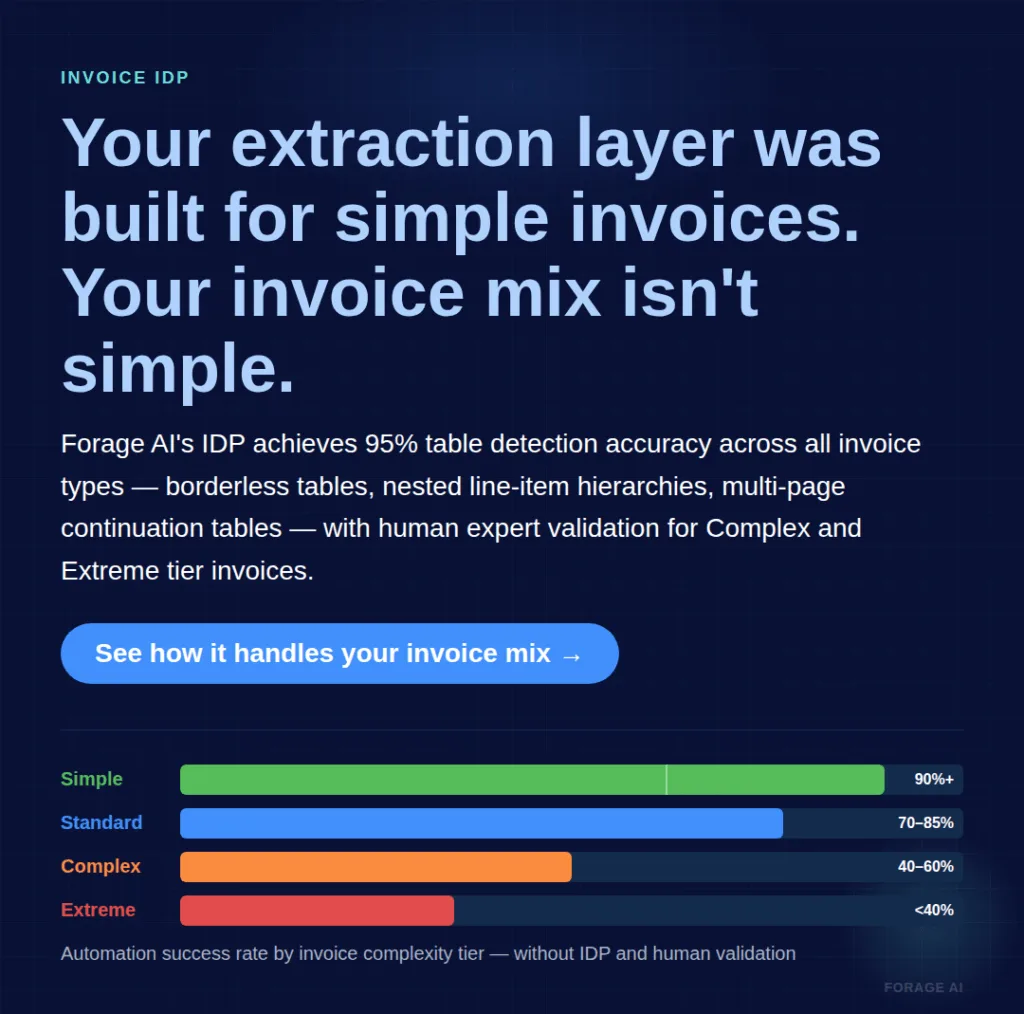
Not all invoices have the same automation challenge. Grading your invoice mix by complexity tells you more about your expected automation success than any vendor accuracy claim:
- Simple: Single-page, fixed layout, PO-backed, standard fields (invoice number, date, total, single tax line). Automation success rate: 90%+. OCR handles these adequately.
- Standard: Multi-line items, two-level headers, some formatting variation across vendors. Success rate: 70-85%. Requires competent AI extraction, not just template OCR.
- Complex: Borderless tables, nested line-item hierarchies, multi-currency, handwritten annotations, and credit note offsets. Success rate: 40-60%. Requires Intelligent Document Processing (IDP) with confidence scoring.
- Extreme: Multi-page continuation tables, mixed-format documents (EML with PDF attachments), regulatory invoice variants across jurisdictions. Success rate: below 40% without IDP and human validation.
If your invoice mix is primarily Simple, your OCR is probably fine. If you’re processing Standard-to-Complex invoices at volume (and most enterprise AP teams are), extraction accuracy is your bottleneck. No workflow automation downstream will compensate.
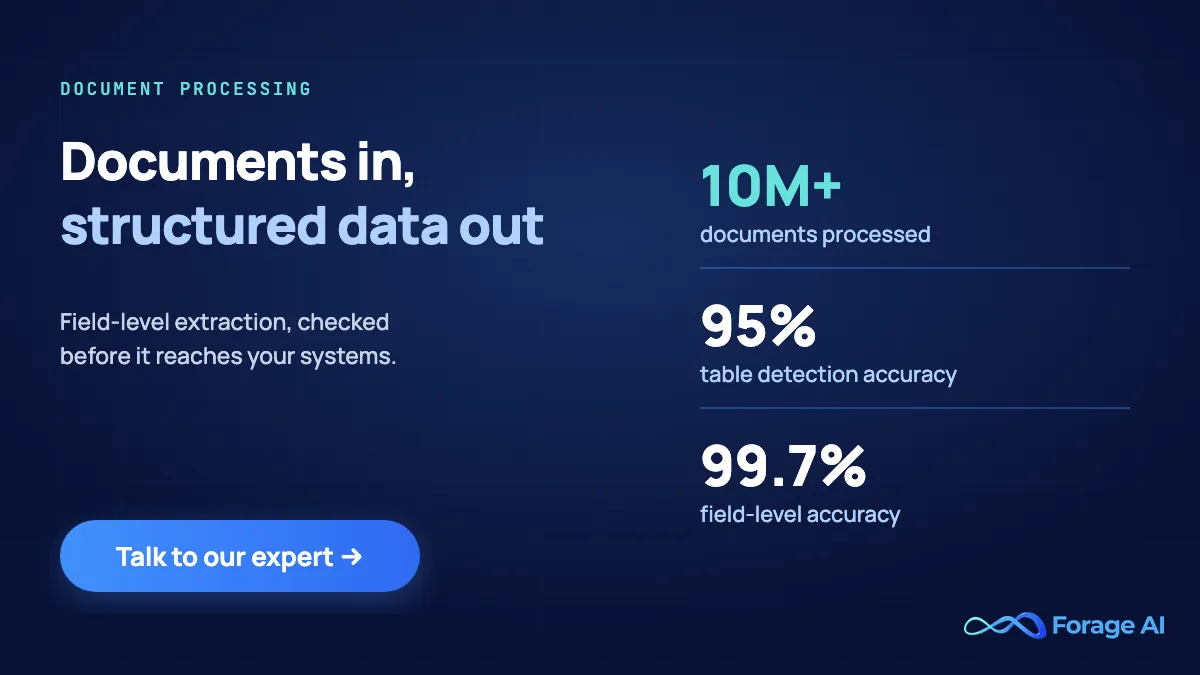
Forage AI’s IDP service achieves 95% table detection accuracy across all table types using in-house ML models that go beyond traditional grid structures. For the Complex and Extreme tiers, that accuracy is combined with human expert validation, catching the structural failures that pure automation misses on multi-line, borderless, and multi-page invoices. How to evaluate whether this kind of extraction layer is right for your invoice mix is covered in the final section.
Quick Summary
Q: Is the OCR tool the problem, or is it the invoice mix?
A: Grade the mix before you blame the tool. Simple single-page, PO-backed invoices automate at 90% or better and ordinary OCR handles them. Standard invoices with multi-line items need real AI extraction. Complex and Extreme invoices, the ones with borderless tables, nested line-item hierarchies and tables that continue across pages, need extraction plus human validation. If most of your volume sits in those last two tiers, tuning at the OCR layer will not move your numbers.
Why Does Your Automation Underperform on Exceptions?
Exception rate is the metric that actually tells you whether your automation works. Not accuracy. Not touchless rate. Exception rate, because it measures how often invoices fall out of the automated flow and require human intervention.
Top-performing AP teams maintain a 9% exception rate. Everyone outside that top tier averages 22%, and the overall average is 14% (Ardent Partners, 2025). That’s a 2.4x gap between the top tier and the rest, and it’s not explained by tool selection. It’s explained by how well teams diagnose and address the specific failure categories, and by the exceptions they create.
“Exceptions (duplicate invoices, incorrect POs, coding mismatches) aren’t rare. They’re standard.” Most AP teams spend more time resolving exceptions than processing clean invoices. The question isn’t whether to eliminate exceptions entirely, it’s which categories you can actually fix, and in what order.
Five categories, each with a different root cause and a different fix:
Format exceptions. The invoice arrives in a layout your extraction system hasn’t seen, or in a format it can’t process cleanly (scanned image with low resolution, EML attachment, handwritten notes in margins). Root cause: vendor format variability. Fix: broader extraction capability or vendor format standardization.
Data exceptions. Extracted fields are missing, mismatched, or implausible. A line-item total doesn’t match quantity times unit price. A tax ID is absent. A vendor name doesn’t match the vendor master. Root cause: extraction accuracy or vendor data quality. Fix: depends on whether the extraction is wrong or the source document is wrong.
Matching exceptions. The invoice doesn’t match the PO within tolerance. Quantities differ. Prices differ. The invoice line items don’t match the PO line items. Root cause: legitimate business variance (partial shipments, price adjustments) or extraction error. Fix: tune matching tolerances to account for legitimate variance; fix extraction to handle errors.
Approval exceptions. The invoice routes correctly but stalls: approver unavailable, threshold exceeded, budget code requires secondary approval. Root cause: workflow design, not extraction. Fix: escalation rules, delegation paths, and auto-approval thresholds for low-risk invoices.
System exceptions. ERP connectivity failures, duplicate detection misfires, and timeout errors on large batch uploads. Root cause: infrastructure. Fix: integration engineering.
Look at the distribution before doing anything else. If 60% of your exceptions are format and data exceptions, your extraction layer is the problem. If they’re matching exceptions, review your tolerance settings and PO coverage. If they’re approval exceptions, your workflow design needs work. Treating all exceptions with “add more reviewers” is the most expensive possible approach.
20% of vendors cause 80% of exceptions. That Pareto distribution means vendor-level exception tracking (not just aggregate rates) is the fastest path to reducing your overall exception volume. Identify the 20%, diagnose their specific exception type, and fix the root cause at the vendor level.
Why Do Touchless Rates Plateau at the Last 20%?
Every AP automation vendor quotes touchless processing targets of 70-80%. Top performers achieve it. The maximum achievable with advanced platforms is approximately 89% (Deloitte/Basware benchmark). But most teams plateau at 50-65%, and adding more automation budget doesn’t move the needle.
The reason is structural. Reaching high touchless rates requires four foundational elements: fully linked ERP systems, accurate supplier records, strict PO adherence, and automatic exception resolution. Most finance teams lack at least two of these. Without all four, you’re automating on a foundation with gaps, and every gap creates a category of invoices that will never process touchlessly.
The “last 20%” breaks down into four recurring categories:
Non-PO invoices requiring GL coding judgment. These can’t be three-way matched because there’s no PO. They require someone to assign the right general ledger code, cost center, and approval path based on invoice content. This is a judgment call, not a data extraction problem. The same pattern shows up on the AR side in claims processing automation, where adjudicators apply policy and coding judgment to documents that no rules engine can clear on its own. It also mirrors what legal ops teams encounter with contract data extraction, where clause-level judgment, not character recognition, determines whether a document clears review touchlessly. Unless your system has AI-driven GL coding with high confidence thresholds, these invoices always route to a human.
Vendor format variability on complex documents. Every new vendor format your system hasn’t been trained on creates extraction uncertainty. At 500+ vendors, you’re dealing with hundreds of distinct invoice layouts. Template-based extraction breaks here; even AI extraction needs sufficient training data per format to achieve confidence.
Multi-entity and intercompany routing. Invoices that apply across business units, subsidiaries, or shared service centers require routing logic that most AP platforms handle poorly. The invoice is extracted correctly, but the system can’t determine which entity to charge without manual review.
Currency, tax, and regulatory variation. International invoices with withholding tax, VAT reverse charges, or jurisdiction-specific line items require validation rules that vary by country. This complexity is genuine, not a configuration problem.
Expert Insights
The regulatory variation is not settling down either. The European Commission’s Directorate-General for Taxation and Customs Union records that the VAT in the Digital Age package “was adopted on 11 March 2025 following re-consultation of the European Parliament and will be rolled out progressively until January 2035”, and that “Digital Reporting Requirements will affect cross-border B2B transactions from 1 July 2030.” A touchless target for cross-border invoices has to survive a reporting regime that is still being phased in.
The metric vendors quote, and the metric that determines your results aren’t the same thing: 99.7% workflow accuracy, not extraction accuracy.” Extraction accuracy is what vendors measure. Workflow accuracy (including matching, coding, posting, and reconciliation) determines whether the invoice flows through correctly. The CitizenM case study showed 2.5 FTE freed per 50,000 invoices annually by measuring workflow accuracy, not extraction accuracy.
Most AP platforms extract data and hand it to ERP systems, awaiting human confirmation. This is not true touchless processing. It’s automated extraction with manual posting. The difference between 90% and 99% touchless rates is whether the system posts directly to your ERP as a named user, or exports data that someone still clicks “approve” on.
Touchless Rate Diagnostic
If your touchless rate has plateaued, check these five factors in order:
- Vendor data quality. Are 15-20% of your vendor records duplicated? Are 30-40% missing tax IDs? Bad vendor master data creates exceptions that no automation can resolve.
- PO coverage rate. What percentage of your invoices have a corresponding PO? Non-PO invoices structurally resist touchless processing.
- Extraction accuracy by invoice type. Run your extraction against your Complex and Extreme tier invoices specifically. Aggregate accuracy hides the failures on the invoices that matter most.
- ERP integration depth. Does your system post directly, or export awaiting confirmation? The latter caps your true touchless rate regardless of extraction quality.
- Exception resolution automation. Can your system auto-resolve predictable exceptions (price variance within tolerance, known partial shipment patterns), or does every exception route to a human?
Quick Summary
Q: What is actually left in the last 20%?
A: Four categories, none of them a configuration problem: non-PO invoices that need general ledger coding judgment, vendor format variability across hundreds of layouts, multi-entity and intercompany routing, and currency, tax and jurisdiction rules. A high touchless rate also needs four foundations in place at once, linked ERP systems, accurate supplier records, strict PO adherence and automatic exception resolution, and most finance teams are missing at least two of them.
The Vendor Data Quality Prerequisite Most Teams Skip
The touchless rate diagnostic points to vendor data quality as one of the first checkpoints, and for good reason. Most accounts payable automation implementations go live with a data quality problem they’ve chosen to ignore. The vendor master file, the database of all your suppliers and their payment details, is typically the weakest link in the system. It’s the foundation on which everything else depends.
Across multiple audits and research sources, the pattern holds: 15-20% duplicate vendor records (100-200 duplicates per 1,000 vendors). 30-40% of vendor records are missing tax IDs .20-30% of invoices match to “catch-all” vendor records: generic entries that indicate the system couldn’t find the right vendor.10-15% of payment errors trace directly to incorrect vendor or bank account information.
For a 500-vendor company, the annual cost of poor vendor data ranges from$33K to $98K+, factoring in manual duplicate resolution, invoice exception handling, payment errors, tax compliance issues, and AP staff time spent re-keying data.
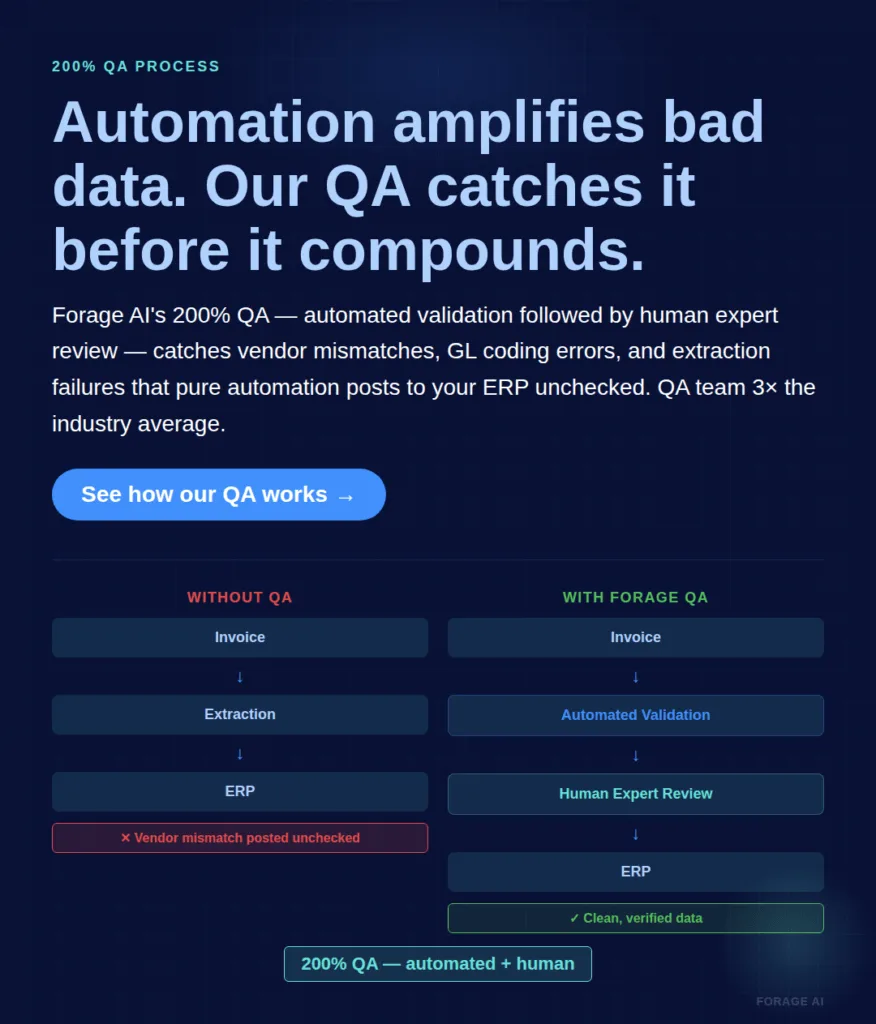
Automation amplifies bad data at machine speed. Manual processing is slow, but a human reviewer can catch obvious vendor mismatches, duplicate records, and missing fields. When you automate extraction and routing on top of a dirty vendor master, the system processes errors faster than anyone can catch them. Invoices are matched to the wrong vendor, posted to the wrong GL code, and flow through to payment before anyone notices.
“We’ll clean the data after go-live” is the single most common statement in failed AP automation implementations. Cleaning after go-live means you’re running your automation on bad data during the period when the team is least familiar with the new system and least equipped to catch errors.
AP Data Quality Checklist
Before your automation delivers its promised touchless rate, verify these five prerequisites:
- Vendor master deduplication. Reduce duplicates to below 5%. Merge records, standardize naming conventions, and establish unique vendor identifiers.
- Tax ID completeness. Every active vendor record must have a verified tax ID. Missing IDs create compliance exceptions on every invoice.
- GL code standardization. Consistent, current GL codes with clear mapping rules. Outdated or inconsistent codes create coding exceptions that route to manual review.
- PO coverage rate. Know what percentage of your invoices are PO-backed. Non-PO invoices need a separate, defined workflow, not the same automation path with a manual override at the end.
- Bank account verification. Verified payment details for every active vendor. Unverified accounts create payment exceptions and fraud risk.
Companies that implement automation with clean vendor data see invoice exceptions reduced by 40-60%, duplicate prevention at 95%+ accuracy, and vendor onboarding accelerated from weeks to days.
That’s the gap a QA layer is designed to close. Forage AI’s IDP service uses a Human+AI hybrid model with a 200% QA process: every extraction passes through automated validation followed by human expert review. The QA team is three times the industry average size relative to the delivery team. In invoice processing specifically, this catches vendor mismatches, GL coding errors, and field extraction failures that pure automation misses, particularly on the Complex and Extreme tier invoices, where a single field error can have material financial consequences.
Quick Summary
Q: Why clean the vendor master before go-live rather than after?
A: Because automation amplifies bad data at machine speed. A human reviewer catches an obvious vendor mismatch; an automated pipeline posts it and moves on. Typical vendor files carry 15-20% duplicate records and 30-40% missing tax IDs, and 10-15% of payment errors trace straight back to wrong vendor or bank details. Teams that go live on clean vendor data report invoice exceptions down 40-60%.
Evaluating Your Extraction Layer: OCR, IDP, or Managed Service
If you’ve identified your bottleneck as extraction accuracy (your exceptions are primarily format and data issues, your touchless rate plateaus on complex invoices, and tuning OCR configurations yields diminishing returns), the question becomes which extraction approach best matches your invoice profile. It is worth benchmarking your options against the current best invoice data extraction tools before committing, since the right fit depends on your complexity tier and volume rather than headline accuracy claims.
Three options, each appropriate for different conditions:
OCR-only. Appropriate if your invoice mix is primarily Simple tier (fixed layouts, PO-backed, single vendor templates), your volume is low-to-moderate, and your team can maintain templates as vendor formats change. Cost-effective for stable, predictable document streams. But if you’re managing 50+ templates and spending engineering time adding new ones every month, you’ve outgrown this approach.
AI/IDP platform. Appropriate for Standard-to-Complex invoices at moderate-to-high volume, if you have an internal team capable of managing the platform, tuning confidence thresholds, and maintaining ERP integration.Implementation timelines: 6-12 months for enterprise deployments. First-year ROI of 300-500% for organizations processing 1,000+ monthly invoices, but data quality issues affect 30-40% of implementations. The technology works; the integration often doesn’t.
Managed IDP service. Appropriate for Complex-to-Extreme invoices at high volume, especially when compliance requirements (SOC 2, GDPR, HIPAA) mandate audit trails and provable accuracy, or when your team lacks the capacity to manage extraction infrastructure internally. Implementation timeline: 1-2 weeks from brief to live pipeline. The trade-off is that you’re outsourcing a capability rather than building it. For teams where extraction isn’t a core competency and engineering bandwidth is the constraint, this is the right call.
Extraction Approach Decision Matrix
Match your invoice profile to the right approach:
- Simple invoices + low volume + stable vendors → OCR-only. Don’t over-engineer.
- Standard invoices + growing volume + some vendor variability → AI/IDP platform with internal team. Build the capability.
- Complex/Extreme invoices + high volume + compliance requirements → Managed IDP service. Focus your team on what they do with the data, not how they extract it.
- Mixed complexity + high volume + limited internal capacity → Managed IDP for complex documents, OCR for simple ones. Hybrid approach.
Forage AI’s IDP service handles the full range of enterprise invoice formats: PDF, DOC, EML, MSG, JPG, TIFF, including handwritten notes, multi-page documents exceeding 2,000 pages, and the borderless, nested, and continuation table structures that break standard extraction. The service handles regulated documents under contractual controls and client-specific handling rules agreed up front, with built-in validation, audit trails, and encryption. Typical onboarding: 1-2 weeks from brief to live pipeline, with the Forage AI team handling all data mapping and model tuning.
Red flags in extraction evaluation:
- Accuracy claims that don’t break out performance by document complexity
- No confidence score visibility (you can’t see why the system flagged or missed a field)
- No human-in-the-loop review pathway for uncertain extractions
- Demos only on clean, simple, single-page invoices
- No audit trail or compliance documentation
- Pricing that doesn’t scale with your volume trajectory
Frequently Asked Questions
How much does it cost to process an invoice manually vs. automatically?
Manual processing costs$12.88-$19.83 per invoice (Ardent Partners). Top-performing automated processing costs$2.36-$2.78. But the headline cost-per-invoice comparison understates the real gap. Error correction adds~$53 per mistake, and 39% of manually processed invoices contain errors. At 10,000 invoices per month, the error-correction cost alone exceeds $200K annually.
What is a good rate for touchless invoice processing?
The average AP organisation processes 32.6% of invoices touchless. Best-in-Class teams reach 49.2%, against 23.4% for everyone else (Ardent Partners, 2025). Higher figures in vendor material are usually platform ceilings on clean invoice mixes, not benchmarks. Read the touchless rate beside the exception rate: 45% touchless with a 9% exception rate is healthier than 55% touchless with 22% exceptions, because the second team is routing problems rather than resolving them.
Why is my invoice automation exception rate so high?
Five root causes, in order of frequency: vendor format variability, poor vendor master data (15-20% duplicates typical), extraction failures on complex invoices, workflow design gaps, and ERP integration issues. 20% of vendors cause 80% of exceptions. Start by identifying your top exception-generating vendors and diagnosing their specific failure category.
What is the difference between OCR and IDP for invoices?
OCR extracts characters from images. IDP adds classification, contextual extraction, confidence scoring, data validation, and continuous learning. OCR works for simple, fixed-layout invoices. IDP handles the variable-format, multi-line, complex-table invoices that generate 60-70% of AP exceptions. The difference is architectural, not incremental.
How long does AP automation take to implement?
Enterprise IDP platforms: 6-12 months. Managed IDP services: 1-2 weeks. API-based builds: 3-6 months. Organizations achieving the fastest ROI (3-4 month payback) combine executive sponsorship with change management programs and clean vendor data at go-live.
Can I automate all my invoices?
No. Simple PO-backed invoices automate at 90%+ success. Complex multi-line, multi-page, borderless invoices may never reach touchless processing without IDP and human validation. The goal isn’t 100% automation. It’s routing the right invoices through the right process: touchless for Simple, AI-assisted for Standard and Complex, human-validated for Extreme.
The Architecture Problem, Not the Tool Problem
Invoice automation failures aren’t tool failures. They’re architectural failures. The teams that are still manually reviewing every third invoice aren’t using the wrong software. They’re solving an extraction problem with a workflow tool, or fixing an upstream data quality problem with a downstream correction process.
If your exceptions are primarily format and data exceptions, your extraction layer is the bottleneck. If your touchless rate plateaus despite configuration changes, check your vendor data quality and PO coverage before blaming the platform. If your accuracy degrades on complex invoices, the problem is architectural: OCR at its ceiling on documents that require structural understanding, not character recognition.
The AP teams achieving sub-10% exception rates aren’t using fundamentally different tools. They’ve fixed three things: extraction accuracy aligned with their actual invoice complexity, clean vendor master data as a prerequisite rather than an afterthought, and exception handling that diagnoses root causes rather than adding more reviewers.
S
Written by
Sai Subramaniam
Data Infrastructure Enthusiast, Forage AI
Sai is a data infrastructure enthusiast who has spent the past two to three years following the AI space closely, from the infrastructure layer to the fast-growing world of data for AI. He is genuinely curious about how modern data pipelines get built and where the data industry is heading, and he writes insightful pieces on the core topics that shape this niche.
Reviewed by the team of experts at Forage AI for accuracy and clarity.