
From OCR to IDP: Why Your Document Intelligence Must Evolve Before 2026
The Hidden Cost of Stagnant Technology
For many enterprises, document processing still means one thing: OCR. And if that’s how your team describes its current workflow, you’re operating on infrastructure that stopped evolving years ago. The result is predictable, avoidable errors, excessive manual validation, and countless hours lost reconciling “automated” outputs that still need human intervention.
You are not alone in this, and the inertia is measurable. A 2026 Rossum survey of 450 finance leaders found that 54.2% of teams still rely on legacy OCR, even though most of them already know it underperforms. If that survey is what put a vendor shortlist in front of you, our roundup of Rossum alternatives covers the field. Across financial services, healthcare, legal, and insurance workflows, teams are buried under invoices, claims, contracts, onboarding forms, and compliance documents that demand constant babysitting. OCR helps you digitize the page, but it doesn’t help you understand it, and that gap has quietly become one of your largest operational inefficiencies.
This is why the real question is not OCR vs IDP as competing products, but whether your pipeline needs text extraction or document understanding. The shift from Optical Character Recognition to Intelligent Document Processing (IDP) matters because IDP doesn’t simply read characters. It interprets context, relationships, and meaning, turning every document into a structured, governed data asset. Modern enterprises aren’t adopting IDP because it’s a new technology trend; they’re adopting it because this evolution unlocks defensible efficiency, the ability to automate at scale without sacrificing accuracy.
And to understand this evolution clearly, you first need to see how the document processing landscape has transformed over the last decade, where OCR actually breaks, and how to decide which technology your own document mix really requires.
Quick Digest
- The three eras of document processing: OCR digitized the page, templates automated fixed layouts, and IDP added the understanding both lacked, each era solving one problem and exposing the next.
- Where OCR actually breaks: the dangerous failures are not the errors that get caught, but the silent ones, with over 50% of OCR-extracted data still requiring manual checking in enterprise environments.
- Why tables break OCR: 40 to 60% of enterprise data lives in tables, and multi-page or borderless tables push success rates down to roughly 70%, because tables need two-dimensional reasoning OCR was never built for.
- The IDP difference: IDP is not OCR with an AI label; it adds five architectural layers, classification, contextual extraction, confidence scoring, validation, and continuous learning, and cuts error rates by over 52% versus OCR-only pipelines.
- When to stay with OCR: fixed layouts, fewer than five stable document types, and character-level accuracy needs are legitimate reasons to keep OCR, overengineering wastes money.
The Three Eras of Document Processing
The progression from OCR to IDP didn’t happen overnight. It unfolded in three distinct eras, each solving a problem, but also creating new limitations that the next era had to overcome.
A) The OCR Era (Digitization): The “What” Machine
OCR ushered in the first major step forward by eliminating the need to manually retype paper documents. Think of it as a fast, literal typist, excellent at transcribing characters, but indifferent to meaning. It produced searchable PDFs and plain text files, making archives digital but not intelligent.
The limitation was structural: OCR provided text with zero understanding. Every task after extraction, classification, validation, interpretation, still required human effort.
Expert Insights
The shift between these eras is now accelerating because the intelligence layer itself is changing. Generative and agentic AI is “becoming an equalizer that challenges vendors’ ability to differentiate,” observes Boris Evelson, VP and Principal Analyst at Forrester, in the firm’s analysis of how AI is reshaping the intelligent document processing market (2025). In other words, the OCR-to-IDP transition is no longer a slow upgrade cycle, it is a structural reset of the entire category.
B) The Template Era (Automation): The “Where” Machine
Because OCR alone couldn’t operationalize data, enterprises built rule-based systems on top of it. These were template-driven extractors: automation that worked only if every field stayed exactly where the template expected it to be.
This era solved one problem, repeatability, but introduced brittleness.
A slightly redesigned invoice, a new claims layout, or a contract with an unexpected clause would break extraction. This is exactly why carriers comparing the best insurance data extraction software learn to distrust template-based tools: an ACORD form rendered by a different agency system, or a loss run in an unfamiliar layout, quietly defeats them. Maintenance cost ballooned as teams added more templates, updated rules, and built exception queues. You can see this fragility play out in detail when you look at invoice automation in practice, where vendor PDFs, line-item variability, and tax fields routinely defeat template-based OCR pipelines.
C) The IDP Era (Intelligence): The “Why” Machine
IDP emerged because enterprises needed automation that could handle reality, not just perfect templates. IDP behaves like a context-aware analyst: it identifies meaning, relationships, and business logic across structured, semi-structured, and unstructured formats, even when layouts change. IDP not only extracts, it understands. This matters because roughly 80 to 90% of enterprise data is unstructured, and the era built only to read fixed fields was never going to reach most of it.
This evolution sets the stage for the real differentiator: context. But before we get to what IDP adds, it is worth being precise about where OCR actually breaks, because the failure modes are more specific, and more dangerous, than most teams assume.
Where Does OCR Actually Break in Production?
The most damaging OCR failures are not the ones that throw errors and get caught. They are the ones that pass through silently. Most articles give you a flat list, poor image quality, handwriting, complex layouts, but that framing is useless for diagnosing production failures. What matters is severity, and the failures are best understood as four tiers.
Tier 1: Silent Data Corruption (Most Dangerous)
The output looks correct, no errors are flagged, and the extraction completes successfully, but the data relationships are wrong. A multi-column invoice gets read left-to-right as a single stream. Line item descriptions end up matched to the wrong quantities. The table header shifts one column to the right, and every cell below it is misattributed. The system processes it, your pipeline ingests it, and nobody catches it until a financial reconciliation fails three weeks later. This is the tier OCR tuning cannot fix, because the system does not know it is wrong.
Tier 2: Structural Misread (High Impact)
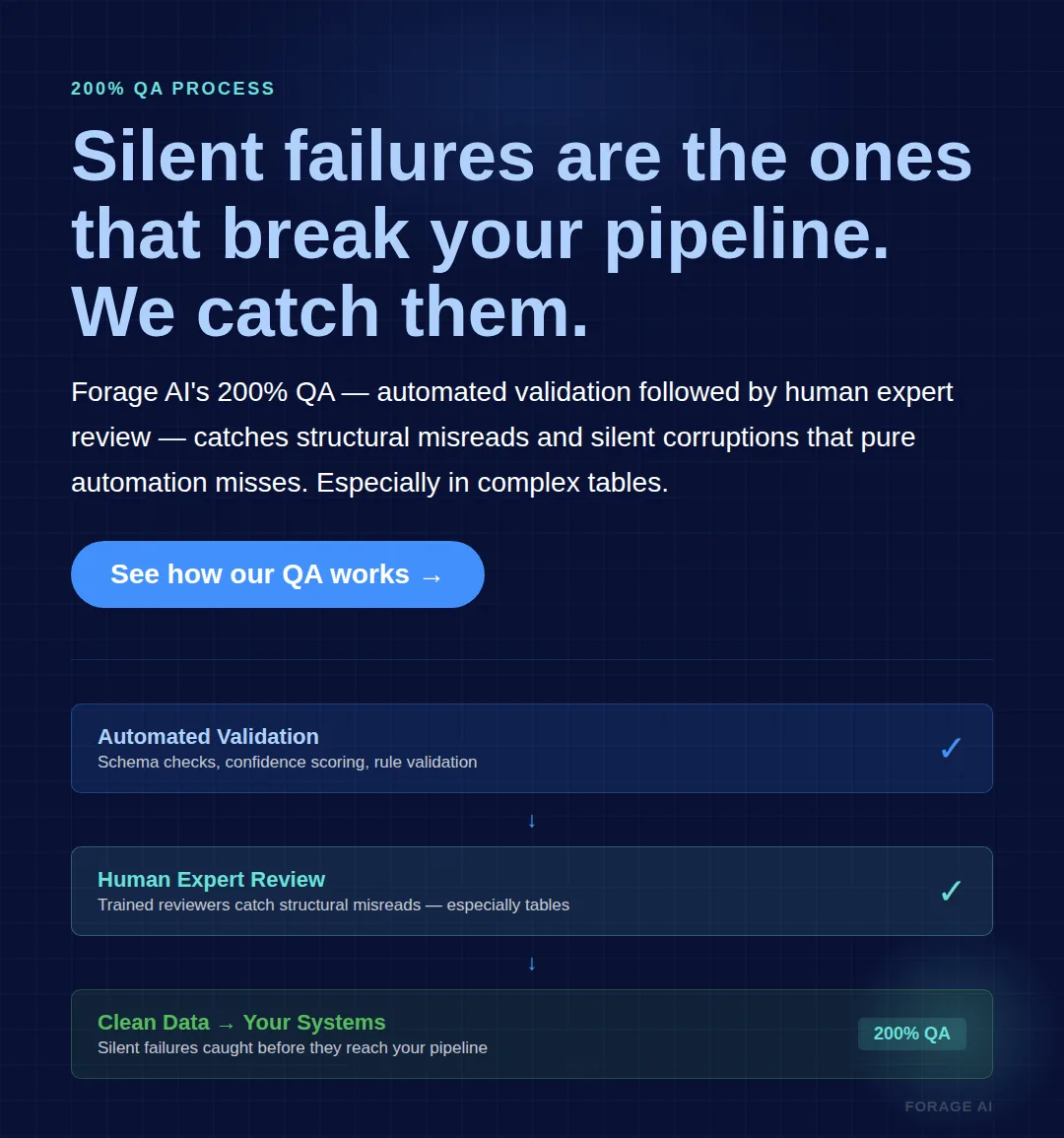
The system partially understands the document but misinterprets its structure. Tables get flattened into paragraph text. Merged cells split into separate entries. Multi-level headers collapse into a single row, losing the parent-child relationships between column groups. Unlike silent corruption, structural misreads are often detectable during quality assurance reviews, but most OCR pipelines check whether text was extracted, not whether the relationships between fields were preserved.
Tier 3: Character-Level Errors (Moderate Impact)
This is what most teams think of when they think “OCR failure.” Font confusion. Handwriting misreads, where accuracy drops to 80.7% on the IAM benchmark dataset, and cursive hits roughly 88% word accuracy at best. Special character drops. This is the only tier where traditional OCR tuning helps, through better preprocessing, higher-resolution scans, and domain-specific training data. If your failures are primarily Tier 3, investing in your OCR pipeline is the right call, and you probably do not need IDP.
Tier 4: Complete Extraction Failure (Lowest Risk)
Corrupt scans, heavy watermarks, and severely degraded documents cause the system to fail visibly. These are the least dangerous failures because they get caught immediately, and nobody ships empty or garbled output downstream without noticing.
Quick Summary
Q: Which OCR failures do the most damage in production?
A: The silent ones. Tier 1 silent data corruption and Tier 2 structural misreads produce plausible-looking output with no errors flagged, so wrong field relationships flow into your pipeline unnoticed. Tier 3 character-level errors are the only tier OCR tuning fixes, and Tier 4 complete failures get caught immediately. If your failures are mostly Tiers 1 and 2, the problem is architectural, not a tuning issue.
The critical insight: most teams focus improvement on Tiers 3 and 4 because those failures are visible. But Tiers 1 and 2 cause the most damage precisely because they are invisible. There is also what practitioners call the “Day 11” pattern, where a system works well during testing and early production, then gradually degrades as edge cases accumulate. Format changes and new vendor layouts each add a small failure rate that compounds silently over weeks.
Expert Insights
Production testing keeps surfacing the same gap between demo and deployment. A 2026 practitioner analysis by IDP-Software documented eight leading OCR tools that “destroyed table formatting” on multilingual invoices while performing well on clean test documents, summarizing the pattern bluntly: “The demo works. Production does not.” The lesson for evaluators is to test on your messiest real documents, not the vendor’s curated sample set.
Stat to know
Over 50% of OCR-extracted data still requires manual checking in enterprise environments, and the primary reason is not character-level errors but structural misreads that produce plausible-looking yet incorrect output. Source: TurboLens, 2026.
Why Do Tables Break OCR?
If you have run OCR on production documents for any length of time, you already know where the system breaks first. Tables. Between 40% and 60% of enterprise information lives in tables, and it is in tables that the gap between character recognition and document understanding becomes impossible to ignore.
OCR reads documents line by line, left to right, but tables require two-dimensional spatial reasoning. The system must understand which cell belongs to which row and column, how headers relate to the data beneath them, and where one table ends and another begins. That is a fundamentally different problem than character recognition, and it is one OCR was not designed to solve. Specific table structures each break OCR in their own way.
- Merged cells. When cells span multiple columns or rows, OCR either splits the content across the cells it expects or omits it entirely. Even cloud-native enterprise OCR tools struggle here.
- Multi-level headers. Two or three header rows, where top-level categories span sub-columns, require understanding nested relationships. Three-row headers with nested groups are typically returned flattened, with incorrect span relationships.
- Borderless tables. No visual grid means OCR cannot detect the structure, so content is extracted as flowing text with no cell boundaries. Financial statements and government forms use these extensively.
- Multi-page tables compound all of the above. A table that starts on page 3 and continues on page 5 has an approximately 70% success rate with current tools, and the remaining 30% require manual reconstruction.
Table complexity grading helps clarify where the risk sits: simple tables (fixed grid, single header row) are within OCR’s capability; moderate tables (some merged cells, two-level headers) produce inconsistent results; and complex tables (borderless, nested, multi-page, spanning rows) reliably break OCR. If your document mix includes moderate-to-complex tables, that is the clearest single signal you have outgrown OCR.
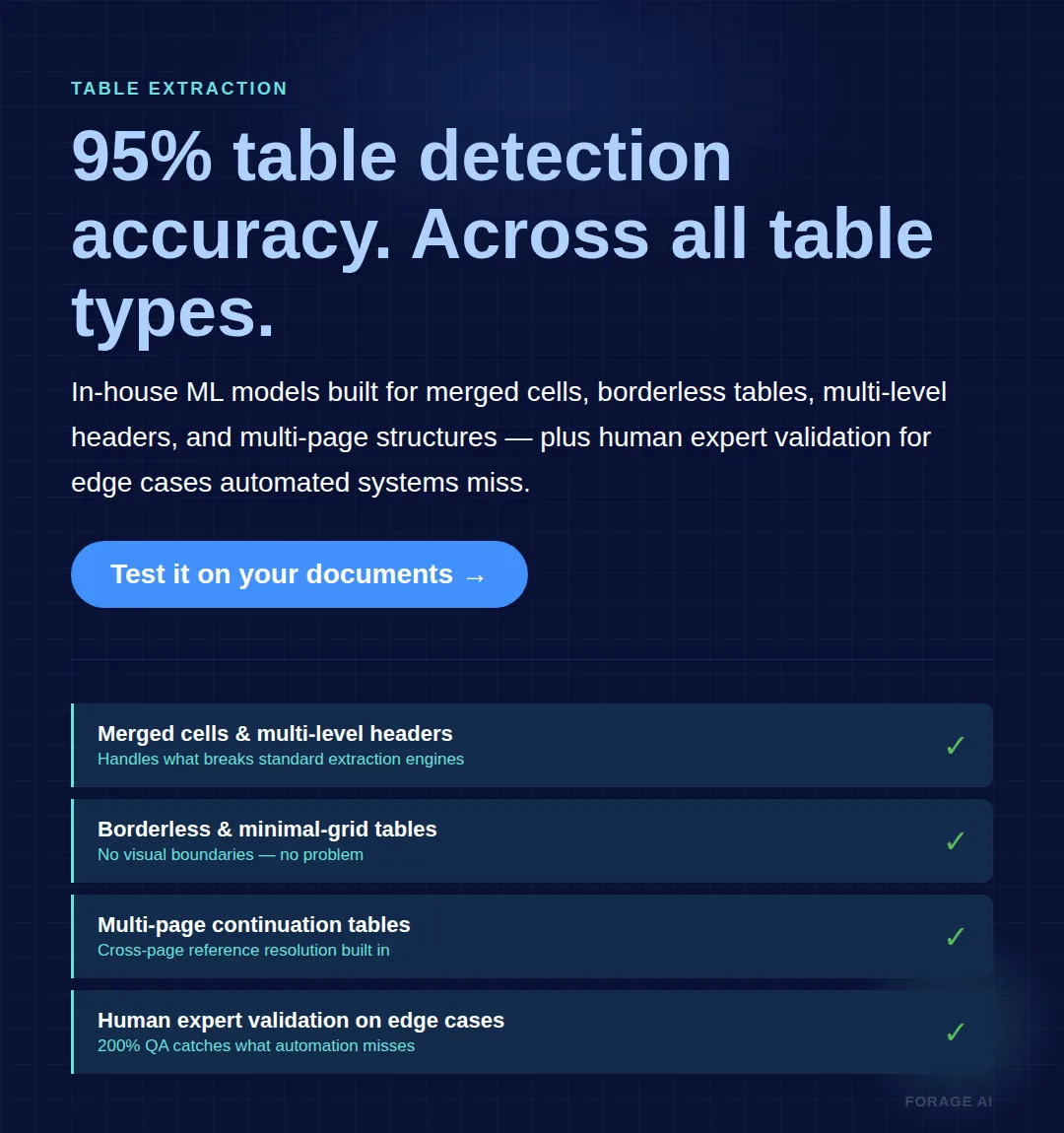
This is why table detection accuracy, not character accuracy, is the metric that matters for complex document processing. Forage AI’s IDP service achieves 95% table detection accuracy across all table types using in-house ML models that go beyond traditional grid structures, combined with human expert validation for the edge cases automated systems miss.
The breakdown is well documented even on flagship enterprise tooling. In Microsoft’s own developer Q&A, engineers report Azure Document Intelligence splitting or omitting content on merged cells, and academic work on table structure recognition (arXiv, 2025) confirms that integrating structure detection with OCR remains an unsolved technical challenge for cells that span multiple rows. The takeaway: this is an architectural limit, not a vendor-specific bug you can escape by switching OCR engines.
The IDP Difference: From Characters to Context
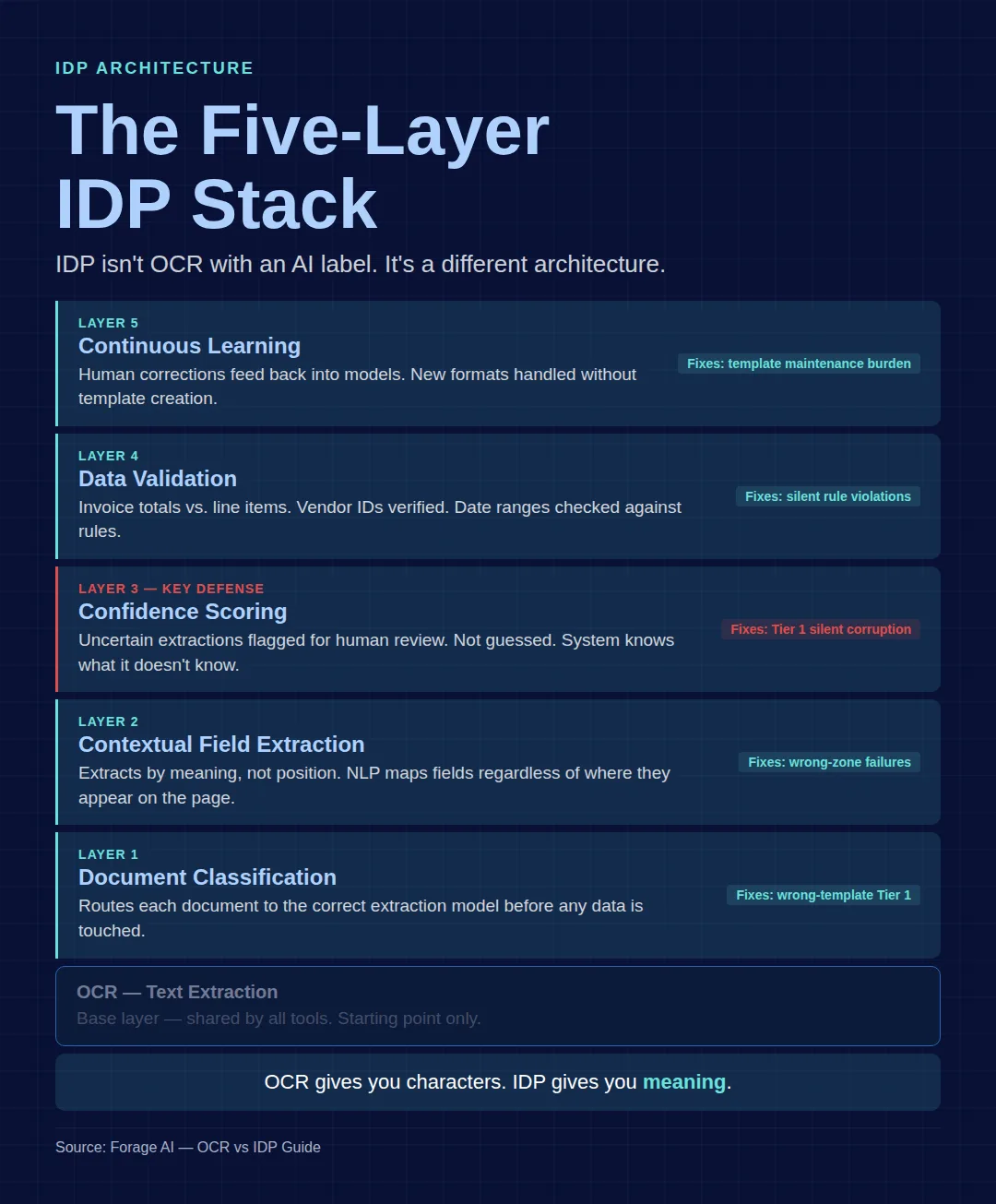
The leap from OCR to IDP is not about faster extraction. It’s about deeper comprehension. IDP is not “OCR with an AI label”; it is a different architecture. Where OCR is one layer, text extraction, IDP adds intelligence through three core capabilities and five processing layers, each addressing a specific failure mode from the taxonomy above.
1. Natural Language Processing (NLP)
NLP enables semantic understanding. IDP can interpret that “payment due in 30 days,” “net 30,” and “terms: 30” represent the same business rule. It recognizes entities, relationships, obligations, compliance language, and intent, even when phrased differently.
2. Computer Vision & Layout Awareness
Documents aren’t just words; they’re structures. IDP identifies tables, sections, footnotes, signatures, checkboxes, handwriting, annotations, and multi-column layouts. It distinguishes between a header and a clause, not because of location, but because of visual pattern understanding.
3. Machine Learning Adaptability
Unlike templates, IDP models improve with use. They learn from corrections, adapt to variability, and classify new document types with minimal manual configuration. This reduces engineering maintenance and supports scale across thousands of vendors, clients, or partners.
The Five-Layer IDP Architecture
Concretely, IDP stacks five layers on top of raw OCR, and each one closes a specific gap that causes OCR failures:
- Layer 1, Document Classification. Before extracting anything, the system identifies the document type and routes it to the right extraction model, preventing the wrong-template problem that causes many Tier 1 failures.
- Layer 2, Contextual Field Extraction. Instead of extracting by position, IDP extracts by meaning, understanding that “$12,500” in the bottom-right of an invoice is a total, not a line item.
- Layer 3, Confidence Scoring. Every field gets a confidence score; fields below threshold route to human review instead of passing through as assumed-correct data. This is the primary defense against silent data corruption.
- Layer 4, Data Validation. Extracted data is checked against business rules, does the invoice total match the line items, is the vendor ID known, does the date fall in range.
- Layer 5, Continuous Learning. Human corrections feed back into the models, so new formats don’t require manual template creation. This removes the template-maintenance burden that scales so poorly with OCR.
These capabilities allow IDP to categorize documents automatically, validate extracted fields against business rules, detect anomalies (“invoice amount exceeds PO limit”), and route exceptions intelligently. In other words, IDP doesn’t just read documents; it participates in the decision-making process. IDP isn’t magic, though. Even optimized IDP pipelines still send 15 to 30% of documents to human review, which is why the most reliable approach combines machine extraction with systematic human QA. Forage AI’s IDP service uses a Human+AI hybrid model with a 200% QA process: every extraction passes through automated validation followed by human expert review.
Stat to know
IDP reduces error rates by over 52% compared to OCR-only pipelines and top performers reach 95%+ straight-through processing rates. For context, Metro AG cut invoice turnaround from 1 to 2 days down to one hour after moving beyond OCR. Source: Docsumo, 2025; ABBYY.
Quick Summary
Q: What does IDP add beyond better character recognition?
A: IDP adds five architectural layers on top of OCR: document classification, contextual field extraction, confidence scoring, data validation, and continuous learning, powered by NLP, computer vision, and machine learning. Together they let the system understand meaning and structure, flag uncertainty instead of guessing, and learn from corrections. The result is over 52% fewer errors than OCR-only pipelines, though even strong IDP still routes 15 to 30% of documents to human review.
When Have You Outgrown OCR?
Not every document pipeline needs IDP, and overengineering your extraction stack wastes money while adding operational complexity. The decision comes down to your document types, your volume, and the kind of accuracy your downstream systems actually require.
| Stay with OCR if… | You’ve outgrown OCR when… |
|---|---|
| Documents use fixed layouts (tax forms, standardized applications, internal templates) | Formats vary across vendors, clients, or sources, and you maintain 50+ templates |
| You process fewer than 5 document types with stable structures | Table extraction is required and depends on cell-to-header relationships |
| Accuracy needs are character-level (searchable PDFs, not structured data) | You need field-level accuracy, not just text extraction |
| Volume is low enough that manual QC catches what OCR misses | Volume makes manual QC unsustainable (10,000+ documents per month) |
| Your failures are Tier 3 (character-level) on otherwise structured docs | You process semi-structured or unstructured documents, or compliance requires audit trails |
A few caveats are worth noting before you decide. Approximately 40% of IDP implementations underperform their initial ROI projections, and the cause is typically integration failures rather than technology limitations. Switching to IDP is not a guarantee; it adds implementation complexity, team skill requirements, and ongoing optimization needs. The most important step before any decision is to diagnose your actual failure tier: if you are dealing with Tier 3 character-level failures, fix your OCR; if the failures are Tier 1 or Tier 2, the problem is architectural, and IDP is what addresses it.
Stat to know
At 95% character accuracy on a 2,500-character invoice, 125 characters need manual correction per invoice, which works out to roughly $25,600 a year at 10,000 invoices in correction labor alone, before downstream errors. Source: JiffyAI.
The honest framing is that IDP is not automatically the answer. “Most enterprise AI remains a solution seeking a problem. Much is technology for technology’s sake,” warns Alan Pelz-Sharpe, Founder of Deep Analysis, in Rossum’s 2026 trends report. The discipline is to let the failure tier and the document mix justify the switch, not the novelty of the technology.
Why Does the Shift to IDP Matter Now?
The move from OCR to IDP is not just about embracing innovation; it is a response to structural pressures that traditional systems can no longer absorb.
The Data Volume Explosion
Document volume has grown exponentially across industries, and manual review, even partial, doesn’t scale. Batch-oriented OCR and fragile templates introduce bottlenecks and slow cycle times. Intelligent automation is now mandatory, not optional.
The Compliance & Accuracy Mandate
In regulated environments, a single misread field or missing clause can result in fines, rejected claims, audit observations, or legal exposure. As of August 2025, the EU AI Act makes audit trails and human-in-the-loop oversight mandatory for regulated AI document processing, raising the bar further. IDP strengthens governance by providing consistent rule-based extraction, traceable decision logs, reliable audit trails, and a reduction in human-induced variance. These are not features, they are operational safeguards.
From Cost Center to Insights Engine
OCR created digital documents. IDP creates structured data that can feed forecasting models, risk engines, fraud detection workflows, procurement analytics, patient record intelligence, and contract lifecycle analysis. The data trapped in PDFs and emails becomes accessible for analytics and AI, unlocking insights that were previously invisible. This is why IDP has shifted from “IT project” to core infrastructure for data-driven operations.
Stat to know
65% of enterprises are actively accelerating IDP initiatives, with two-thirds focused on replacing legacy systems, and the biggest reported benefit was reduced processing time (50%), not headcount reduction (30%). Source: AIIM/Deep Analysis survey of 600 organizations, 2025.
The bar for these projects has moved from experimentation to accountability. “Data extraction and conversational AI was only the opening act. In 2026, AI will be judged by impact on P&L, not pilots,” says Olivier Gomez, CEO of IAC.ai, in Rossum’s 2026 trends report. For document teams, that means the OCR-to-IDP business case now has to be written in throughput, error reduction, and compliance terms, not technology terms.
How Should You Evaluate and Implement IDP?
If you’ve determined that your failures are architectural and your document mix demands more than OCR can deliver, the next step is choosing and rolling out the right platform. Weigh these criteria by your specific failure profile, then implement in stages.
- Table extraction accuracy. This is the metric. Ask for results on your actual documents, including merged cells, multi-level headers, and borderless formats. If a vendor can’t break this out, their “99% accuracy” number is meaningless for your use case.
- Variable format handling. How does it handle a completely new layout it has never seen? Template-based IDP is just OCR with more templates; true IDP handles new formats through classification and contextual extraction.
- Confidence score transparency. Can you see why a specific extraction was flagged, and set per-field thresholds? Opaque scoring means you cannot tune for your accuracy requirements.
- Human-in-the-loop (HITL) workflow design. What percentage of documents route to review, and how fast does the queue clear? A system at 98% accuracy with no clear exception path is worse than one at 92% with well-designed routing.
- Compliance certifications. For regulated industries, documented security and privacy controls are baseline, not optional. Forage AI’s IDP service handles regulated document types under contractual controls and client-specific handling rules agreed up front, with built-in validation, audit trails, and encryption, plus the full range of enterprise formats (PDF, DOC, EML, MSG, JPG, TIFF), including handwritten notes and documents exceeding 2,000 pages.
- Integration depth. Direct ERP, CRM, and downstream workflow integration via API and webhooks. The extraction is only valuable if it flows into your systems without manual reformatting.
- Implementation timeline. Traditional enterprise IDP takes 6 to 12 months; modern AI-native platforms deploy in 1 to 2 weeks; building from APIs takes 3 to 6 months. Your timeline tolerance narrows the field.
Red flags in IDP evaluation: accuracy claims with no document-type breakdown, no confidence-score visibility, no human-review pathway, demos only on clean structured test documents, no audit trail or compliance documentation, and pricing that doesn’t scale with your volume trajectory.
On the rollout itself, four principles keep IDP from becoming another isolated point tool. Start with your document chaos: pick 2 to 3 high-volume, high-variability workflows, such as insurance claims, vendor invoices, or onboarding packets, where template-based OCR clearly fails. Prioritize ROI over perfection by choosing pilots where accuracy directly reduces cost, like faster invoice throughput or modern contract extraction. Demand native intelligence, not AI “add-ons” bolted onto template logic. And invest in change management, shifting your team from data entry to higher-value exception handling.
Transparency is the criterion most teams under-weight. “One material mistake can erase years of credibility. Finance cannot rely on black-box models,” says Caroline Krebs, VP of Finance at Rossum, in the firm’s 2026 trends report. The practical test is to demand visibility into how the system handles uncertainty, the low-confidence and edge cases, rather than how it performs on the easy ones.
The Future-Proof Advantage
As enterprises modernize document intelligence, one trend is becoming clear: IDP is the foundational layer for the next leap, Cognitive Automation. Once documents produce clean, structured data, AI agents can begin executing broader workflows such as approving invoices, triaging patient cases, escalating contract clauses, verifying compliance exceptions, and enriching customer records.
IDP provides the training data these agents require. Companies adopting IDP today are not simply fixing operational pain points; they are building the data infrastructure that will power their future AI strategy. This is the competitive edge that persists beyond automation cycles.
Stat to know
67% of enterprises are now evaluating agentic AI approaches to document processing, up from 23% two years earlier, and early adopters report cutting human review on AP workflows from 40% down to 4%. Source: Artificio, citing Gartner, 2025.
Frequently Asked Questions
What is the failure rate of OCR on business documents?
On clean, typed text, OCR achieves 99%+ character accuracy. On complex business documents with variable layouts, that drops to 60 to 80%, and handwriting recognition falls to around 80%. But character accuracy isn’t the metric that matters: at 95% on a 2,500-character invoice, 125 characters still need manual correction, and the silent structural errors are the ones that actually break pipelines.
Can OCR extract data from tables accurately?
Simple fixed-grid tables with single header rows: usually yes. Anything more complex, merged cells, multi-level headers, or borderless tables, produces unreliable results. Multi-page table success rates are approximately 70%, and since 40 to 60% of enterprise data lives in tables, this is where most teams first outgrow OCR.
Is IDP just OCR with AI added on top?
No. OCR is one layer, text extraction. IDP adds classification, contextual extraction, confidence scoring, data validation, and continuous learning. The difference is architectural, not incremental. OCR tells you what characters are on the page; IDP tells you what the document means.
When should I switch from OCR to IDP?
Switch when document formats vary across vendors, table extraction is required, you need field-level accuracy, volume exceeds your manual QC capacity, or compliance mandates audit trails. If your failures are Tier 3 character-level issues on otherwise structured documents, tune your OCR instead, it’s the right tool for that problem.
How much does OCR error correction cost?
At roughly $2.56 per invoice correction and about 6 minutes 15 seconds per fix, processing 10,000 invoices annually costs around $25,600 in correction labor alone. This excludes downstream remediation, compliance risk, and the team time spent investigating data discrepancies.
How long does IDP implementation take?
Traditional enterprise IDP platforms take 6 to 12 months. Modern AI-native IDP can be deployed in 1 to 2 weeks for standard use cases, while building from APIs takes 3 to 6 months. The range depends on document complexity, integration requirements, and whether you need compliance certifications.
Conclusion: The Real Question Isn’t “OCR or IDP”
The question isn’t which technology is better in the abstract. It’s whether your document pipeline needs text extraction or document understanding. Those are different architectural requirements, and treating one as the other is where most teams get stuck. If your OCR failures are Tier 3 character-level issues on structured documents, tune your OCR. If they are Tier 1 or Tier 2, silent corruption, structural misreads, or broken table relationships, no amount of OCR configuration can close an architectural gap.
The teams still running OCR on complex, variable documents aren’t making a technology choice. They’re making a cost choice, and the cost of manual correction, silent data corruption, and compounding template maintenance grows with every new vendor format and every month the pipeline runs. The transition from OCR to IDP is ultimately a shift in mindset: from digitizing pages to understanding information, from extracting text to enabling intelligence, from having data to being able to use it.
Your next step isn’t to replace OCR overnight. It’s to pilot IDP in your most variable, error-prone workflow and measure the reduction in manual touchpoints, exception rates, and time-to-insight. If you’re unsure where IDP would create the most value, that’s where Forage AI can help. We assess your current document workflows, identify quick-win opportunities, and integrate intelligent document processing into existing data pipelines without disruption. A short diagnostic often reveals where IDP will deliver measurable impact the fastest.
Sai is a data infrastructure enthusiast who has spent the past two to three years following the AI space closely, from the infrastructure layer to the fast-growing world of data for AI. He is genuinely curious about how modern data pipelines get built and where the data industry is heading, and he writes insightful pieces on the core topics that shape this niche.