
Octoparse Alternatives: Best Web Scraping Tools & Managed Services Compared
CAPTCHA now guards more than 11% of websites, and as of July 2025 Cloudflare blocks AI scrapers by default across its network (Cloudflare, 2025). Two data points, one implication: the defenses a point-and-click tool has to clear got measurably harder inside a single year.
The tools that were sufficient on a forgiving 2023 web are not the tools that hold on the 2026 web. That is the structural reason teams searching for an Octoparse alternative are rarely shopping for a lookalike. The data points them at a different category.
You did not buy a desktop scraper to become a maintenance team. You bought it because someone needed competitor prices, listing data, or research signals last quarter, and the GUI promised “no code.”
For a while the promise held. Then volume grew. Sites added bot defenses. A point-and-click selector that worked on Tuesday broke on Friday.
The pattern is consistent across the teams we have worked with: the cost a visual scraper hides is not the license fee, it is the engineering time a broken selector quietly consumes. The “no maintenance” tool becomes a maintenance backlog, and the question shifts from “which template do I clone?” to “which Octoparse alternative fits the job I have now?”
That is the real question behind every search for an Octoparse alternative. Sometimes it is “which lookalike?” More often, once volume and site complexity climb together, it is “have we outgrown the DIY tier entirely?”
This guide answers both. It names the actual alternatives, grouped by the category they belong to, and tells you which one to switch to over Octoparse and why for each.
One number anchors the whole decision: at enterprise scale, vendor fees are the minority of total cost-to-data. The engineering, maintenance, and QA hidden behind a cheap subscription are the majority, and the category you pick decides which side of that split you pay.
The categories still matter, so we keep them, briefly: they tell you what kind of tool you are shopping for before you compare individual products. But the products are the point. Below you will find roughly twenty real alternatives, each with its own comparison table and a direct read on where it beats Octoparse and where it does not.
Quick Digest
- Why teams leave a 4.7: Octoparse rates Capterra 4.7 (n=106) and G2 4.8 (n=52). A rating measures the vendor’s median customer, not your workload, so leaving is a fit decision, not a verdict on quality.
- The four categories: No-code, developer frameworks, scraper APIs and proxies, fully managed services. The gap between categories decides your outcome far more than the gap between products inside one.
- The upgrade is usually vertical: Most teams searching for an alternative need a different category, not another visual tool. Swapping Octoparse for a second point-and-click builder moves the same ceiling a few feet.
- How to read the ratings: Every score below carries its sample size. Capterra, GetApp and Software Advice share one Gartner corpus; G2 and Trustpilot figures are labelled corroborated-via-secondary. Where we could not corroborate a sample size, no star figure is printed.
- Sample sizes differ by two orders of magnitude: Apify carries n=512, Diffbot n=4. Comparing those two scores as if they were equivalent evidence is the single most common error in alternatives roundups.
How did we pick and rate these alternatives?
Start with the incumbent’s own scores, because fairness first is the only way this list is useful. Octoparse holds Capterra 4.7 (n=106), G2 4.8 (n=52), Trustpilot 4.1 (n=96) and TrustRadius 7.0 out of 10 (n=13). Those are good numbers. Nothing below argues Octoparse is a bad tool; the argument is that a tool can be well built and still be the wrong category for your workload.
Every rating in this article is printed with its sample size. A 4.9 on ten reviews and a 4.8 on five hundred are not the same claim, and averaging them into a leaderboard destroys the only information that mattered. Capterra, GetApp and Software Advice draw on one shared Gartner review corpus, so we treat them as a single source rather than three. G2 and Trustpilot figures are labelled corroborated-via-secondary, because both block direct automated access and the numbers were confirmed through secondary reporting instead of a first-party fetch.
Where we could not corroborate a sample size, we print no star figure at all. That applies to Web Scraper.io, Browse AI and ScrapingBee below. It is less satisfying than a tidy table of scores, and it is the difference between evidence and decoration. Pricing throughout comes from vendor pricing pages rather than aggregators, which routinely carry stale figures. All ratings and prices in this article were verified on 2026-08-25. Review counts move; if you are reading this months later, re-check the two or three that would actually change your decision.
Octoparse alternatives at a glance
If you want the answer in one screen, here it is. The full alternatives roster, organized by the four categories of web-data tooling, with a one-line “best for” and the reason to pick it over Octoparse.
No-code and point-and-click (the closest swaps for Octoparse)
- ParseHub. Best for analysts hitting Octoparse’s JavaScript ceiling. Over Octoparse when dynamic, interactive sites keep breaking your templates.
- Web Scraper.io. Best for browser-based scraping that lives in a Chrome extension. Over Octoparse when you want a lighter, in-browser builder with no desktop app.
- Browse AI. Best for monitoring pages for changes, not just one-off extraction. Over Octoparse when you need scheduled change alerts and AI-suggested fields.
- Simplescraper. Best for fast, single-site extraction straight to an API or Google Sheet. Over Octoparse when setup time matters more than depth.
- Instant Data Scraper. Best for free, one-click table and list grabs. Over Octoparse when the job is occasional and you do not want to learn a builder.
- Bardeen. Best for tying scraping into a broader workflow automation. Over Octoparse when extraction is one step in a larger automation across your SaaS stack.
- Kadoa. Best for AI-driven extraction that adapts when a site changes. Over Octoparse when you want selectors that self-heal instead of breaking.
Developer frameworks and libraries (for teams that want to own the code)
- Scrapy. Best for Python teams building large, structured crawlers. Over Octoparse when you need full control and have engineers to maintain it.
- Playwright. Best for scraping heavy JavaScript apps via real browser automation. Over Octoparse when you must render and interact like a real user.
- Beautiful Soup. Best for parsing static HTML in a quick Python script. Over Octoparse when the target is simple and a script beats a GUI.
- Apify. Best for running and scaling pre-built or custom scrapers in the cloud. Over Octoparse when you want a code-friendly platform with a marketplace of ready actors.
Proxy, scraper API, and data providers (the infrastructure layer)
- Bright Data. Best for large-scale scraping that needs a deep proxy network. Over Octoparse when anti-bot defenses are your main blocker.
- Zyte. Best for engineering teams that want a scraping API plus the people behind Scrapy. Over Octoparse when you need API-grade extraction with smart proxy handling.
- ScrapingBee. Best for developers who want one API call that handles browsers and proxies. Over Octoparse when you want to skip infrastructure and write only parsing logic.
- Diffbot. Best for AI-driven structured extraction and knowledge-graph data. Over Octoparse when you want fields returned without writing selectors at all.
- Import.io. Best for enterprise teams wanting a hosted extraction platform with support. Over Octoparse when you need a managed-leaning platform rather than a desktop tool.
- Nimble. Best for AI-powered web data APIs with structured output. Over Octoparse when you want an API that returns parsed data, not raw HTML.
Fully managed extraction services (when you want data, not a tool)
- Forage AI. Best for teams that need reliable, custom web data delivered without owning any scraping logic. Over Octoparse when reliability, scale, and custom schemas are non-negotiable and you want the maintenance burden off your team entirely. This is the answer when you have outgrown point-and-click.
- Grepsr. Best for managed data-as-a-service on a recurring feed. Over Octoparse when you want a vendor to run the extraction and hand you clean data.
- ScrapeHero. Best for custom crawling projects and ready-made datasets. Over Octoparse when you want a service to build and operate the pipeline for you.
Why do teams outgrow Octoparse and tools like it?
Visual scrapers solve a specific job well: a single analyst needs structured data from a handful of sites, on a recurring but forgiving cadence, and is willing to babysit the workflow. The point-and-click interface, the cloud-run scheduling, the export-to-CSV finish line, that is a clean fit for that job.
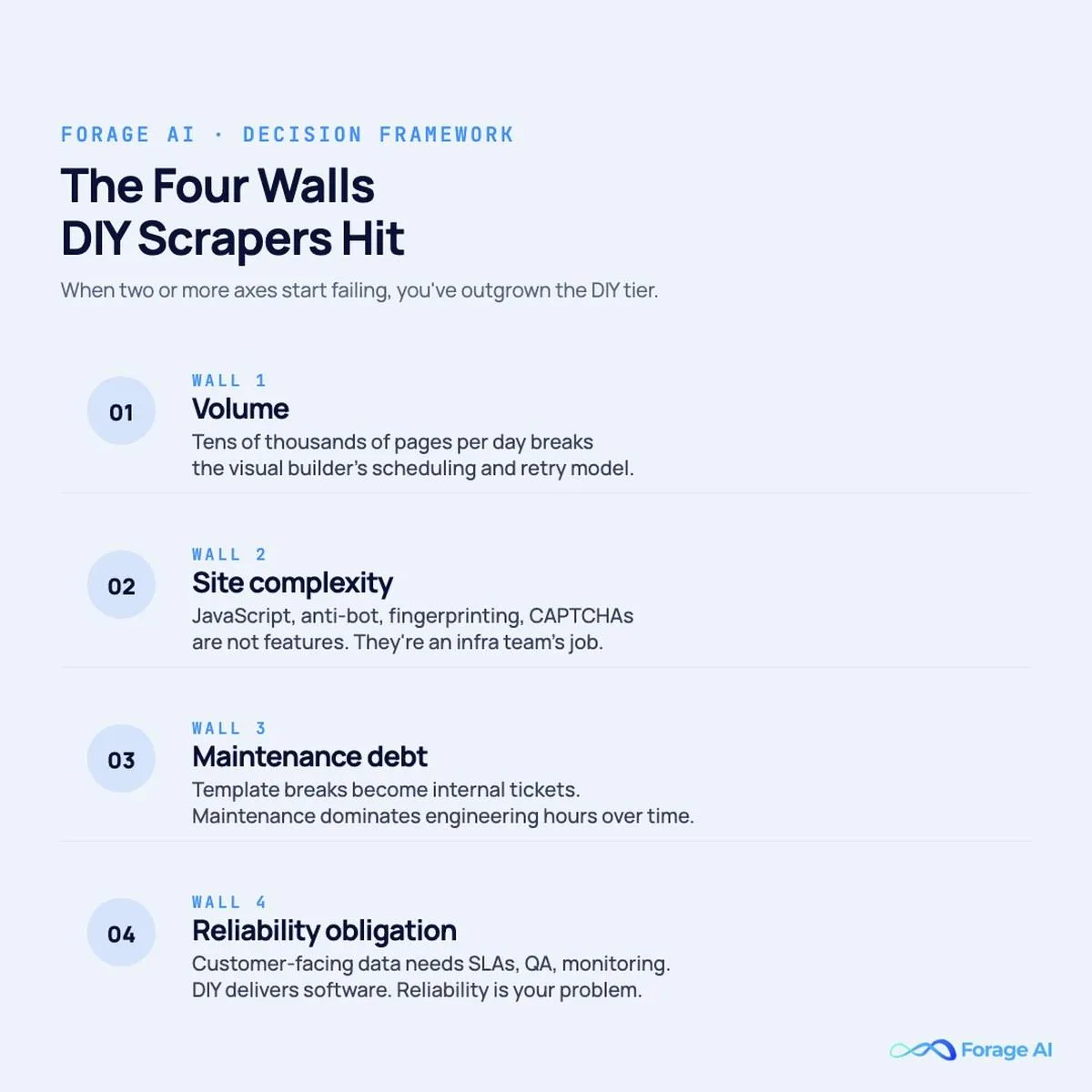
The fit erodes along four predictable axes, and those same four axes are the decision criteria you should carry into every comparison below.
Volume: a workflow that scrapes 5,000 product pages a week is comfortable; 500,000 SKUs refreshed daily across 30 competitor sites is a different category, where scheduling, retries, IP rotation, and queue management become an infrastructure team’s job.
Expert Insights
Read the incumbent’s scorecard before you read anyone’s criticism of it. Octoparse holds Capterra 4.7 on 106 reviews and G2 4.8 on 52 (accessed August 2026), which are healthy numbers on a respectable base. Teams still leave, and the reason is structural rather than qualitative: a review score describes the vendor’s median customer, and the median Octoparse customer is not running 500,000 SKUs a day across anti-bot-defended sites. When your workload sits three standard deviations from that median, the score stops predicting your experience. That is why “but it is well rated” is a weak argument against switching, and equally why “it is badly built” is a false one.
Site complexity: modern e-commerce, marketplace, and SaaS sites render via JavaScript, lazy-load on scroll, fingerprint browsers, and challenge with CAPTCHA, and a template-based selector breaks whenever the DOM shifts.
Maintenance debt: every scraper degrades silently as the source site evolves, and with a DIY tool that debt lands inside your team as a stream of internal tickets.
Reliability obligation: when the data feeds a customer-facing product, an investment thesis, or an executive dashboard, “the scraper broke and I’ll re-run it tomorrow” stops being acceptable.
When two or more of these axes start failing at once, the search begins. The mistake most teams make is searching laterally, for another visual tool, when the data says the upgrade they need is vertical, into a different category. So before the roster, here are the categories you are actually choosing between.
The Four Categories of Octoparse Alternatives
Most “alternative” lists blur a distinction that decides the outcome. The products below are not interchangeable; each sits in one of four categories, and the differences between categories matter more than the differences within them. Match the category to your volume, complexity, engineering bandwidth, and reliability needs first, then pick the product.
- No-code and point-and-click. The same category as Octoparse. A non-engineer points, clicks, defines templates, schedules runs, exports data. Picks: ParseHub, Web Scraper.io, Browse AI, Simplescraper, Instant Data Scraper, Bardeen, Kadoa. Choose this category when your volume and complexity are moderate and you want to stay code-free, but you have hit a specific Octoparse limit (JavaScript, monitoring, setup speed, or self-healing selectors).
- Developer frameworks and libraries. Code-first tools your engineers write and maintain. Picks: Scrapy, Playwright, Beautiful Soup, Apify. Choose this category when you have engineering bandwidth and want full control over extraction logic.
- Proxy, scraper API, and data providers. Infrastructure-as-a-service for the hard parts, proxy rotation, headless browsers, CAPTCHA handling, returning HTML or structured data. Picks: Bright Data, Zyte, ScrapingBee, Diffbot, Import.io, Nimble. Choose this category when bot evasion is your blocker and you want to keep parsing in-house.
- Fully managed extraction services. You describe the sites, fields, cadence, and delivery format; the vendor builds, runs, maintains, and QAs everything, and hands you clean data. Picks: Forage AI, Grepsr, ScrapeHero. Choose this category when you need data as a deliverable and want the reliability obligation to live with the vendor.
Sample sizes across this roster span two orders of magnitude, and that fact quietly invalidates most alternatives tables. Apify carries 512 Capterra reviews; Diffbot carries four, the most recent from 2021 (accessed August 2026). A 4.8 on 512 and a 4.5 on 4 are not comparable measurements, and ranking them in one column implies a precision the underlying data cannot support. Use ratings to compare products inside a category where the review populations are at least similar in kind, and use the category definition itself, not stars, to choose between categories.
No-Code and Point-and-Click Alternatives
These are the closest swaps for Octoparse: you keep the visual, code-free workflow and trade up on one specific limitation. Pick by the limit you have actually hit.
ParseHub
| Attribute | Detail |
|---|---|
| Best for | Analysts who like the point-and-click model but keep hitting Octoparse’s JavaScript and interaction ceiling. |
| Key use cases | Dynamic sites, infinite scroll, dropdowns and forms, multi-page extraction. |
| Pricing model | Free tier with limited pages per run; paid monthly plans scaling by pages and run speed. |
| Deployment | Desktop app (Windows, macOS, Linux) with cloud runs. |
| vs Octoparse (why switch) | Handles interactive, JavaScript-heavy sites more gracefully than Octoparse templates. |
| Standout strength | Relative-selection logic that copes with messy, irregular page structures. |
| Ratings (with n, accessed 2026-08-25) | Capterra 4.5 (n=16). |
| Watch-out | Users report higher per-page pricing and a steeper learning curve on complex projects. |
ParseHub is the most direct like-for-like swap when the frustration with Octoparse is specifically dynamic content. It uses a similar visual builder, but the selection engine was designed around interactive elements: clicking through pagination, expanding dropdowns, filling search forms, and following links several levels deep.
For analysts whose templates kept breaking on JavaScript-rendered listings, that difference is the whole reason to switch.
Reviewers on G2 and Capterra tend to praise its handling of complicated sites and its desktop-plus-cloud model. The recurring complaint is cost: paid tiers are widely described as pricier per page than Octoparse, and free runs are slow. The pattern in the reviews is consistent. It is a better-than-Octoparse choice when complexity is your wall, not a cheaper one.
Where it stays in the same bucket as Octoparse: it is still a single-analyst DIY tool. Push it to hundreds of thousands of pages a day across dozens of adversarial sites and you are back to babysitting selectors, on a different brand of GUI.
Web Scraper.io
| Attribute | Detail |
|---|---|
| Best for | People who want a lightweight, browser-based scraper with no desktop install. |
| Key use cases | Quick site maps, e-commerce category scrapes, learning the basics of point-and-click extraction. |
| Pricing model | Free Chrome extension for local scraping; paid cloud plans for scheduling and higher volume. |
| Deployment | Browser extension plus an optional cloud platform. |
| vs Octoparse (why switch) | Lives inside the browser, so there is nothing to install and the learning curve is shorter. |
| Standout strength | Free local extension that covers a lot of straightforward jobs at zero cost. |
| Ratings (with n, accessed 2026-08-25) | Listed on Capterra and Trustpilot, but no sample size we could corroborate, so no star figure is printed here. |
| Watch-out | The free extension runs locally and single-threaded; serious scheduling and scale require the paid cloud. |
Web Scraper.io is the alternative to reach for when Octoparse feels heavy. The core product is a Chrome extension: you build a “sitemap” of selectors visually, run it in the browser, and export to CSV or JSON. For static and lightly dynamic e-commerce and directory sites, it covers a surprising amount of ground at zero cost.
The platform earns consistent praise for being approachable and free to start, which makes it a common first tool for analysts and a teaching tool for new scrapers. The boundary is in the architecture: the free, in-browser mode is local and single-threaded, so anything requiring scheduled runs, parallelism, or proxy rotation pushes you onto the paid cloud, where the convenience gap with Octoparse narrows.
Pick it over Octoparse when your jobs are small, your sites are not heavily defended, and you would rather work inside a tab than maintain a desktop application.
Browse AI
| Attribute | Detail |
|---|---|
| Best for | Teams that need to monitor pages for changes, not just extract once. |
| Key use cases | Price and stock monitoring, competitor change alerts, recurring list extraction. |
| Pricing model | Free tier with limited credits; paid monthly plans priced by credits and monitored robots. |
| Deployment | Cloud platform with browser-based setup and integrations. |
| vs Octoparse (why switch) | Built-in change monitoring and AI-assisted field selection that Octoparse does not center. |
| Standout strength | Point at a page and it suggests fields, then watches for changes and alerts you. |
| Ratings (with n, accessed 2026-08-25) | A review base exists across platforms; sample sizes were not independently corroborated, so no star figure is printed here. |
| Watch-out | Credit-based pricing can climb quickly once you monitor many pages frequently. |
Browse AI reframes scraping as monitoring. You train a “robot” by clicking the data you want, the platform suggests fields with AI assistance, then it runs on a schedule and alerts you when the page changes. For a marketer or analyst whose real job is “tell me when a competitor changes a price,” that is a closer fit than Octoparse’s extract-and-export loop.
Reviewers highlight the speed of setup and the change-detection feature as the reasons they switched, and the prebuilt integrations into spreadsheets and automation tools get called out as a strength. The watch-out is the credit model: monitoring many pages on a tight cadence consumes credits fast, and costs can outpace expectations.
Choose it over Octoparse when the value is in the alert, not the archive, and when you would rather describe what to watch than maintain extraction templates.
Simplescraper
| Attribute | Detail |
|---|---|
| Best for | Fast extraction from a single site straight into an API, Sheet, or webhook. |
| Key use cases | Quick data pulls, feeding no-code apps, lightweight recurring exports. |
| Pricing model | Free tier for local use; paid plans for cloud runs and API credits. |
| Deployment | Chrome extension with a cloud API layer. |
| vs Octoparse (why switch) | Much faster to set up for simple sites and exposes results as an API quickly. |
| Standout strength | Turns a scrape into a usable API endpoint with minimal configuration. |
| Ratings (with n, accessed 2026-08-25) | Chrome Web Store 4.5 (n=341); a second reading of the same listing shows 4.4 (n=364). Small base either way, and the conflict is noted rather than averaged away. |
| Watch-out | Built for simplicity, so deeply nested or defended sites are not its strength. |
Simplescraper matches its name. It is a Chrome extension that lets you select data and, within minutes, expose it as an API or pipe it to Google Sheets, Airtable, or a webhook. For builders wiring web data into a no-code app, that speed-to-API is the draw, and it is a friendlier on-ramp than Octoparse for a one-site job.
Users like how little friction stands between “I see the data” and “the data is in my app.” The tradeoff is depth: the same simplicity that makes it fast means it is not the tool for sprawling, multi-level crawls or sites with aggressive anti-bot layers. It is a precision instrument for small jobs.
Reach for it over Octoparse when the goal is “get this one site into my stack today,” not “operate a fleet of extractors.”
Instant Data Scraper
| Attribute | Detail |
|---|---|
| Best for | One-click, free extraction of tables and lists without any setup. |
| Key use cases | Grabbing a single table, exporting a search-results page, occasional ad-hoc pulls. |
| Pricing model | Free browser extension. |
| Deployment | Chrome extension, runs locally. |
| vs Octoparse (why switch) | Zero configuration: it auto-detects tabular data and exports it in seconds. |
| Standout strength | Heuristic auto-detection of the main data block on a page. |
| Ratings (with n, accessed 2026-08-25) | Chrome Web Store 4.9 (n≈7,000, corroborated-via-secondary). A free extension, so the base skews positive: nobody churns off free. |
| Watch-out | No scheduling, no cloud, no custom schemas; it is a manual, one-off tool. |
Instant Data Scraper is the free utility you keep in the toolbar for the times Octoparse is overkill. It uses heuristics to guess which part of the page is the data you want, highlights it, and exports to CSV or Excel with one click. For grabbing a single table or a results page, nothing is faster.
It is widely recommended in scraping communities precisely because it does one thing well and costs nothing. The flip side is that it does only that: there is no scheduling, no cloud execution, no proxy handling, and no way to define a custom schema across sites.
Use it instead of Octoparse for genuinely occasional, manual extraction. The moment the job becomes recurring or large, it is the wrong tool, and so, arguably, is the whole no-code category.
Bardeen
| Attribute | Detail |
|---|---|
| Best for | Teams where scraping is one step inside a larger workflow automation. |
| Key use cases | Lead enrichment, pulling data into a CRM, automating repetitive browser tasks. |
| Pricing model | Free tier; paid plans for premium runs and advanced automations. |
| Deployment | Browser extension with workflow automations and integrations. |
| vs Octoparse (why switch) | Connects extraction to actions across your SaaS tools, not just an export file. |
| Standout strength | Combines scraping with automation across apps like LinkedIn, Sheets, and CRMs. |
| Ratings (with n, accessed 2026-08-25) | G2 4.8 (n=35, corroborated-via-secondary). No Capterra sample size corroborated. |
| Watch-out | Automation-first, so it is lighter on heavy-duty, large-scale crawling. |
Bardeen treats scraping as a means, not an end. Its strength is workflow automation: extract data from a page, then route it into a CRM, enrich it, send a message, or update a sheet, all in one automation. For sales and operations teams, that “scrape and do something” loop is closer to the job than Octoparse’s “scrape and export.”
Reviewers value the prebuilt “playbooks” and the integrations into the SaaS tools they already use. Because automation is the center of gravity, it is not built to be a high-volume crawler; its extraction is tuned for the kinds of pages that feed go-to-market workflows.
Choose it over Octoparse when the data is an input to an action, and the action is the point.
Kadoa
| Attribute | Detail |
|---|---|
| Best for | Teams that want AI-driven extraction with selectors that adapt when sites change. |
| Key use cases | Recurring extraction from sites that redesign often, schema-driven data feeds. |
| Pricing model | Usage-based and subscription tiers; contact-based for higher volumes. |
| Deployment | Cloud platform with API access. |
| vs Octoparse (why switch) | AI generates and maintains the extraction logic, reducing the break-and-fix cycle. |
| Standout strength | Self-adapting extraction that aims to heal when a page structure changes. |
| Ratings (with n, accessed 2026-08-25) | No material review base on Capterra, G2 or Trustpilot as of August 2026. Too new to carry review evidence, which is itself the finding. |
| Watch-out | Newer entrant; AI extraction still needs validation on high-stakes fields. |
Kadoa is the AI-native answer to the single most common Octoparse complaint: selectors that break when a site changes. Instead of hand-building templates, you describe the data you want, and the platform uses AI to generate and adapt the extraction logic, aiming to keep running when the DOM shifts.
That self-healing promise is the draw for teams tired of the maintenance treadmill, and early adopters point to the reduction in manual fixes as the reason they moved. As with any AI extraction, the watch-out is verification: for fields where being wrong has a downstream cost, you still want QA on the output, because “adapts automatically” and “adapts correctly” are not the same guarantee. If you are weighing this self-healing approach across the wider field, our guide to the best AI web scraping tools compares how each one handles that trade-off.
Expert Insights
The no-code category is harder to stay inside than it was, because the web defended itself. CAPTCHA challenges now protect more than 11% of websites, and in July 2025 Cloudflare began blocking AI scrapers by default across its network (Cloudflare, 2025). A self-healing AI selector helps when a page restructures its HTML; it does nothing against a network-level block. The data points to a clean read for a no-code buyer: AI extraction handles DOM drift, not bot defenses, so a tool that promises “it adapts automatically” is solving the maintenance problem, not the access problem.
Pick it over Octoparse when maintenance debt is your primary pain and you want the tool, rather than your team, to absorb site changes. If the data is also high-stakes, this is the point where the no-code category starts handing off to managed services.
Quick Summary
Q: Which no-code Octoparse alternative should you pick?
A: Pick the no-code alternative by the specific Octoparse limit you have hit, because these tools all keep the visual, code-free workflow and differ only on the wall they remove. Choose ParseHub for JavaScript-heavy, interactive sites; Web Scraper.io for a lightweight in-browser builder; Browse AI when the value is change monitoring, not one-off extraction; Simplescraper for fast single-site scrape-to-API; Instant Data Scraper for free, occasional table grabs; Bardeen when scraping is one step in a larger automation; and Kadoa when you want AI selectors that self-heal. The shared ceiling is the same as Octoparse: push any of them to hundreds of thousands of pages a day across adversarial sites and you are back to babysitting selectors.
Developer Frameworks and Libraries
If you have engineers and want to own the extraction logic, you leave the visual category entirely. These are code-first tools. They give you total control, and they hand you total responsibility for maintenance, infrastructure, and QA.
Scrapy
| Attribute | Detail |
|---|---|
| Best for | Python teams building large, structured, maintainable crawlers. |
| Key use cases | Large-scale crawling, recurring pipelines, custom extraction at scale. |
| Pricing model | Free and open source; you pay for hosting and engineering time. |
| Deployment | Python framework, self-hosted or on your own infrastructure. |
| vs Octoparse (why switch) | Unlimited control and scale, with no GUI ceiling. |
| Standout strength | Mature, battle-tested crawling framework with a deep plugin ecosystem. |
| Ratings (with n, accessed 2026-08-25) | Open-source library, no review-platform listing. Judge it on maintenance activity, release cadence and community size, not on stars. |
| Watch-out | Requires Python skills, and you own proxies, retries, and maintenance. |
Scrapy is the default for engineering teams that want to build crawlers properly. It is a mature Python framework with structured spiders, item pipelines, middleware, and a large community, and it scales as far as your infrastructure does. Where Octoparse has a ceiling, Scrapy has whatever your team can build.
The cost is engineering. Scrapy does not solve proxy rotation, browser rendering, or CAPTCHA on its own; you bolt those on, and you own every line of maintenance when a target site changes. For teams with the skills and the will, that control is the entire point.
Choose it over Octoparse only when extraction is a capability you want to build and keep in-house, with the headcount to back it.
Playwright
| Attribute | Detail |
|---|---|
| Best for | Scraping heavy JavaScript apps through real browser automation. |
| Key use cases | Single-page apps, login-gated flows, interaction-heavy extraction, testing. |
| Pricing model | Free and open source; you pay for compute and engineering time. |
| Deployment | Library for Node.js, Python, Java, and .NET; self-hosted. |
| vs Octoparse (why switch) | Drives a real browser, so it handles dynamic content Octoparse stumbles on. |
| Standout strength | Reliable automation of modern, JavaScript-rendered pages across browsers. |
| Ratings (with n, accessed 2026-08-25) | Open-source library, no review-platform listing. Same caveat as Scrapy: the signal is maintainer activity, not review scores. |
| Watch-out | Resource-heavy at scale, and you build all the scraping logic yourself. |
Playwright is browser automation that doubles as a scraping engine for the hardest dynamic sites. Because it drives a real browser (Chromium, Firefox, or WebKit), it renders JavaScript, handles logins, and interacts with pages the way a user does, which is exactly where template-based tools like Octoparse give up.
Engineers like its reliability and cross-browser support, and it has become a common choice over older headless tooling. The tradeoffs are measurable: running real browsers is resource-intensive at scale, and Playwright gives you a browser, not a scraping platform, so proxies, scheduling, parsing, and QA are all yours to build.
Use it over Octoparse when the blocker is rendering and interaction, and you have the engineers to operate it.
Beautiful Soup
| Attribute | Detail |
|---|---|
| Best for | Parsing static HTML inside a quick, focused Python script. |
| Key use cases | Small scripts, one-off extractions, parsing already-downloaded pages. |
| Pricing model | Free and open source. |
| Deployment | Python library, used in your own scripts. |
| vs Octoparse (why switch) | For simple, static targets, a short script beats a whole GUI. |
| Standout strength | Simple, forgiving HTML parsing that is easy to learn. |
| Ratings (with n, accessed 2026-08-25) | Open-source library, no review-platform listing. A parsing library rather than a product, so review platforms do not cover it. |
| Watch-out | It only parses; it does not fetch pages, render JavaScript, or handle proxies. |
Beautiful Soup is the Python parsing library that countless scrapers start with. Paired with a request library, it turns raw HTML into navigable, queryable structure with little code. For a developer facing a simple, static page, writing ten lines of Beautiful Soup is often faster and cleaner than configuring Octoparse.
Its strength is approachability; it is the standard teaching tool for HTML parsing and forgiving of messy markup. Its boundary is just as clear: it parses, but it does not fetch pages on its own, render JavaScript, rotate proxies, or schedule runs. It is one component, not a platform.
Reach for it instead of Octoparse on small, static jobs where a script is the right size of tool. For anything dynamic or large, it becomes one piece of a much bigger build.
Apify
| Attribute | Detail |
|---|---|
| Best for | Developers who want a cloud platform to run pre-built or custom scrapers. |
| Key use cases | Running ready-made scrapers, scaling custom crawlers, feeding pipelines and LLMs. |
| Pricing model | Free monthly credits, then pay-as-you-go plus paid subscription tiers. |
| Deployment | Cloud platform with API, SDK, and a marketplace of “actors.” |
| vs Octoparse (why switch) | Code-friendly platform with thousands of prebuilt scrapers and real API access. |
| Standout strength | A marketplace of ready-made scrapers plus the ability to run your own at scale. |
| Ratings (with n, accessed 2026-08-25) | Capterra 4.8 (n=512; Ease 4.7 · Service 4.6). The largest sample on this roster by a distance. |
| Watch-out | Most value is unlocked with developer skills; pay-as-you-go costs need watching. |
Apify sits on the bridge between developer tooling and platform. It hosts thousands of prebuilt scrapers (“actors”) for popular sites, and it lets your engineers build and deploy custom ones with proper APIs, scheduling, storage, and proxy integration. For a team building a data pipeline that feeds BI tools, CRMs, or models, it is a far more flexible home than Octoparse.
Reviewers consistently call out the actor marketplace and the API-first design as the reasons it scales where visual tools cannot. The watch-outs are the usual platform ones: the deepest value needs developer skills, and pay-as-you-go billing rewards teams that monitor their consumption.
Choose it over Octoparse when you want code-grade control and cloud scale without standing up all your own infrastructure, though if your needs are bespoke enterprise schemas it is worth weighing the managed and API alternatives to Apify, and you have the engineering to use it.
Quick Summary
Q: When is a developer framework the right answer?
A: When extraction is a capability you want to own in-house and you have the engineers to keep it. Scrapy suits large, structured, maintainable crawlers. Playwright suits heavy JavaScript apps that need real browser automation. Beautiful Soup suits small static parsing inside a focused script. Apify adds cloud scale over prebuilt or custom actors. None of them solves proxy rotation, browser rendering or CAPTCHA on its own; you add that yourself.
Proxy, Scraper API, and Data Providers
This category solves the infrastructure that breaks Octoparse at scale: proxy rotation, headless browsers, CAPTCHA handling, and anti-bot evasion. These tools hand back HTML or structured data; you still own the parsing and the schema in most cases. They are the right move when bot defenses, not workflow design, are your blocker.
Bright Data
| Attribute | Detail |
|---|---|
| Best for | Large-scale scraping that needs one of the deepest proxy networks available. |
| Key use cases | High-volume e-commerce scraping, geo-targeted data, defeating tough anti-bot defenses. |
| Pricing model | Pay-per-successful-request and per-GB, plus monthly plans; entry commitments at the platform tier. |
| Deployment | Cloud APIs, proxy network, and a scraping-browser product. |
| vs Octoparse (why switch) | Purpose-built for the proxy and anti-bot layer Octoparse cannot handle at scale. |
| Standout strength | Very large, granular proxy network with strong geo-targeting. |
| Ratings (with n, accessed 2026-08-25) | Capterra 4.7 (n=68) · Trustpilot 4.4 (n≈970, corroborated-via-secondary). |
| Watch-out | Pricing and configuration are complex; you still build parsing and QA. |
Bright Data is the heavyweight of the infrastructure category. Its proxy network is among the largest available, with fine-grained geo-targeting, and it layers scraping APIs and a scraping browser on top. When the wall in front of your Octoparse workflow is anti-bot defense at scale, this is the category leader teams evaluate first.
Pricing is usage-based, commonly quoted per thousand successful requests and per gigabyte of traffic, with platform plans for committed volume. Reviewers respect the scale and reliability; the recurring caution is that pricing and setup are complex enough to need real attention, and the platform hands you raw access, not finished data, so parsing and QA remain your job.
Pick it over Octoparse when bot evasion at volume is the blocker and you have engineers to turn raw responses into clean datasets.
Zyte
| Attribute | Detail |
|---|---|
| Best for | Engineering teams that want a scraping API from the people behind Scrapy. |
| Key use cases | Automated proxy and ban handling, large crawls, developer-led extraction. |
| Pricing model | Pay-as-you-go per request, with cost scaling by target difficulty. |
| Deployment | Cloud API and developer tooling. |
| vs Octoparse (why switch) | API-grade extraction with automatic proxy and anti-ban management. |
| Standout strength | Smart, automated handling of bans and proxies, backed by deep scraping expertise. |
| Ratings (with n, accessed 2026-08-25) | Capterra 4.4 (n=43; Ease 4.5 · Service 4.4) · G2 4.3 (n=114, corroborated-via-secondary). |
| Watch-out | Costs rise sharply on heavily protected targets; it is developer-oriented. |
Zyte comes from the team that maintains Scrapy, and that pedigree shows. Its API automates the parts of scraping that cause the most pain: proxy selection, ban avoidance, and browser rendering, billed by request with the price scaling to how defended the target is. For developer teams, that “let the API figure out how to get through” model is a measurable upgrade over Octoparse’s static templates.
Reviewers credit the automated anti-ban handling and the depth of scraping knowledge behind the product. The caution shows up in the bill: simple pages are cheap, but heavily protected targets can get expensive per request, and the product assumes engineers in the loop. If that pricing model gives you pause, our guide to the best web scraping services and tools to replace Zyte weighs the options side by side.
Choose it over Octoparse when you want an API to absorb the bot-evasion fight while your team keeps the parsing.
ScrapingBee
| Attribute | Detail |
|---|---|
| Best for | Developers who want a single API call that handles browsers and proxies. |
| Key use cases | Rendering JavaScript pages, rotating proxies, straightforward API-based scraping. |
| Pricing model | Credit-based monthly plans; credits cost more for JavaScript rendering and premium proxies. |
| Deployment | Cloud API. |
| vs Octoparse (why switch) | Removes infrastructure entirely so you write only parsing logic. |
| Standout strength | Clean, well-documented API that is fast to integrate. |
| Ratings (with n, accessed 2026-08-25) | A review base exists, but sample sizes were not corroborated, so no star figure is printed here. |
| Watch-out | Credit multipliers for rendering and premium proxies can raise effective cost. |
ScrapingBee is the developer-friendly middle of the infrastructure category. One API call handles the headless browser and proxy rotation and returns the rendered page, leaving your team to write only the parsing. For engineers who found Octoparse too rigid but do not want to operate a proxy fleet, that simplicity is the appeal.
The documentation and ease of integration get steady praise. The pricing nuance to understand is the credit model: enabling JavaScript rendering or premium proxies consumes more credits per call, so the effective cost on hard pages is higher than the headline rate suggests.
Use it over Octoparse when you want to delete infrastructure work and keep only the parsing, on a volume you can predict.
Diffbot
| Attribute | Detail |
|---|---|
| Best for | AI-driven structured extraction without writing selectors. |
| Key use cases | Article and product extraction, building knowledge graphs, large-scale structured data. |
| Pricing model | Subscription tiers by volume and API access. |
| Deployment | Cloud APIs, including extraction APIs and a knowledge graph. |
| vs Octoparse (why switch) | Returns structured fields automatically using machine learning, no templates. |
| Standout strength | AI extraction that identifies entities and fields across page types. |
| Ratings (with n, accessed 2026-08-25) | Capterra 4.5 (n=4), with the most recent review dating to 2021. Four reviews is not evidence, and it is not headlined anywhere in this piece. |
| Watch-out | Best on common page types; bespoke schemas may need verification or custom work. |
Diffbot takes a different path to the same goal: instead of selectors, it uses machine learning to read a page and return structured fields, articles, products, discussions, and more, and it can feed a large knowledge graph. For teams that want data out without building extraction templates, it removes the step Octoparse makes you do by hand.
The strength reviewers cite is exactly that automation: point it at common page types and get clean structure back. The watch-out is the boundary of any model-driven approach, output on bespoke or unusual page types needs validation, and truly custom schemas can push you toward custom work.
Pick it over Octoparse when your targets fit common, well-understood page types and you would rather consume an API than maintain selectors.
Import.io
| Attribute | Detail |
|---|---|
| Best for | Enterprise teams wanting a hosted extraction platform with support. |
| Key use cases | Recurring enterprise data feeds, price and product intelligence, supported pipelines. |
| Pricing model | Enterprise subscription, quote-based. |
| Deployment | Cloud platform with managed-leaning support. |
| vs Octoparse (why switch) | A hosted, supported platform rather than a desktop tool you run yourself. |
| Standout strength | Enterprise focus with support and services around the platform. |
| Ratings (with n, accessed 2026-08-25) | Capterra 4.3 (n=13). A small base, consistent with a product past its peak. |
| Watch-out | Enterprise pricing and onboarding; heavier than a self-serve tool. |
Import.io sits at the enterprise end of the platform category, leaning toward managed support. It provides a hosted extraction platform with services wrapped around it, aimed at companies that want recurring data feeds without running a desktop tool. Compared to Octoparse, the pitch is less “here is software” and more “here is a supported platform.”
Reviewers point to the enterprise orientation and the support layer as differentiators from self-serve tools. The flip side is the usual enterprise reality: quote-based pricing, a heavier onboarding, and a commitment that only makes sense at a certain scale.
Choose it over Octoparse when you want a supported platform and are comfortable with an enterprise engagement, but do not yet need a fully managed service to own reliability end to end.
Nimble
| Attribute | Detail |
|---|---|
| Best for | Teams wanting AI-powered web data APIs that return structured output. |
| Key use cases | Structured web data feeds, SERP and e-commerce data, AI-assisted parsing. |
| Pricing model | Subscription plans, with entry tiers and usage-based scaling. |
| Deployment | Cloud APIs with an AI parsing layer. |
| vs Octoparse (why switch) | Returns parsed, structured data through an API rather than raw HTML. |
| Standout strength | AI parsing layer that delivers structured results out of the box. |
| Ratings (with n, accessed 2026-08-25) | G2 4.9 (n=39, corroborated-via-secondary). Note: the Capterra listing showing 4.4 (n=1,868) is Nimble CRM, an unrelated company. Do not read that score as this vendor. |
| Watch-out | Newer than incumbents; validate coverage and output on your targets. |
Nimble pairs scraping infrastructure with an AI parsing layer, so the API returns structured data rather than raw HTML. For teams that want the proxy-and-browser problem solved and the parsing largely done, it compresses two jobs Octoparse leaves separate into one API response.
The structured-output approach and the AI parsing are what reviewers highlight as time-savers. As a newer entrant against entrenched proxy providers, the data-led step is to validate coverage and output quality on your specific targets before committing volume.
Pick it over Octoparse when you want an API that hands back parsed data and you are comfortable testing a newer platform against your sources.
The reason this category exists at all is that bot detection stopped being about IP addresses. Modern defenses combine device fingerprints, behavioral analysis, TLS fingerprints, and header validation, so web scraping without getting blocked now means answering every one of those layers at once, and the economics have inverted: AI systems now solve CAPTCHA challenges at near-perfect accuracy in under a second, while humans take 9 to 15 seconds and pass far less reliably (ScrapingAPI.ai analysis, 2025). For an Octoparse buyer, the data reads one way: the proxy-and-evasion layer is no longer a feature you bolt on, it is a full-time engineering discipline. A scraper API rents you that discipline. It does not take the parsing or the data-quality obligation off your plate.
Quick Summary
Q: What does the infrastructure layer actually buy you?
A: It absorbs the parts that break a visual scraper at scale: proxy rotation, headless browsers and bot evasion. Bright Data leads on proxy depth, Zyte comes from the team behind Scrapy and automates anti-ban handling, ScrapingBee wraps browsers and proxies into one API call, and Diffbot and Nimble hand back parsed structure instead of raw HTML. Unless the provider returns structured output, parsing and pipeline work stay with your team.
Fully Managed Extraction Services
This is the category teams reach when they stop wanting a tool and start wanting data. You describe the sites, fields, cadence, and delivery format; the vendor builds the extractors, runs the infrastructure, maintains the pipelines as sites change, runs QA, and delivers clean data. You never see or maintain the scraping logic.
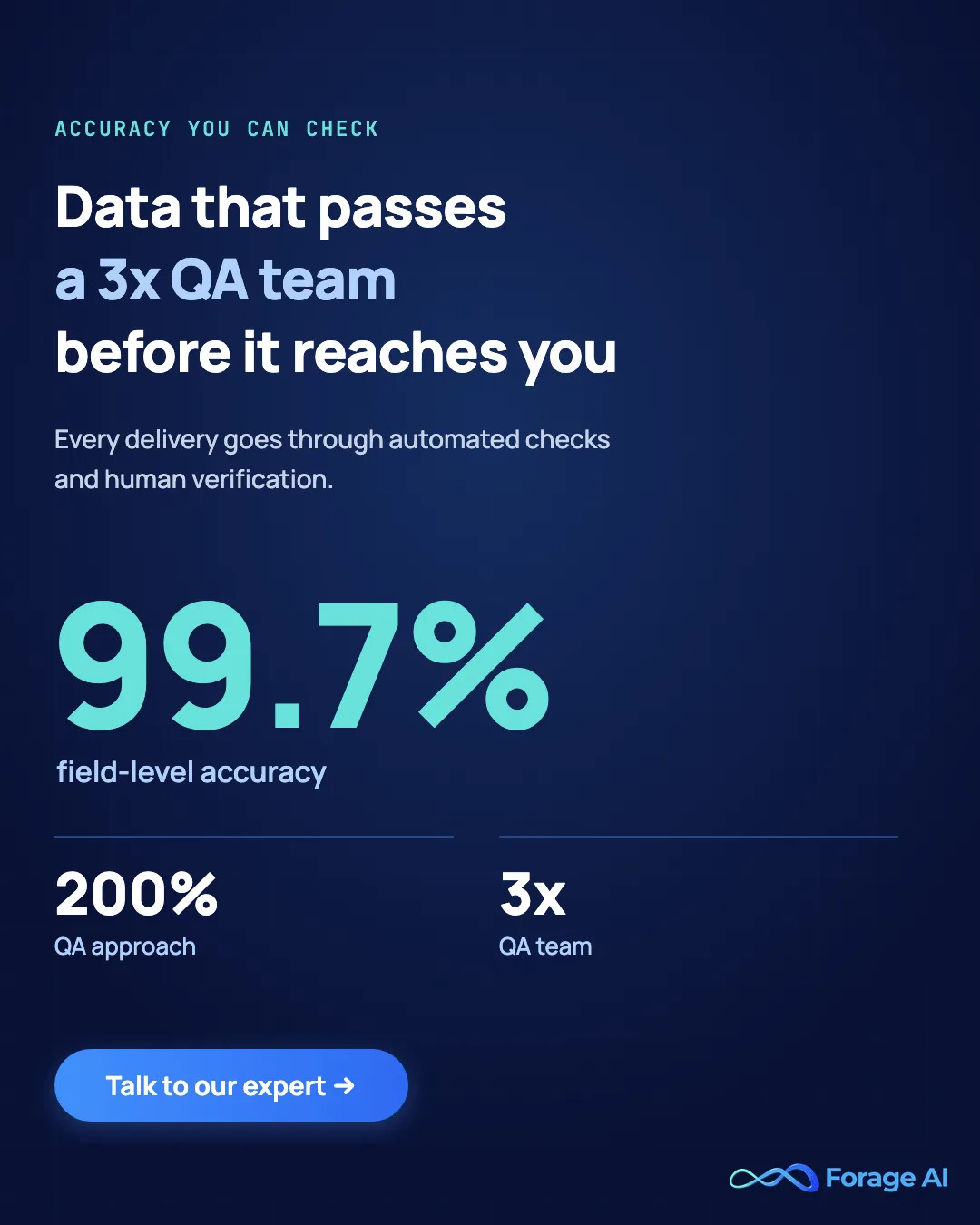
This is the destination the data points to when you have outgrown point-and-click and the four signals (volume, complexity, maintenance debt, reliability obligation) are firing at once.
Forage AI
| Attribute | Detail |
|---|---|
| Best for | Teams that need reliable, custom web data delivered, with zero scraping logic in their codebase. |
| Key use cases | Large-scale custom extraction, bespoke schemas, pricing and alternative-data feeds, compliance-sensitive data. |
| Pricing model | Per-engagement, scaled by site count, field complexity, cadence, and volume. |
| Deployment | Fully managed; data delivered to your warehouse, API, or feed. |
| vs Octoparse (why switch) | You stop operating extraction entirely; reliability, maintenance, and QA move to the vendor. |
| Standout strength | Dedicated team per engagement, three-layer QA, custom schemas, and capacity across more than 500 million sites. You own the data, with no resale and no maintenance burden. |
| Ratings (with n, accessed 2026-08-25) | G2 4.8, shown first-party on forage.ai. We hold no third-party review count comparable to Apify’s 512 or Grepsr’s 85, and we are not going to imply one. |
| Watch-out | Built for serious, recurring workloads; a one-off scrape of five sites does not justify it. |
Forage AI is the answer when “which Octoparse alternative?” has quietly become “we should not be running scrapers at all.” It is a fully managed extraction service: you specify the sources, the schema, and the cadence, and a dedicated team builds and operates the pipeline, runs the proxies and headless browsers, maintains everything as sites change, and delivers structured data to your environment. There is no scraper logic in your codebase, and no on-call rotation for broken templates.
What separates it from the rest of this list is accountability. The model includes a dedicated extraction team per engagement, three-layer QA across structural validation, content validation, and historical-trend anomaly detection, and the capacity to extract from more than 500 million sites. You own the data outright, it is not resold, and the maintenance burden that lands on your team with every DIY tool sits with the vendor instead.
That is why it leads the managed-services category here: it is the end state the numbers point to for teams whose data is too important to leave on a DIY tier and too custom to buy off the shelf.
It is better than Octoparse when reliability, scale, and custom schemas are non-negotiable, and it is the wrong choice when your need is genuinely small and occasional. A monthly check on five retailers belongs on a free extension. A daily pricing feed across thirty thousand SKUs that powers a customer-facing dashboard, or an investment dataset where wrong data drives wrong trades, belongs here.
Grepsr
| Attribute | Detail |
|---|---|
| Best for | Teams wanting managed data-as-a-service on a recurring feed. |
| Key use cases | Recurring data feeds, lead and market data, managed extraction projects. |
| Pricing model | Subscription and project-based, quote-driven. |
| Deployment | Managed service with a self-serve platform layer. |
| vs Octoparse (why switch) | A vendor runs extraction and delivers clean data instead of you operating a tool. |
| Standout strength | Managed delivery with a platform that blends self-serve and done-for-you. |
| Ratings (with n, accessed 2026-08-25) | Capterra 4.8 (n=85; Support 5.0 · Value 4.8). |
| Watch-out | Less custom-engineering depth than a fully bespoke engagement for complex schemas. |
Grepsr delivers web data as a managed service with a platform layer on top, blending self-serve configuration with a done-for-you option. You set up the data you want, and the vendor handles the extraction and delivers it on a recurring schedule. Against Octoparse, the difference is that the operating burden moves off your desk.
Reviewers value the managed delivery and the responsiveness of the team. The read on the boundary is clear: for the most complex, deeply custom schemas with heavy normalization, a fully bespoke engagement goes further; Grepsr is strong for recurring feeds that are managed but not maximally exotic.
Choose it over Octoparse when you want managed delivery of recurring data and a platform you can also touch yourself.
ScrapeHero
| Attribute | Detail |
|---|---|
| Best for | Custom crawling projects and ready-made datasets, fully operated for you. |
| Key use cases | Custom extraction projects, e-commerce and location datasets, large recurring crawls. |
| Pricing model | Project-based and subscription, quote-driven; some off-the-shelf datasets. |
| Deployment | Fully managed service. |
| vs Octoparse (why switch) | A service builds and runs the pipeline; you receive data, not software. |
| Standout strength | Custom project delivery plus a catalog of prebuilt datasets. |
| Ratings (with n, accessed 2026-08-25) | Capterra 4.7 (n=26) · G2 4.7 (n≈63, corroborated-via-secondary). |
| Watch-out | Custom engagements are quote-based; scope and cadence drive cost. |
ScrapeHero is a managed service that spans custom crawling projects and a library of ready-made datasets. You can commission a bespoke pipeline or buy an existing dataset, and in both cases the extraction is operated for you. Compared to Octoparse, you trade software you run for data you receive; teams weighing the reverse move start from the ScrapeHero alternatives list.
The breadth, custom projects alongside off-the-shelf datasets, is what reviewers tend to highlight, since it lets a buyer start with a dataset and graduate to custom work. As with any managed engagement, custom projects are quote-based, and scope, complexity, and cadence determine the cost.
Pick it over Octoparse when you want a service to build and operate the pipeline, with the option of buying a prebuilt dataset to start.
“Before structured change management, maintenance consumed nearly a quarter of our engineering sprint capacity. With versioning and validation controls, that dropped materially.” That account, from web-data platform PromptCloud (PromptCloud, 2025), names the cost buyers underweight: the comparison between a DIY tool and a managed service is not price, it is accountability. A tool gives you software and hands you the reliability problem. A managed service gives you data and owns it. Those are different products, sold to different buyers, even when the underlying activity, scraping a web page, looks identical.
Which alternative fits your job?
Now that you have the roster, here is the repeatable way to narrow it. Pricing pages do not help, because a $99/month visual tool and a $10,000/month managed service are not competing on the same line item; they are competing on which problem you want solved. Work through these questions in order, and the right shortlist falls out.
Question 1: How critical is the data to a downstream decision or product?
If wrong or missing data forces a customer-facing apology, a bad trade, a stocked-out SKU, or a re-run of an executive dashboard, you are in reliability territory, which points to a managed service (Forage AI, Grepsr, ScrapeHero). If the stakes are lower, a no-code tool or an API is defensible.
Question 2: How many sites, how often, how much volume?
- Fewer than 10 sites, fewer than 5,000 pages per week, weekly cadence: a no-code tool (ParseHub, Web Scraper.io, Browse AI) will probably do.
- 10 to 50 sites, tens of thousands of pages per day, daily cadence: a scraper API (Bright Data, Zyte, ScrapingBee) is the realistic floor; a managed service if reliability matters more than control.
- More than 50 sites, hundreds of thousands of pages per day, near-real-time refresh: managed-service territory. No-code and most APIs will work in the demo and strain in production.
Question 3: How much engineering time can you actually spend on extraction?
This is the question buyers answer optimistically. Developer frameworks (Scrapy, Playwright, Beautiful Soup) and scraper APIs assume engineers in the loop, building and maintaining logic. If extraction is not a capability you want to build, the math for a managed service changes: you are not paying for scraping, you are buying back engineering time and shifting reliability onto a vendor whose business depends on getting it right.
Question 4: How custom is your schema?
No-code tools let you define a simple schema per workflow but do not normalize across sites. APIs and frameworks let your engineers build any schema and own the maintenance. AI extraction (Diffbot, Kadoa, Nimble) handles common page types well, with validation needed on the unusual ones. Genuinely bespoke schemas, with cross-site normalization, are where a managed service like Forage AI absorbs the full complexity.
Question 5: What is your time-to-value tolerance?
A no-code workflow can be live the same afternoon. An API implementation with parsing and pipeline work takes weeks. A managed onboarding is also weeks, but the elapsed time is the vendor’s, not yours.
If you need data in 24 hours, only the no-code tier can promise it, and the price of that speed is the reliability and scale ceilings you hit later. For a feed that must run reliably for years, a managed service wins on cumulative time-to-value even when week one looks slower.
For the broader build-vs-buy logic and the failure modes that push teams from one category to the next, see our companion analyses on web scraping companies vs. tools and managed vs. automated web scraping services.
The variable that decides this most often is the one that never appears on a pricing page. One published account put ongoing maintenance at nearly a quarter of engineering sprint capacity before change-management controls were introduced (PromptCloud, 2025). Whatever your engineering rate is, price that quarter and put the number next to the subscription line before you compare anything. The five questions above are really one question asked five ways: who absorbs the breakage when a site changes, and have you costed that person’s time honestly.
Quick Summary
Q: How do you narrow the roster?
A: Five questions, in order. How critical is the data to a downstream decision or product? How many sites, how often, and at what volume? How much engineering time can you actually spend on extraction? How custom is your schema? And what is your time-to-value tolerance? Pricing pages do not settle any of them, which is why the category question comes before the product question.
What is actually on your bill?
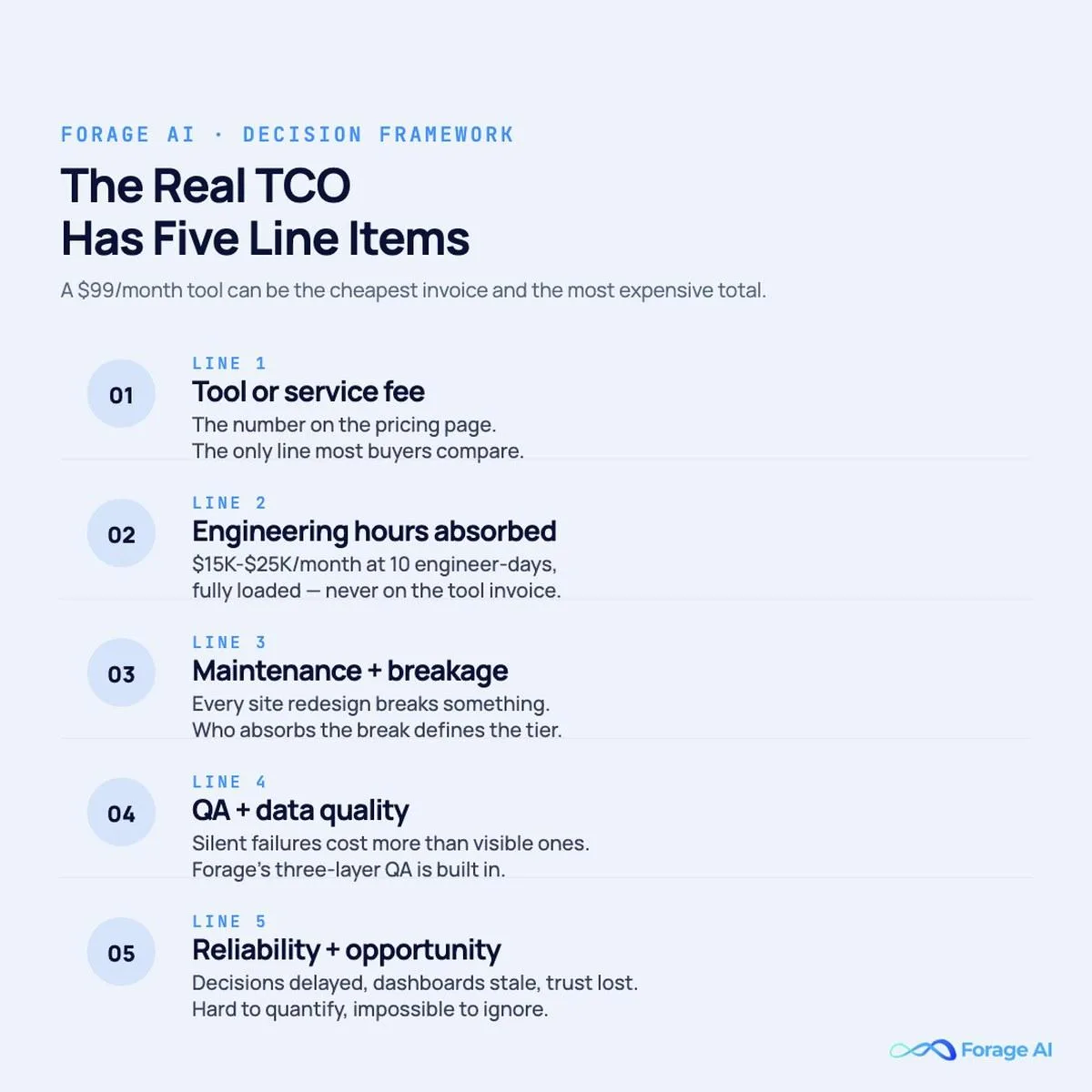
Whichever alternative you shortlist, compare it on total cost, not the pricing-page number. A $209/month scraper subscription looks cheap next to a $15,000/month managed engagement, until you account for every cost the subscription quietly passes to your team. The honest comparison has five line items, not one.
- Line 1: Tool or service fee. The number on the pricing page. No-code tools sit in the low hundreds to low thousands per month. Scraper APIs scale with volume, often low thousands per month for serious workloads. Managed services run from low five figures to high six figures annually. This is the only line buyers usually compare.
- Line 2: Engineering hours absorbed. “No code” is rarely “no engineering” at scale. Someone maintains templates, debugs failed runs, builds the pipeline to your warehouse, and re-records workflows after site changes. A conservative estimate is one to three engineer-days per month per major source. At a loaded rate, ten engineer-days a month is $15,000 to $25,000 that never appears on the tool invoice.
- Line 3: Maintenance and breakage. Every scraper depends on a source site that will redesign, add anti-bot defenses, or restructure its taxonomy. With a DIY tool you absorb the break; with a scraper API you absorb the parsing break; with a managed service the vendor absorbs both. For more on why this debt compounds, see why product teams regret building automated web scraping in-house.
- Line 4: QA and data quality. A scraper can complete “successfully” while quietly returning the wrong field, missing rows, or duplicates. Catching that needs structural validation, content validation, anomaly detection, and a human for edge cases. No-code and API buyers own this layer entirely; a managed service like Forage AI builds three-layer QA into the service.
- Line 5: Reliability and opportunity cost. When a critical pipeline breaks at scale, the cost is the meeting it generates, the decision it delays, the customer-facing surface that goes stale, and the trust your data team loses. Hard to quantify in advance, impossible to ignore in retrospect.
For more on when off-the-shelf datasets stop fitting and custom schemas become the wedge, see our analysis on custom web data extraction vs. pre-built tools.
Stat callout. At enterprise scale, total cost-to-data is rarely 80% vendor fees and 20% internal. It runs closer to 30% vendor fees and 70% internal: engineering hours, maintenance, QA, infrastructure, and the cost of being wrong. One published account puts maintenance alone at nearly a quarter of engineering sprint capacity before change-management controls were added (PromptCloud, 2025). The category you pick changes which side of that 30/70 split you pay.
What does moving off Octoparse actually look like?
Once you have picked an alternative, the next question is operational: how disruptive is the move? The honest answer depends on the existing setup, and a clean migration follows a short sequence.
Inventory the current state. List every active workflow, the source site, the fields, the cadence, the downstream consumer, and the criticality. Most buyers discover the active list is half the size they assumed, with old workflows feeding dashboards no one reads.
Identify the workloads that actually need to migrate. The ones hitting one of the four signals, volume, complexity, maintenance burden, or reliability obligation, are the migration candidates. The rest can stay or be retired.
Run parallel for a defined window. A serious migration runs the new pipeline alongside the old for two to four weeks, comparing outputs row-by-row to validate schema correctness, completeness, and consistency. The parallel run is the only way to catch silent extraction differences before they reach downstream consumers.
Hand over the on-call. The cleanest signal of a successful migration to a managed service is that your team stops getting paged when a scraper breaks. If the on-call obligation has transferred, the migration has done its job.
Decommission deliberately. Retire Octoparse only after the new pipeline has run cleanly through a meaningful cycle, typically a full month across all migrated workloads. Premature decommissioning is the most preventable failure mode. For the diligence questions worth asking before signing with any vendor, our enterprise evaluation checklist for data extraction companies covers them.
Budget for the fact that the destination web is more hostile than the one your original templates were built against. CAPTCHA now guards more than 11% of websites, and Cloudflare began blocking AI scrapers by default across its network in July 2025 (Cloudflare, 2025). A migration that only ports selectors one-for-one tends to surface this in week three, when the sites that worked in testing start failing at production cadence. Run the new stack in parallel against your ten hardest sites, not your ten easiest, before you decommission anything.
FAQ
What is the best free alternative to Octoparse? For occasional, manual jobs, Instant Data Scraper (a free Chrome extension) and the free tier of Web Scraper.io cover a lot of ground at no cost. For developers, Scrapy, Playwright, and Beautiful Soup are free and open source, though they require engineering time. Free works until volume, site complexity, or reliability needs push you toward a paid tool, an API, or a managed service.
Which Octoparse alternative is best for dynamic, JavaScript-heavy sites? Among no-code tools, ParseHub handles interactive sites better than Octoparse. For developers, Playwright drives a real browser and renders JavaScript reliably. If anti-bot defenses are the wall, a scraper API like Bright Data, Zyte, or ScrapingBee is built for exactly that layer.
How do I know if I have outgrown a no-code scraper entirely? The four signals are cumulative: volume past tens of thousands of pages per day, increasingly dynamic or anti-bot-protected sites, mounting maintenance hours across your team, and a reliability obligation you cannot personally guarantee. Hitting one can be managed. Hitting two or more usually means the next purchase belongs in a different category, an API or a managed service.
Are scraper APIs a real middle option, or just a stepping stone? They are a real middle option for teams with engineering bandwidth that want to keep parsing logic in-house and primarily need the bot-evasion layer. Many teams settle there permanently. They become a stepping stone only when the maintenance and QA burden you keep in-house starts to look similar to what a managed service would absorb entirely.
How do managed services’ prices compare to no-code tools and scraper APIs? Different unit. No-code tools price per seat and per cloud-runtime tier. Scraper APIs price per request or per credit. Managed services price per engagement, a function of site count, field complexity, cadence, and volume, with most enterprise engagements in low five-figure to high six-figure annual ranges. The right comparison is not unit price; it is total cost-to-data, including the engineering, maintenance, and QA you no longer pay for internally.
Can I just buy an off-the-shelf dataset instead of building a custom extraction? Sometimes. For common sources and standard schemas, off-the-shelf datasets (from providers like Diffbot or ScrapeHero) are often the right answer and cheaper than a custom engagement. The question is whether your downstream use case maps to the standard schema. If it requires custom fields, custom normalization, or sources outside the dataset’s coverage, you are back to custom extraction, and the right category for that is usually a managed service.
What does “managed” actually cover at Forage AI specifically? Discovery and scoping of your sources and schema; build of the extraction pipelines by a dedicated team; running the infrastructure (proxies, headless browsers, queues, retries); three-layer QA across structural, content, and trend-anomaly checks; ongoing maintenance as source sites change; and delivery in the format your downstream systems expect, feed, API, or warehouse drop. The buyer’s involvement after onboarding is review and refinement, not extraction operations.
What happens when a source site redesigns or adds new anti-bot defenses? With a no-code tool, it is your team’s problem. With a scraper API, the API absorbs the infrastructure side and your team absorbs the parsing side. With a managed service, the vendor absorbs both. At Forage AI, source-side changes are part of the engagement scope; pipelines are updated and validated as part of the service, with the buyer typically informed only when a change has business-meaningful schema implications.
Conclusion
The honest framing of “Octoparse alternatives” is not which single lookalike to buy next. It is which alternative fits the job you actually have.
If you have hit a specific no-code limit, ParseHub, Web Scraper.io, Browse AI, Simplescraper, Instant Data Scraper, Bardeen, or Kadoa keeps you code-free and trades up on that one wall. If you want to own the code, Scrapy, Playwright, Beautiful Soup, or Apify give you control.
If bot evasion at scale is the blocker, Bright Data, Zyte, ScrapingBee, Diffbot, Import.io, or Nimble solves the infrastructure. And when reliability, scale, and custom schemas are non-negotiable, a managed service like Forage AI, Grepsr, or ScrapeHero owns the whole problem.
The teams that get this right ask the category question first, then the product question. The teams that struggle compare a $99/month tool to a $15,000/month service and conclude the gap is too wide, without ever counting the engineering hours, maintenance debt, and reliability risk the cheaper line item silently transfers to their own books.
If you are searching for an alternative, you have already crossed the threshold where comparisons matter. Forage AI competes deliberately in the managed-services category, with a dedicated team per engagement, custom schemas built to the buyer’s specification, three-layer QA, and the capacity to extract reliably across more than 500 million sites. You own the data, it is not resold, and the maintenance burden is ours, not yours.
For teams whose data is too important to leave on a DIY tier, and too custom to buy off the shelf, that is the conversation we exist to have. Talk to our team about your extraction requirements.
S
Written by
Sai Subramaniam
Data Infrastructure Enthusiast, Forage AI
Sai is a data infrastructure enthusiast who has spent the past two to three years following the AI space closely, from the infrastructure layer to the fast-growing world of data for AI. He is genuinely curious about how modern data pipelines get built and where the data industry is heading, and he writes insightful pieces on the core topics that shape this niche.
Reviewed by the team of experts at Forage AI for accuracy and clarity.