
Best AI Web Scraping Tools: 6 Top Picks for 2026 (Deep Dive)
For years, web scraping meant writing CSS selectors and XPath, then babysitting them as every site redesign quietly broke your pipeline. AI changed what the job is. Instead of telling a scraper exactly where a price appears on the page, you tell a model what the price is, and it finds it even after the layout changes. That shift is why a wave of AI web scraping tools now sits between you and the messy, JavaScript-heavy, anti-bot-defended web.
This is a deep guide, not a long one. Rather than list fifteen tools you will never evaluate, it goes deep on six that earn a shortlist, what AI actually changes about each, the real features, public pricing, and what users report. They are grouped by who you are: a developer building AI pipelines, a no-code operator, or an enterprise team. One of the six, Forage AI, is a managed service rather than a tool you run, and the guide makes that distinction clear.
The headline reason this matters: one 2025 study found that LLM-powered scrapers needed 70% less maintenance than traditional selector-based ones. Less breakage is the whole pitch.
Quick Digest
- What AI changes: models extract by meaning, not by CSS selector, so layout changes break far less and maintenance drops sharply.
- Developers and AI pipelines: Firecrawl turns sites into clean LLM-ready markdown; ScrapeGraphAI returns schema-validated JSON from natural-language prompts.
- No-code users and operations: Browse AI trains a point-and-click robot with monitoring; Octoparse pairs AI auto-detect with 600+ templates.
- Enterprise scale: Bright Data brings 437+ pre-built scrapers and a 99.99% uptime SLA; Forage AI is a managed, done-for-you service rather than a tool.
- Pricing reality: AI extraction is not flat; an “AI extract” call often costs several times a basic scrape, so per-page cost can dwarf the plan price.
How does AI improve web scraping?
Before the tools, it helps to be precise about what “AI” is doing here, because the marketing blurs it. Four changes are real and they are why these tools exist.
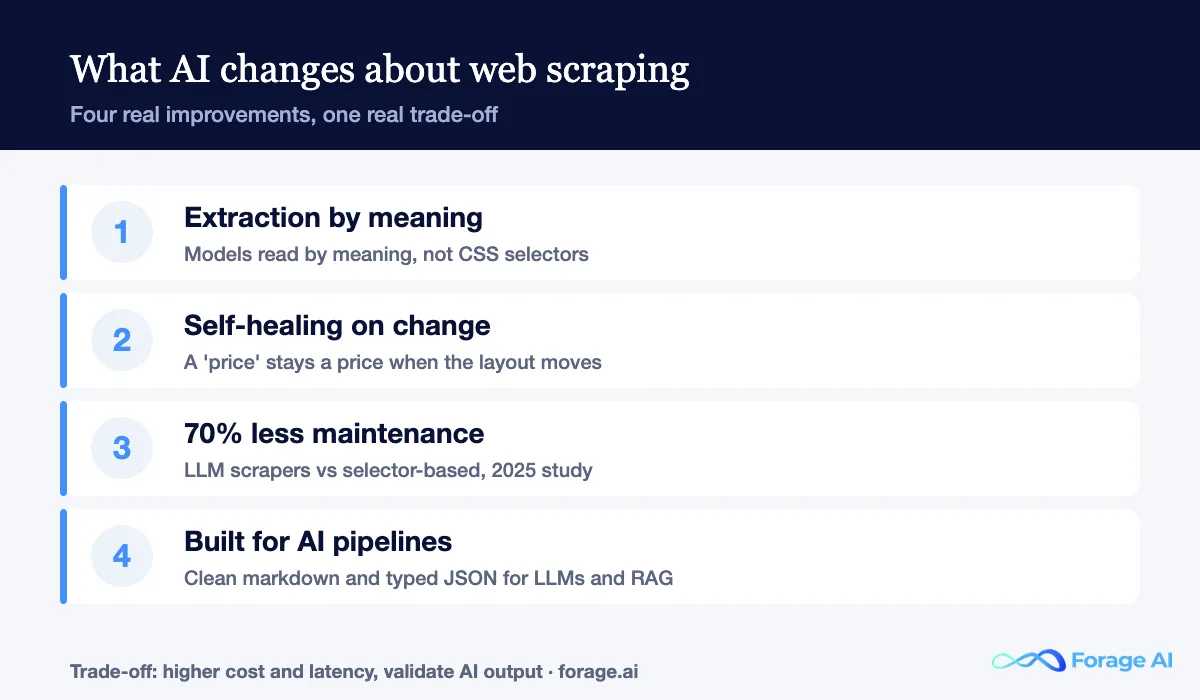
Extraction by meaning, not by selector. Classic scrapers map a field to a CSS path: the price lives in div.product > span.amount. AI scraping sends cleaned HTML or markdown to a model with a schema or prompt, and the model returns structured JSON. You describe what to extract, not where it sits, which is a fundamentally more durable instruction.
Self-healing when sites change. Because the model infers meaning, a redesign matters less. As one 2026 analysis put it, the AI “recognizes that a ‘price’ is still a ‘price’ even if the CSS class changed.” Selector-based scrapers need a human every time a site ships an A/B test; AI scrapers often adapt on their own.
Less maintenance, cleaner output, built for pipelines. The maintenance saving is the headline (70% less in that 2025 study), but the second win is shape: these tools output the clean markdown or typed JSON that LLM, RAG, and agent pipelines consume directly, with JavaScript rendered in the cloud so you run no browser yourself.
The honest trade-off
AI extraction costs more, runs slower, and still needs validation. LLM calls add latency and price, and the model can return confident, wrong fields, one public benchmark had an AI scraper return 72 rows for 52 products. Treat AI output as something to validate, not trust blind.
The six AI scraping tools at a glance
Six tools, grouped by who they are for. The deep dives follow, then a comparison table and a decision framework.
| Tool | Category | Best for |
|---|---|---|
| Firecrawl | Developers & AI pipelines | Clean LLM-ready markdown for RAG and agents |
| ScrapeGraphAI | Developers & AI pipelines | Schema-validated JSON from natural-language prompts |
| Browse AI | No-code & operations | Point-and-click robots with change monitoring |
| Octoparse | No-code & operations | AI auto-detect plus 600+ ready templates |
| Bright Data | Enterprise scale | Pre-built scrapers and proxy scale with an SLA |
| Forage AI | Enterprise scale (managed service) | Validated data delivered, no tool to operate |
The tools, by category
Best for developers and AI pipelines
Firecrawl
| Best for | Feeding clean web data into LLMs, RAG, and agents |
| AI approach | Site to markdown, plus autonomous extract |
| Pricing model | Credit tiers; AI extract costs more per call |
| Deployment | API and open source |
| Watch-out | Credit burn once you enable AI extraction |
How AI helps: Firecrawl is built for the AI workflow end-to-end. Its tagline, “power AI agents with clean web data,” is the product: point it at a URL or a whole site, and it returns clean markdown or structured data an LLM can read without a parsing layer, with an autonomous extract mode and MCP support so agents can call it directly.
Core features: single-call site-wide crawl that follows links, respects robots.txt and sitemaps, and handles pagination; scrape, crawl, map, search, and extract endpoints; reliable JavaScript rendering; clean markdown or JSON output; open-source core with a hosted API.
Pricing: credit-based, from roughly $16 per month on the Hobby tier (about 3,000 credits) up to around $333 per month on Growth (500,000 credits), as of June 2026. The catch to the model: a basic scrape is one credit, but an AI extraction is about five, so AI-heavy use spends far faster than the headline plan suggests.
What users say: developers repeatedly praise that it “just worked” on JavaScript-heavy sites that broke other scrapers, and love the clean markdown for RAG. The recurring complaint is credit consumption once JSON and enhanced extraction are switched on, so watch your per-page cost in real workloads.
Best for: developers building LLM, RAG, or agent pipelines who want clean web data with minimal parsing code, whichever of the two LlamaIndex vs LangChain options sits downstream.
ScrapeGraphAI
| Best for | Schema-validated JSON for data pipelines and apps |
| AI approach | LLM graph extraction from a prompt |
| Pricing model | Per-page usage; premium per page |
| Deployment | Open source plus API, Python and JS SDKs |
| Watch-out | Accuracy varies; budget prompt-tuning |
How AI helps: ScrapeGraphAI bills itself as “the scraper for the AI era, no proxies, no maintenance, just reliable data.” You write a natural-language prompt describing the fields you want, and it returns schema-validated, typed JSON, using an LLM to understand the page so it adapts when the layout changes rather than breaking.
Core features: natural-language prompt to structured JSON; schema validation on output; LLM graph-based extraction that adapts to layout shifts; open-source library plus a hosted API; Python and JavaScript SDKs for dropping it into a pipeline.
Pricing: usage-based, and at roughly $0.034 per page on the Starter tier as of June 2026, it is one of the priciest AI scrapers per page; you are paying for the LLM step on every request. Model your volume before committing, because per-page LLM cost adds up quickly at scale.
What users say: reviewers like the concept and the typed output, but flag that accuracy is inconsistent between the playground and the API (one n8n test returned 72 rows for 52 products), so production use requires real prompt tuning and output validation.
Best for: developers who want LLM-interpreted, schema-typed extraction in code and are willing to invest in validation.
Quick Summary
Q: What is the best AI web scraping tool for LLM and RAG pipelines?
A: Firecrawl if you want clean markdown from whole sites with minimal code, and ScrapeGraphAI if you want schema-typed JSON from natural-language prompts. Both are developer-first and adapt to layout changes; the difference is output shape, markdown for ingestion versus typed JSON for structured pipelines. Budget for per-page AI cost and output validation with either.
Best for no-code users and operations
Browse AI
| Best for | No-code teams tracking specific pages over time |
| AI approach | Point-and-click training plus auto-adapt |
| Pricing model | Free tier plus task/credit tiers |
| Deployment | Browser-based, no install |
| Watch-out | Built for monitoring, not massive crawls |
How AI helps: Browse AI lets a non-developer point and click to “train a robot” on a page, then run it on a schedule, with the AI handling the extraction and adapting to minor changes. Its standout is monitoring: it watches pages and alerts you when data changes, which turns scraping into an ongoing operations tool rather than a one-off pull.
Core features: point-and-click robot training with no code; scheduled runs and change monitoring with alerts; a library of prebuilt robots for common sites; integrations with Google Sheets, Zapier, and other no-code tools; bulk run support.
Pricing: a free tier to start, then task- and credit-based paid tiers published on its site, as of June 2026. The model is built around the number of robot runs and rows captured, which suits steady monitoring better than a single giant crawl.
What users say: users praise how quickly a non-technical person can stand up a working scraper and the value of the monitoring and alerts. The honest limit they note is scale: it shines at tracking a defined set of pages, not at crawling millions.
Best for: operations and growth teams without engineers who need to track specific pages and get alerted on change.
Octoparse
| Best for | No-code scraping with ready-made templates |
| AI approach | AI auto-detect of fields and pagination |
| Pricing model | Free tier plus monthly subscription |
| Deployment | Desktop app plus cloud extraction |
| Watch-out | Not built for the largest, fastest jobs |
How AI helps: Octoparse adds AI auto-detection to a classic visual scraper: open a page, and it proposes the fields and pagination to capture, so a non-coder can get a working extractor in minutes. It is the most template-rich option here, which entirely removes setup for popular sites.
Core features: point-and-click builder with AI auto-detection; 600+ ready-to-use templates; cloud extraction with scheduled runs; IP rotation and CAPTCHA solving; export to CSV, Excel, JSON, and databases.
Pricing: a free plan, then roughly $99 per month for Standard and around $249 per month for Professional, as of June 2026 (published figures vary by promotion). Unused credits expire at the end of the cycle, which is worth planning around.
What users say: reviewers consistently single out ease of use, the interface, and templates that make scraping accessible to non-technical users, while noting it is not the tool for the highest-scale or fastest jobs. For moderate volumes and standard sites, that trade is fine.
Best for: analysts and small teams who want no-code extraction with templates and do not need extreme scale.
Best for enterprise scale
Bright Data
| Best for | Enterprise-scale scraping with reliability guarantees |
| AI approach | Web Scraper API plus Web MCP for agents |
| Pricing model | Usage-based; enterprise minimums |
| Deployment | API plus managed datasets |
| Watch-out | Complex billing; real spend climbs fast |
How AI helps: Bright Data brings AI to enterprise infrastructure. Its Web Scraper API bundles proxy rotation, JavaScript rendering, CAPTCHA solving, and structured output in one call, and its Web MCP lets AI agents (it has published integrations with Snowflake Cortex and Databricks) pull live web data directly, the enterprise version of feeding agents.
Core features: 437+ pre-built scrapers for sites like Amazon, LinkedIn, and Instagram; a network of 400M+ residential IPs across 195 countries; bulk handling up to 5,000 URLs per call; a 99.99% uptime SLA, the only provider in its comparison to guarantee that figure; Web MCP for agent integration.
Pricing: usage-based and genuinely complex, billing varies by request, bandwidth, or both. The practical floor is around $500 per month, most active operations spend $1,000 to $5,000, and enterprise customers often pass $10,000 per month, as of June 2026.
What users say: rated 4.6 on G2, 4.8 on Capterra, and 4.4 on Trustpilot, with 20,000+ customers including Fortune 500 firms and AI labs. Reviewers value the scale and reliability; the consistent gripe is billing complexity and how fast real spend climbs on heavy targets.
Best for: enterprise teams that need pre-built scrapers, proxy scale, and a reliability SLA, and have the budget for it.
Forage AI
| Best for | Teams that want delivered, validated data, not a tool |
| AI approach | AI plus human-in-the-loop extraction |
| Pricing model | Scoped managed engagement |
| Deployment | Fully managed service, delivered to your schema |
| Watch-out | A service, not self-serve software |
A note on what this is. Unlike the five tools above, Forage AI is not a tool you log into and operate; it is a managed, done-for-you service. It belongs in this guide because, for many enterprise teams, the real question is not which scraper to run but whether they should run one at all. If you want the data, not the tooling, this is the alternative to all five.
How AI helps: Forage AI combines AI extraction with human-in-the-loop validation, so the model does the volume, and people catch the edge cases before delivery. You get the maintenance-free benefit of AI scraping without owning the prompts, the proxies, or the validation queue, because that work happens on Forage AI’s side.
Core features: custom extraction pipelines built and maintained for you; AI plus expert human validation on output; delivery in your schema and format; enterprise data governance with no reselling of your data; on-premise or private-cloud deployment and client-specific handling rules for regulated use cases.
Pricing: a scoped managed engagement rather than a self-serve plan, priced to the project rather than per request, so there is no credit meter to watch. Talk to our expert to scope it against your sources and volume.
Best for: enterprise teams that want validated web data delivered to their systems without building or operating a scraping stack.
How the AI scraping tools compare
Now that you have met all six, here is how they line up on the axes that decide a pick. Pricing is the public model as of June 2026; Forage AI is a scoped service rather than a metered plan.
| Tool | Category | AI approach | Pricing model | Best for | Watch-out |
|---|---|---|---|---|---|
| Firecrawl | Dev & AI pipelines | Site to markdown + extract | Credits, $16-$333/mo | LLM/RAG ingestion | AI extract burns credits |
| ScrapeGraphAI | Dev & AI pipelines | Prompt to typed JSON | Per page (~$0.034) | Structured pipelines | Accuracy varies |
| Browse AI | No-code & ops | Trained robot + monitoring | Free + task tiers | Page monitoring | Not for huge crawls |
| Octoparse | No-code & ops | AI auto-detect + templates | Free / ~$99 / ~$249 | No-code extraction | Not for top scale |
| Bright Data | Enterprise | Scraper API + Web MCP | Usage, ~$500/mo+ | Scale with an SLA | Complex billing |
| Forage AI | Enterprise (managed) | AI + human validation | Scoped engagement | Data delivered, no tool | A service, not software |
How do you choose an AI scraping tool?
Start from who you are and what you are feeding. Four questions sort the six.
- Are you building an AI pipeline in code? Firecrawl for clean markdown into LLM and RAG workflows; ScrapeGraphAI for schema-typed JSON from prompts. Budget for per-page AI cost and validation.
- Do you have no engineers? Browse AI to monitor specific pages with alerts; Octoparse for general no-code extraction with templates and AI auto-detect.
- Do you need enterprise-scale reliability? Bright Data for pre-built scrapers, proxy depth, and a 99.99% SLA, if you have the budget and engineers to run it.
- Do you want the data, not the tool? Forage AI is a managed service that delivers validated data into your schema, so no one on your team needs to operate a scraper.
And the honest counter-case: AI is not always the answer. For a small set of stable, structured pages, a classic scraper is cheaper, faster, and sufficiently accurate, and you skip the LLM cost and validation overhead entirely. Reach for AI when sites change often, fight bots, or feed a model, which is exactly when the maintenance savings pay for the per-page premium. For more on that trade, see our guide to Zyte alternatives and our deep dive into data extraction automation.
Last updated June 2026. No vendor paid for placement; rankings reflect public pricing, reviews, vendor-reported figures, and hands-on review of each product. Pricing and ratings change often, verify current figures before you buy.
FAQ
Does AI web scraping actually work, and how accurate is it?
It works well and sharply reduces maintenance. One 2025 study found 70% less upkeep than selector-based scraping, because the model extracts by meaning and adapts to layout changes. Accuracy is good but not automatic: LLM extraction can return confident but incorrect fields, so production use requires prompt tuning and output validation rather than blind trust.
What is the best AI web scraping tool for LLM and RAG pipelines?
Firecrawl is the easiest path to clean, LLM-ready markdown from whole sites, and ScrapeGraphAI is strongest when you want schema-validated JSON from a natural-language prompt. Both are developer-first; choose based on whether your pipeline ingests markdown or typed JSON, and budget for the per-page AI cost.
What is the best no-code AI web scraper?
Browse AI for monitoring specific pages and getting alerted on change, and Octoparse for general no-code extraction with AI auto-detect and 600+ templates. Both require no code; neither is built for the largest, fastest crawls, where a developer tool or managed provider fits better.
Is an AI scraping tool cheaper than a managed service?
On paper, usually yes; in practice, it depends on the people around it. Tools look cheaper until you add engineering time to run them, validate AI output, and handle anti-bot breakage. Once a team runs many sources continuously, a managed service like Forage AI can cost less in total because that operational work is included rather than absorbed by your team.
Do I always need an AI scraper?
No. For a small set of stable, structured pages, a traditional scraper is cheaper, faster, and accurate, with no LLM cost or validation overhead. AI scraping earns its premium on sites that change often, deploy anti-bot defenses, or feed an AI model, where reduced maintenance outweighs the per-page cost.
Related Articles
- Use Cases for AI-Powered Web Data Extraction. Where AI scraping delivers the most value.
- Web Scraping Companies vs Tools. The build-versus-buy framing behind this comparison.
- Custom Web Scraping. When off-the-shelf tools stop scaling.
- A Guide to Modern Data Extraction Services in 2026. How managed extraction fits a wider data strategy.
Sai is a data infrastructure enthusiast who has spent the past two to three years following the AI space closely, from the infrastructure layer to the fast-growing world of data for AI. He is genuinely curious about how modern data pipelines get built and where the data industry is heading, and he writes insightful pieces on the core topics that shape this niche.