
Top Competitor Price Tracking Tools: Manual, Tools, and Managed Services Compared
Competitor price tracking is one of those problems that looks simple until you actually try to run it at scale. Pull a competitor’s price for one SKU on one site, and a spreadsheet does the job. Try to pull thirty thousand SKUs across twenty-five competitor sites, refreshed daily, with promotion logic, pack-size normalization, and out-of-stock detection, and the spreadsheet was never the right tool.
The teams running serious price intelligence have learned this the long way: through a few good quarters of manual collection, a multi-year flirtation with point-and-click scrapers, an in-house Python project that consumed a senior engineer for eighteen months, and eventually a managed pipeline that delivered what the rest never quite did. The pattern is so common it is almost a maturity curve.
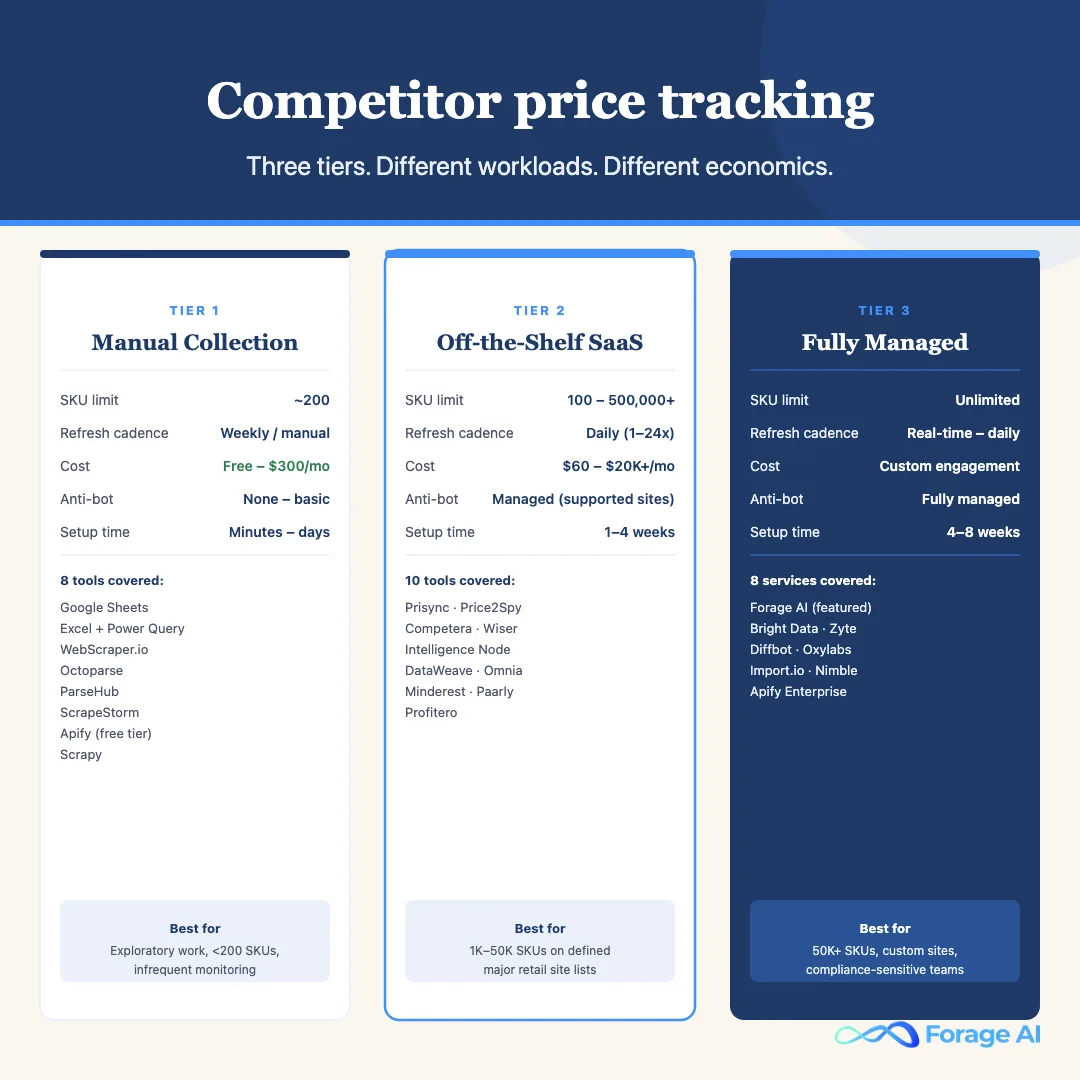
This article maps that curve, and names the tools at every tier. We cover three tiers of competitor price tracking: manual collection, off-the-shelf SaaS tools, and fully managed data services. For each tier we walk through the tools that actually get used, what each one delivers, where each one breaks, and what it costs when you factor in the engineering and analyst hours that never make it onto an invoice.
- What the job actually requires, the seven stages every complete price tracking workflow must handle, and where off-the-shelf tools stop covering them.
- Tier 1: Manual collection tools, 8 tools reviewed: Google Sheets, Excel + Power Query, WebScraper.io, Octoparse, ParseHub, ScrapeStorm, Apify (free tier), and Scrapy.
- Tier 2: Off-the-shelf price tracking SaaS, 10 tools reviewed: Prisync, Price2Spy, Competera, Wiser Solutions, Intelligence Node, DataWeave, Omnia Retail, Minderest, Paarly, and Profitero.
- Tier 3: Fully managed data services, 8 providers reviewed: Forage AI (featured), Bright Data, Zyte, Diffbot, Oxylabs, Import.io, Nimble, and Apify Enterprise.
- Total cost of ownership, the six-line model that includes analyst hours, engineering hours, and maintenance cost alongside the vendor invoice.
- Decision framework, three questions that determine which tier fits your workload, cadence, and compliance requirements.
- Migration, how teams move between tiers without losing the historical data they have already collected.
What Does Competitor Price Tracking Require?
Before comparing tiers, it helps to be precise about the job. The phrase “price tracking” sounds like reading a number off a page. The actual job is closer to running a data pipeline with adversarial uptime requirements.
A complete competitor price tracking workflow handles seven stages:
- Site identification. A defined set of competitor sites you care about. For most retailers, that is a curated list of direct competitors; for marketplaces, it is the sellers on a defined set of platforms.
- SKU mapping. A mapping table that ties each of your SKUs to one or more competitor product identifiers, by ASIN, MPN, UPC, or fuzzy product matching. This is the hardest part and the most undervalued.
- Data extraction. Pulling the price, the promotion or discount applied, the unit price (per ounce, per square foot, per item), the shipping cost where it affects landed price, availability status, and any seller-specific badges (Prime, fulfilled-by, marketplace seller versus first-party).
- Normalization. Reconciling differently structured prices into a comparable unit. A competitor’s “Buy 2, save 15%” needs to be converted into an effective per-unit price that your pricing engine can compare to your shelf price.
- Refresh cadence. Re-pulling the data at a frequency that matches the volatility of the market, daily for most retail categories, hourly or near-real-time for marketplaces and high-velocity categories.
- Quality assurance. Catching the cases where the scrape “succeeded” but the data is wrong: stale price returned from a cached page, wrong product matched, promotion misread, currency confusion on international sites.
- Delivery. Landing the clean data into your pricing engine, your BI tool, your alerting system, or your repricer, in a structured format, on a predictable schedule.
Every one of those stages is a place where the workflow can quietly degrade. Most off-the-shelf tools handle stages one through three and hand the rest back to you. That is the seam where buyers find themselves rebuilding the pipeline they thought they were buying.
For the broader context of how e-commerce scraping has evolved and where the architectural seams sit, see our E-commerce Web Scraping Comparison: Traditional vs AI for the rendering-and-extraction layer.
Tier 1: Manual Collection Tools
The starting point for almost every price intelligence practice. An analyst opens competitor sites, copies prices into a spreadsheet, normalizes by hand, and circulates a weekly or monthly report. For low volumes, fewer than 200 SKUs across fewer than 10 competitor sites, manual collection is faster to set up than any other tier and far cheaper than it looks at first glance. There is no infrastructure to build, no vendor to onboard, and no engineering review. The analyst doing the work also tends to develop product-category knowledge that pure automation does not capture: which competitor regularly mislabels a multi-pack, which one runs unannounced promotions, which one’s website is wrong on Tuesdays.
What kills manual collection is volume, and volume arrives faster than most teams expect. Past a few hundred SKUs, the work stops fitting in one person’s week. Past a few thousand, it stops fitting in a team’s. The “weekly” pricing report becomes bi-weekly, then monthly, then quarterly, and by then no one trusts the numbers. Consistency degrades across analysts: two people handling the same competitor will normalize promotions slightly differently. The data accumulates a noise floor that masks the small price moves you are actually trying to detect. Manual is a starting tier, not a permanent one.
Tier 1 Tool Comparison
| Tool | Best for | Setup time | SKU limit (practical) | Refresh cadence | Cost | Anti-bot handling | API |
|---|---|---|---|---|---|---|---|
| Google Sheets | Exploratory spot-checks | Minutes | ~200 | Hourly (unreliable) | Free | None | No |
| Excel + Power Query | Office 365 teams | Hours | ~500 | Scheduled (desktop open) | ~$12/mo | None | No |
| WebScraper.io | Non-technical teams | Hours–1 day | 5,000 (cloud) | Daily (cloud) | Free / $50/mo | Basic proxy (paid) | No |
| Octoparse | Major retail templates | Hours–1 day | 10,000 (cloud) | Every 15 min (top tier) | Free / $75–$249/mo | Cloud proxies (paid) | Yes (cloud) |
| ParseHub | JS-rendered content | Hours–1 day | ~5,000 | Daily min | Free / $149/mo | US residential proxies | Yes |
| ScrapeStorm | Auto field detection | Hours | 10,000 | Daily min | $49–$299/mo | Proxy rotation | Yes |
| Apify (free tier) | Teams with some engineering | 1–2 days | Unlimited (compute-gated) | Scheduled or triggered | Free / $49+/mo | Rotating proxies (extra) | Yes |
| Scrapy | Engineering teams, full control | Weeks | Unlimited | Cron-based | Free (OSS) | None built-in | Custom |
Google Sheets (ImportXML / ImportHTML)
| Feature | Value |
|---|---|
| Pricing | Free (included with Google Workspace / personal Google account) |
| SKU capacity | ~200 before performance and management become painful |
| Refresh frequency | Hourly via triggers (unreliable); otherwise manual |
| Anti-bot handling | None, standard Google IP, easily blocked by retailer sites |
| Product matching | Manual only |
| Export formats | Google Sheets native, CSV, Excel |
Google Sheets with ImportXML or ImportHTML is what most price tracking programs start with, and for good reason. It requires no setup beyond knowing which URL to point the formula at, it lives in a tool the whole company already uses, and for spot-checking a handful of SKUs on a handful of competitor sites, it works. For a team that is still figuring out which competitor prices actually matter, it is a useful scouting tool.
The failure mode is fast and predictable. Most major retail and marketplace sites actively block Google’s IP ranges, so ImportXML returns empty or stale cached values within days of setup. JavaScript-rendered prices, which is most of them on modern retail sites, are invisible to ImportXML entirely. Past 200 SKUs, the sheet becomes a maintenance burden, not a tool. Teams that try to scale Google Sheets past that threshold spend more time keeping the sheet alive than using the data it produces.
Microsoft Excel + Power Query
| Feature | Value |
|---|---|
| Pricing | ~$12/mo per user (Microsoft 365) or one-time Office license |
| SKU capacity | ~500 before refresh management becomes untenable |
| Refresh frequency | Scheduled via Power Query, but desktop application must be open |
| Anti-bot handling | None |
| Product matching | Manual; Power Query joins tables but matching logic is manually built |
| Export formats | Excel native, CSV, database connections |
Excel with Power Query is a meaningful step up from Google Sheets for teams already embedded in the Microsoft ecosystem. Power Query can connect to multiple data sources, apply transformation logic on refresh, and load structured data into a model without manual copy-paste. For an analyst who knows Power Query well, the setup can handle multi-site price collection with normalization rules baked in.
The structural problems are the same as Google Sheets: no anti-bot handling, no JavaScript rendering, and a hard dependency on the desktop application being open at refresh time. Power Query’s scheduled refresh requires the file to be open and the machine running, which means it is a constraint on the analyst’s workflow, not a background process. Past 500 SKUs, query complexity and connection count become difficult to maintain.
WebScraper.io
| Feature | Value |
|---|---|
| Pricing | Free browser extension; Cloud from $50/mo |
| SKU capacity | 5,000 on cloud tier |
| Refresh frequency | Daily on cloud; manual on browser extension |
| Anti-bot handling | Basic proxy rotation on paid cloud plans |
| Product matching | URL-based only; manual SKU-to-URL mapping |
| Export formats | CSV, Google Sheets |
WebScraper.io is a point-and-click scraper built as a Chrome extension, with a cloud version that runs scheduled jobs without the browser staying open. The setup is visual: you click through a site, define the elements you want to extract, and the tool generates the scraping logic. For non-technical teams that need to pull structured data from a moderate number of product pages, it removes the need for any programming.
Where it breaks is on sites with aggressive bot detection and on product pages where the price loads via JavaScript after the initial page render. When competitor sites restructure, the scraper silently returns empty or malformed data until someone notices and rebuilds the sitemap. At 5,000 SKUs, the management burden of maintaining sitemaps across multiple sites is significant.
Octoparse
| Feature | Value |
|---|---|
| Pricing | Free desktop tier; cloud from $75/mo to $249/mo |
| SKU capacity | Up to 10,000 on cloud plans |
| Refresh frequency | Every 15 minutes on the top cloud tier |
| Anti-bot handling | Cloud proxies included on paid plans; IP rotation built in |
| Product matching | Template library for Amazon, eBay, Walmart, and other major sites |
| Export formats | CSV, Excel, database connectors, API (cloud plans) |
Octoparse is one of the more capable Tier 1 tools for teams that primarily need to track prices on major retail platforms. The template library is the distinguishing feature: pre-built extractors for Amazon, eBay, Walmart, and dozens of other major sites mean a non-technical analyst can be running structured extractions within hours, the same template approach that makes it possible to extract Walmart product data without writing custom selectors. The cloud infrastructure handles scheduling, proxy rotation, and data storage. At the top tier, 15-minute refresh cadence is genuinely useful for marketplace categories with high price volatility.
The limits appear at the edges of the template library. Any competitor site not on Octoparse’s pre-built list requires building a custom template, which degrades when the target site changes its structure. At 10,000 SKUs across a mix of major and minor competitor sites, the template management overhead becomes a part-time job.
ParseHub
| Feature | Value |
|---|---|
| Pricing | Free tier (limited); Professional from $149/mo |
| SKU capacity | ~5,000 on Professional tier |
| Refresh frequency | Minimum daily on paid plans |
| Anti-bot handling | US residential proxies on paid plans |
| Product matching | URL-based only |
| Export formats | JSON, CSV, Google Sheets, REST API |
ParseHub handles JavaScript-rendered content better than most Tier 1 tools, which makes it a relevant option for product pages where prices load dynamically. The visual setup process works with Single Page Applications and dynamic DOM elements more reliably than extension-based scrapers. For teams that need to extract prices from modern React or Vue-based storefronts without writing code, ParseHub is often the first tool that actually returns the right number.
The daily minimum refresh on paid plans is a meaningful constraint for fast-moving categories. At $149/mo for Professional, the price sits awkwardly between low-cost DIY tools and the lower end of Tier 2 SaaS platforms. Product matching is still URL-based and manually maintained. For teams that specifically need JS rendering at Tier 1 price points, ParseHub is one of the better options.
ScrapeStorm
| Feature | Value |
|---|---|
| Pricing | $49/mo (Starter) to $299/mo (Professional) |
| SKU capacity | Up to 10,000 on paid plans |
| Refresh frequency | Daily minimum on all plans |
| Anti-bot handling | Proxy rotation; smart mode for common ecommerce layouts |
| Product matching | AI-assisted field detection for standard product pages; no cross-site matching |
| Export formats | CSV, Excel, Google Sheets, MySQL, SQL Server |
ScrapeStorm’s AI-assisted field detection reduces setup time for standard e-commerce layouts: rather than manually clicking through each element on a page, the tool attempts to automatically identify product price, title, and availability fields. For teams that need to bring on a new competitor site quickly, this is a material time saver on standard product page structures.
The AI detection works well on standard layouts and degrades on custom or heavily modified storefronts. When a target site uses an unusual page structure or updates its front-end framework, the auto-detection needs to be re-run and often produces incorrect field mappings. Daily minimum refresh is the same constraint that limits most Tier 1 tools.
Apify (Free Tier / Community Actors)
| Feature | Value |
|---|---|
| Pricing | Free tier ($5 platform credits/mo); paid from $49/mo |
| SKU capacity | Unlimited, scales with compute spend |
| Refresh frequency | Scheduled or event-triggered via Apify Scheduler |
| Anti-bot handling | Rotating proxies available at additional cost; varies by actor |
| Product matching | Community actors for Amazon, Walmart, eBay, Zalando, and others |
| Export formats | JSON, CSV, dataset API, webhooks |
Apify is the most technically capable Tier 1 option for teams with some engineering ability. The actor marketplace is the key differentiator: pre-built, community-maintained extractors for Amazon, Walmart, eBay, Zalando, and hundreds of other sites mean you are not building from scratch for major platforms. The platform handles compute, scheduling, and output storage. The pricing model, pay per compute unit rather than per SKU, means the ceiling on SKU count is set by willingness to spend on compute, not by a plan limit.
Community actor quality varies: popular actors for Amazon and eBay are actively maintained and reliable; actors for smaller sites may be abandoned or broken. Building a custom actor for a specific competitor site requires engineering time and ongoing maintenance when the site changes. Apify sits at the upper bound of Tier 1, transitioning toward a managed infrastructure play rather than a no-code tool.
Scrapy (Python Framework)
| Feature | Value |
|---|---|
| Pricing | Free (open source) |
| SKU capacity | Unlimited, infrastructure-dependent |
| Refresh frequency | Cron-based; as frequent as the infrastructure allows |
| Anti-bot handling | None built-in, requires Scrapy-Splash, ScraperAPI, or custom middleware |
| Product matching | Custom-built; no out-of-the-box matching |
| Export formats | Custom pipelines to any destination |
Scrapy is not a product. It is a Python library for building web crawlers. An engineering team that knows Python can build a price extraction system on Scrapy that covers any site, in any schema, at any cadence, delivered to any destination. The flexibility is total: no vendor relationship, no per-SKU pricing, no feature ceiling imposed by a SaaS tier. For teams that want full ownership of their extraction pipeline, Scrapy is the starting point most in-house builds use.
The cost of that flexibility is the full engineering burden of running extraction infrastructure. Scrapy handles crawling logic; everything else, JavaScript rendering, proxy management, retry logic, scheduling, output storage, QA, and maintenance when source sites change, is built and maintained by your team. In practice, what we see is that a well-resourced engineering team builds a Scrapy-based pipeline in three to six months, runs it well for six to twelve months, and then finds that maintenance is consuming more engineering time than the original build. Anti-bot handling in particular has become significantly more expensive to maintain in-house in 2026.
Tier 2: Off-the-Shelf Price Tracking Tools
The middle of the market. SaaS platforms designed to track competitor pricing on a defined list of sites, with point-and-click setup, scheduled refreshes, and dashboards or feed exports. This tier covers a wide range, from generic e-commerce data extraction solutions repurposed for price tracking to repricers that bundle competitor data, to dedicated retail price intelligence platforms, to marketplace-specific monitoring tools. The architectural details differ; the buyer experience is similar enough that they form one tier.
For mid-volume workloads, roughly a few thousand to a few tens of thousands of SKUs, on a defined and reasonably stable set of competitor sites refreshed daily, Tier 2 tools genuinely deliver. They eliminate the analyst-hour problem that kills Tier 1 at scale. They produce consistent normalization within the limits of the tool’s logic. They give you a dashboard or an API where the data lives. They scale infrastructure you do not have to maintain. The break points are subtler and tend to surface only after a few months of operation: custom schema fit, site coverage gaps for the specific competitors you actually care about, and a QA gap where the tool returns data but whether the data is correct is still your problem.
Tier 2 Tool Comparison
| Tool | Target market | Starting price | SKU capacity | Refresh frequency | Product matching | Repricing integration | MAP monitoring |
|---|---|---|---|---|---|---|---|
| Prisync | SMB e-commerce, Shopify | $59/mo | 100–50,000 | Daily; 4x/day premium | URL, EAN, MPN | Shopify, WooCommerce | Yes |
| Price2Spy | Mid-market to enterprise | $9.95/mo | 100–500,000+ | Up to 24x/day | Image + description; human review | Magento, Shopify, API | Yes |
| Competera | Mid-market to enterprise | Enterprise (~$20K+/yr) | Enterprise-scale | Daily to near-real-time | AI multi-attribute | Built-in optimization | Yes |
| Wiser Solutions | Omnichannel brands and retailers | Enterprise custom | Enterprise-scale | Daily to multiple/day | AI-powered, online + in-store | Rule-based engine | Yes, with seller ID |
| Intelligence Node | Global retailers, FMCG | Enterprise custom | Enterprise-scale | Daily to real-time (premium) | AI, catalog normalization | External engine integration | Yes |
| DataWeave | Enterprise, long-tail catalogs | Enterprise custom | Enterprise-scale | Daily to multiple/day | AI, strong on unlabeled products | Analytics output only | Yes |
| Omnia Retail | European retailers | Enterprise custom | Enterprise-scale | Daily to multiple/day | Feed-based + manual fallback | Algorithmic rules engine | Yes |
| Minderest | European and LATAM retailers | Mid-market custom | Hundreds of thousands | Daily to multiple/day | GTIN, URL, description; human fallback | Rule-based export + integrations | Yes, with history |
| Paarly | Brands, distribution compliance | ~$299/mo | ~100,000 | Daily | EAN, URL, description | Shopify, PrestaShop | Yes |
| Profitero | Consumer brands on Amazon | Enterprise custom | Enterprise-scale | Daily | Catalog-based, strong on branded SKUs | None (analytics only) | No |
Prisync
| Feature | Value |
|---|---|
| Pricing | $59/mo (100 products) to $229/mo (50,000 products) |
| SKU capacity | 100 to 50,000 depending on plan |
| Refresh frequency | Daily on standard; up to 4x/day on premium plans |
| Anti-bot handling | Managed by Prisync infrastructure |
| Product matching | Automatic by URL, EAN, and MPN; manual fallback |
| Export formats | Dashboard, CSV export, Shopify and WooCommerce integrations, API |
Prisync is one of the most common first Tier 2 purchases for SMB e-commerce teams, and the reason is time-to-value. The setup is straightforward: connect your product catalog, point Prisync at your competitor URLs, and the tool begins tracking. For Shopify merchants in particular, the native integration means competitor price data flows directly into the store’s pricing workflow. The dashboard surfaces price position, price history, and out-of-stock detection across competitors in a single view.
The limitations surface at the edges of the standard use case. Product matching degrades on private-label products, multi-pack SKUs, and product variations where URL-to-SKU mapping is ambiguous. Daily refresh, even on premium plans capped at 4x/day, is too slow for marketplace categories where prices move by the hour. Site coverage is limited to what Prisync officially supports; any competitor site outside that list requires manual tracking or a supplemental tool.
Price2Spy
| Feature | Value |
|---|---|
| Pricing | $9.95/mo (entry) to custom enterprise pricing |
| SKU capacity | 100 to 500,000+ products |
| Refresh frequency | Up to 24 times per day on top-tier plans |
| Anti-bot handling | Managed; includes human-review fallback for blocked pages |
| Product matching | Image + description matching with human review fallback |
| Export formats | Dashboard, CSV, API, Magento / Shopify / WooCommerce integrations |
Price2Spy is one of the longest-running tools in the category, and the maturity shows in breadth of site coverage and depth of product matching logic. The image-plus-description matching approach, backed by a human review process for ambiguous cases, handles edge cases that pure URL or barcode matching misses. Refresh up to 24 times per day at the top tier is genuinely useful for teams tracking fast-moving marketplace categories. The entry price point is low enough that teams can start small and scale SKU count as the program matures.
The user interface reflects its age: functional but not particularly intuitive for teams expecting a modern SaaS dashboard. The API is useful but the documentation is dense and requires engineering time to integrate cleanly. Onboarding for large catalogs takes two to four weeks as product matches are established through the human review process.
Competera
| Feature | Value |
|---|---|
| Pricing | Enterprise, typically $20,000+/year |
| SKU capacity | Enterprise-scale |
| Refresh frequency | Daily to near-real-time depending on plan and category |
| Anti-bot handling | Managed infrastructure |
| Product matching | AI-powered multi-attribute matching |
| Export formats | Dashboard, API, direct pricing engine integration |
Competera occupies a distinct position in Tier 2: it is the only tool in this category that goes beyond monitoring into price optimization with demand forecasting built in. Most Tier 2 tools answer “what is my competitor’s price right now?” Competera answers “what should my price be, given competitor prices, demand elasticity, and inventory state?” For mid-market and enterprise retailers that have passed the monitoring phase and want a data-driven pricing strategy, that combination in a single platform is genuinely useful.
The enterprise pricing and a six-to-twelve-week implementation timeline mean Competera is not a tool you onboard in a week and iterate on. For teams that are not yet running a serious pricing strategy on top of their competitor data, Competera’s optimization capabilities will be underused, and the price tag is hard to justify against simpler monitoring tools.
Wiser Solutions
| Feature | Value |
|---|---|
| Pricing | Enterprise custom |
| SKU capacity | Enterprise-scale |
| Refresh frequency | Daily to multiple times per day |
| Anti-bot handling | Managed infrastructure including in-store data collection teams |
| Product matching | AI-powered, covering both online and physical in-store data |
| Export formats | Dashboard, API, repricing engine integration, custom reporting |
Wiser’s distinguishing capability is the combination of online price tracking with in-store price data. For brands and retailers that compete across both channels, having a single platform that tracks competitor prices on e-commerce sites and in physical retail locations is something most Tier 2 tools do not offer. The MAP compliance workflow, including third-party seller identification on marketplaces, is mature and well-built for brands managing distribution channel pricing.
Enterprise-only pricing makes Wiser inaccessible for smaller teams, and the in-store data collection adds cost and latency that pure online monitoring does not carry. In-store coverage varies significantly by geography: major US metros are well-covered; secondary markets and international locations are thinner. For teams that are purely focused on online competitor tracking, the Wiser premium buys capabilities they will not use.
Intelligence Node
| Feature | Value |
|---|---|
| Pricing | Enterprise custom |
| SKU capacity | Enterprise-scale |
| Refresh frequency | Daily to real-time on premium plans |
| Anti-bot handling | Managed; global infrastructure |
| Product matching | AI-powered with catalog normalization across global retailers |
| Export formats | Dashboard, API, data feeds, BI integrations |
Intelligence Node’s strongest use case is global retail, particularly for FMCG and grocery categories where product normalization across markets with different pack sizes, regional SKUs, and localized pricing is genuinely complex. The platform has deep historical data going back several years, useful for teams that need to model seasonal pricing patterns or benchmark against a historical baseline. The AI-powered catalog normalization handles cross-market product matching at a level that most Tier 2 tools struggle with for international deployments.
For US-only retailers tracking a defined set of domestic competitors, the international depth of Intelligence Node is excess coverage at excess cost. The breadth of global coverage comes with some latency trade-offs in certain markets: premium plans access near-real-time data, but standard deployments operate on daily refresh.
DataWeave
| Feature | Value |
|---|---|
| Pricing | Enterprise custom |
| SKU capacity | Enterprise-scale |
| Refresh frequency | Daily to multiple times per day |
| Anti-bot handling | Managed infrastructure |
| Product matching | AI-powered; strongest in the category for long-tail and unlabeled products |
| Export formats | Dashboard, API, data feeds, analytics exports |
DataWeave’s product matching is the differentiating capability for teams with complex or long-tail catalogs. Most price tracking tools match products by URL, EAN, MPN, or basic description matching. Those approaches break down for private-label, unlabeled, or highly variable products. DataWeave’s AI matching handles multi-attribute similarity across products without clean identifiers, which is the actual hard problem for many enterprise retailers. The digital shelf analytics layer, covering availability, ratings, and reviews alongside pricing in a single view, is genuinely useful for teams managing more than just price position.
The analytics-only positioning means DataWeave does not include a repricing engine. For teams that need to route competitor price signals directly into an automated repricer, DataWeave requires an integration layer. Enterprise pricing and the catalog-heavy use case make DataWeave most appropriate for large retailers with complex product portfolios.
Omnia Retail
| Feature | Value |
|---|---|
| Pricing | Enterprise custom (European market focus) |
| SKU capacity | Enterprise-scale |
| Refresh frequency | Daily to multiple times per day |
| Anti-bot handling | Managed infrastructure |
| Product matching | Feed-based matching; requires supplier data feeds for full accuracy |
| Export formats | Dashboard, API, direct platform integrations for major European e-commerce platforms |
Omnia Retail is the most mature algorithmic repricing platform in the European market. While most Tier 2 tools treat repricing as an export feature, Omnia’s repricing rules engine is the core product. Teams use it to define pricing strategies as conditional logic: price X% below the cheapest competitor for category A, hold at list price for category B when margin drops below threshold C. For European retailers, the platform coverage of local marketplaces and retail sites is considerably deeper than tools optimized for US markets.
Feed-based product matching is Omnia’s architectural requirement and its main setup friction: the tool matches products using supplier data feeds, which requires clean GTIN data and a structured feed integration. For retailers with messy catalogs or limited GTIN coverage, the matching setup takes significant time. US site coverage is limited compared to European coverage.
Minderest
| Feature | Value |
|---|---|
| Pricing | Mid-market custom pricing |
| SKU capacity | Up to hundreds of thousands of products |
| Refresh frequency | Daily to multiple times per day |
| Anti-bot handling | Managed infrastructure |
| Product matching | Automatic by GTIN, URL, description; human review fallback |
| Export formats | Dashboard, CSV, API, major platform integrations |
Minderest is a strong option for retailers with European and Latin American market exposure, where it maintains better site coverage than tools optimized for the US market. The MAP monitoring with historical audit trail is particularly well-built: the platform tracks MAP violations over time, identifies which sellers are consistently pricing below minimum, and generates the documentation chain that brand teams need for enforcement actions.
US site coverage is more limited than the European footprint. The interface is functional rather than polished, and the API documentation requires more engineering effort than comparable tools to integrate cleanly. For retailers and brands with a European or LATAM footprint that need reliable MAP monitoring with an audit trail, Minderest is a well-matched choice.
Paarly
| Feature | Value |
|---|---|
| Pricing | ~$299/mo to ~$999/mo depending on SKU volume |
| SKU capacity | Up to ~100,000 products |
| Refresh frequency | Daily |
| Anti-bot handling | Managed |
| Product matching | EAN, URL, description-based matching |
| Export formats | Dashboard, CSV, Shopify and PrestaShop integrations |
Paarly is built specifically for brands managing distribution channel pricing compliance, which is a meaningfully different use case from retailer-versus-retailer competitive tracking. A brand using Paarly is not asking “what are my competitors charging for similar products?” It is asking “are my distributors and resellers pricing my products at or above MAP?” The platform is designed around that brand-side workflow, with alerting and dashboards tuned for brand management teams.
Daily-only refresh is a constraint for fast-moving categories where MAP violations can happen within hours of a promotional push. Outside of Western Europe, coverage is thinner. Paarly is the wrong tool for retailers doing standard competitor price tracking; it is the right tool for brands with a defined distribution network that need ongoing channel pricing compliance monitoring.
Profitero
| Feature | Value |
|---|---|
| Pricing | Enterprise custom (now part of Publicis Commerce) |
| SKU capacity | Enterprise-scale |
| Refresh frequency | Daily |
| Anti-bot handling | Managed; focused on major branded retail sites and Amazon |
| Product matching | Catalog-based; strong for branded, clean-GTIN products |
| Export formats | Dashboard, API, data exports, BI integrations |
Profitero’s primary strength is the integrated digital shelf view for branded consumer goods on Amazon and major retailer sites. It combines pricing data with share of voice, content quality scores, review velocity, and availability in a single platform. For a CPG or branded goods company with products listed on Amazon and major grocery, drug, and mass retailers, the integrated view is genuinely more useful than pulling separate pricing and digital shelf reports from different tools.
Profitero is an analytics platform, not a repricing tool. There is no pricing rules engine. MAP monitoring is not a core feature. For retailers doing competitive price tracking across their own category, rather than brands monitoring their own product’s presence on third-party sites, the fit is poor. Daily refresh only limits its usefulness for high-velocity categories.
Quick Summary
Q: What does a Tier 2 price tracking tool actually deliver, and what does it leave to the buyer? A: Tier 2 tools handle extraction, normalization, scheduling, and dashboarding for their officially supported site list. They deliver positive ROI for catalogs of a few thousand to tens of thousands of SKUs on major retail sites. The three gaps they consistently leave are: custom coverage for sites outside the supported list, refresh cadences above daily, and a production-grade QA layer that catches structurally successful but factually wrong extractions. The supported site list is the most important procurement question to ask.
A:
Tier 3: Fully Managed Price Tracking Data Services
The top of the stack. Fully managed data services build and operate the extraction pipeline for you: they handle site coverage, proxy infrastructure, JavaScript rendering, anti-bot countermeasures, normalization, QA, and delivery. Your team receives clean, structured price data in the schema your pricing engine actually consumes, on the cadence your category requires, without your engineering team being on call when a competitor redesigns their product page.
This tier is the right answer when Tier 2 hits its ceiling, which happens in three recognizable situations: you need coverage on competitor sites the Tier 2 tool does not officially support; you need a refresh cadence higher than the SaaS tool provides; or your compliance team will not sign off on the data handling posture of a standard SaaS platform. Managed services solve all three, at the cost of longer setup time and a higher minimum spend. The calculation tips toward Tier 3 once any two of those three signals are consistently present in your workload.
Tier 3 Tool Comparison
| Provider | Coverage model | Starting price | Custom site coverage | Delivery format | Audit trail | Sovereign / on-prem |
|---|---|---|---|---|---|---|
| Forage AI | Managed pipeline, any site | Custom (pipeline-based) | Yes, any public site | Custom schema to your destination | Per-record (source URL, timestamp, job ID, hash) | Yes, under contractual handling controls |
| Bright Data | Proxy network + managed datasets | $500/mo (datasets) | Yes, via Scraping Browser API | JSON, CSV, S3, Snowflake | Basic delivery logs | No |
| Zyte | Managed API + custom spiders | $0.25/1K requests | Yes, via custom spiders | JSON, webhooks, S3 | Job logs; custom per-record | Scrapy self-hosted |
| Diffbot | Knowledge graph + auto extraction | $299/mo | Yes, automatic | JSON API, knowledge graph | Basic extraction metadata | No |
| Oxylabs | Proxy + E-Commerce Scraper API | $99/mo | Yes, via Real-Time Crawler | JSON, CSV, S3 | Delivery logs only | No |
| Import.io | Managed extraction, 50+ pre-built sites | Enterprise custom | Yes, managed service | API, flat files, database | Delivery metadata | No |
| Nimble | AI-powered Web API | $600/mo | Yes, via Web API | JSON structured data | Basic | No |
| Apify Enterprise | Actor platform + managed infra | Custom | Yes, via custom actors | Dataset API, webhooks | Run logs + actor output | No |
Forage AI
| Feature | Value |
|---|---|
| Pricing | Custom, pipeline-based (not per-SKU) |
| SKU capacity | Unlimited; extraction from any public site at any scale |
| Refresh frequency | Real-time to daily; configured per pipeline to match category cadence |
| Anti-bot handling | Fully managed: proxies, headless browsers, retries, queue management, bypass logic |
| Product matching | Custom schema and normalization built to buyer specification at engagement start |
| Export formats | JSON, flat files, database drop, API, in your schema, delivered to your destination |
| Audit trail | Per-record: source URL, timestamp, extraction job ID, content hash on every delivered record |
| Compliance posture | Contractual controls, sovereign deployment available, no third-party LLMs in extraction path |
Forage AI sits at the acquisition and normalization layers of the price tracking stack. We build and maintain the extraction pipelines; your pricing engine, BI tool, or repricer consumes clean structured output in the schema you defined at the start. That separation is intentional. The extraction problem is hard enough on its own without coupling it to pricing strategy decisions.
In practice, this means Forage AI covers the gap that every Tier 2 tool leaves: the competitor sites not on the supported list, the custom normalization logic that off-the-shelf tools do not handle, the audit trail that compliance teams need, and the freshness cadence the SaaS tools cap out on. Per-record lineage, source URL, timestamp, extraction job ID, and content hash, runs as part of every delivery. For teams whose infosec or legal teams will not sign off on price data running through third-party cloud services, sovereign deployment is available: on-prem and private-cloud architecture under contractual controls, no third-party LLMs in the extraction path. When a competitor redesigns their site, Forage AI absorbs the change and updates the pipeline.
Expert Insights
The compliance question in managed extraction is binary faster than most buyers expect. It is not “is our infosec team comfortable with this vendor?” It is “can this vendor pass our legal team’s vendor review at all?” Standard SaaS extraction tools route content through shared cloud infrastructure, sometimes through third-party LLM APIs, and the data handling footprint that creates fails certain vendor review frameworks outright. Teams in healthcare, financial services, and government contracting hit this wall consistently. Sovereign deployment is not a premium feature for those buyers; it is the table-stakes requirement., Forage AI Data Engineering
Bright Data
| Feature | Value |
|---|---|
| Pricing | Dataset subscriptions from $500/mo; proxy pricing per GB transferred |
| SKU capacity | Unlimited, scales with proxy and compute spend |
| Refresh frequency | Scheduled or on-demand; freshness depends on dataset type |
| Anti-bot handling | Best-in-class proxy network: Datacenter, ISP, Residential, Mobile; Web Unlocker API |
| Product matching | Pre-structured datasets for Amazon, Walmart, eBay, and 40+ sites |
| Export formats | JSON, CSV, S3, GCS, Snowflake |
Bright Data operates the largest commercial proxy network available, over 100 million IPs across datacenter, ISP, residential, and mobile types in virtually every geography. The Web Unlocker API handles JavaScript rendering, CAPTCHA solving, and bot-detection bypass as a managed service; for most major retail sites, a URL in returns structured HTML out without building any of the unblocking logic yourself. Ready-made e-commerce datasets for Amazon, Walmart, eBay, and over 40 major platforms deliver pre-structured product data on a scheduled basis.
The pricing model compounds at scale faster than most buyers anticipate: proxy data volume, dataset subscription fees, and compute costs are three separate line items that add up. Compliance posture is standard SaaS, meaning data responsibility sits largely with the customer. For regulated industries or teams with strict data lineage requirements, the audit trail is not production-grade without custom engineering work on top.
Zyte
| Feature | Value |
|---|---|
| Pricing | Zyte API from $0.25/1,000 requests; enterprise custom |
| SKU capacity | Unlimited, scales with API usage and compute |
| Refresh frequency | Scheduled or triggered; frequency determined by API call rate |
| Anti-bot handling | Zyte API handles JS rendering and bot detection as a managed service |
| Product matching | No built-in matching; custom spider development required |
| Export formats | JSON, webhooks, S3; custom pipeline to any destination |
Zyte (formerly Scrapinghub, the company behind the Scrapy framework) is the most technically flexible managed option in Tier 3. For teams that built their extraction pipeline on Scrapy and want to hand off the infrastructure without rebuilding their spiders, Zyte is the natural migration path: run your existing Scrapy spiders on Zyte Cloud, backed by Zyte’s managed JS rendering, proxy rotation, and the kind of anti-bot handling described in our practitioner’s guide to staying unblocked. The Zyte API layer takes care of infrastructure complexity while preserving the engineering team’s control over extraction logic.
The flexibility requires engineering capability to realize. Zyte provides the managed infrastructure; building and maintaining the spiders that define what is extracted, how it is normalized, and where it is delivered is still the buyer’s engineering work. Per-record audit trail is not a built-in feature; it requires custom implementation. Zyte is the right fit for technically capable teams that want managed infrastructure without giving up control over extraction logic.
Diffbot
| Feature | Value |
|---|---|
| Pricing | From $299/mo; enterprise custom |
| SKU capacity | Unlimited, knowledge graph covers 10B+ web entities |
| Refresh frequency | Continuous web crawl; freshness varies by site importance in the knowledge graph |
| Anti-bot handling | Managed; automatic extraction without custom scraper configuration |
| Product matching | Knowledge graph entity resolution across sites |
| Export formats | JSON API, knowledge graph queries |
Diffbot takes a different architectural approach than other Tier 3 tools: instead of building scrapers for specific sites, it continuously crawls the public web and organizes everything into a knowledge graph of entities, including products and prices. For teams that want automatic coverage expansion without configuring extractors, Diffbot is the most hands-off option available. The knowledge graph is genuinely useful for entity-level intelligence: track a manufacturer’s products across all retailers automatically, without pre-defining the site list.
Automatic extraction accuracy varies significantly by site. High-traffic retail sites are well-covered; smaller or regional competitors may have sparse or stale data. Custom schema support is limited: Diffbot delivers data in its own knowledge graph structure, not in the schema your pricing engine expects, which requires a translation layer. Freshness depends on how frequently Diffbot’s crawler visits a given site, which the buyer does not control.
Oxylabs
| Feature | Value |
|---|---|
| Pricing | E-Commerce Scraper API from $99/mo; proxy pricing per GB |
| SKU capacity | Unlimited, scales with API usage |
| Refresh frequency | On-demand or scheduled via API |
| Anti-bot handling | 100M+ IP proxy network; Real-Time Crawler handles most major retail sites |
| Product matching | Pre-structured product data for Amazon, eBay, Walmart, Google Shopping |
| Export formats | JSON, CSV, S3 |
Oxylabs competes directly with Bright Data at the proxy infrastructure + managed API layer. The E-Commerce Scraper API delivers structured product data from major retail sites, including price, availability, title, images, and product attributes, with a clean developer experience and solid documentation. The proxy network is one of the most reliable in the market for handling major retail sites, particularly Amazon, where proxy quality has a direct impact on extraction success rate, and it is the benchmark most Oxylabs competitors get judged on.
Like Bright Data, Oxylabs is infrastructure and API, not a fully managed service. Building the orchestration layer, the scheduling, normalization logic, product matching, QA, and delivery pipeline, is still the buyer’s engineering work. The E-Commerce Scraper API covers the major platforms well and degrades significantly for non-major sites, so teams tracking long-tail or regional competitors will need to build custom extraction on top of the proxy infrastructure.
Import.io
| Feature | Value |
|---|---|
| Pricing | Enterprise custom |
| SKU capacity | Enterprise-scale |
| Refresh frequency | Scheduled; multiple times per day on enterprise plans |
| Anti-bot handling | Managed; large pre-built coverage library |
| Product matching | Pre-built connectors for 50+ major retail sites; custom coverage available |
| Export formats | API, flat files, S3, database connectors |
Import.io is one of the longer-tenured managed extraction services in the market, with a large pre-built coverage library for major retail and e-commerce sites. The account management model distinguishes it from API-first tools: when coverage breaks because a competitor site changes its structure, you have a named contact to call, not just a ticket queue. For enterprise teams that want a managed vendor relationship, that service model has real value.
Import.io has changed ownership multiple times, which creates legitimate continuity questions for teams planning a long-term data pipeline dependency. Pricing is opaque and requires a conversation to get to actual numbers. When evaluating Import.io, ask specifically about the SLA for coverage maintenance, what happens when a site structure change breaks an extractor, and what the escalation path looks like.
Nimble
| Feature | Value |
|---|---|
| Pricing | Web API from $600/mo; enterprise custom |
| SKU capacity | Unlimited, scales with API usage |
| Refresh frequency | On-demand via API; scheduled requests available |
| Anti-bot handling | AI pipeline handles JS rendering, CAPTCHA, and fingerprinting in a single API call |
| Product matching | Structured product data output for major sites; no custom cross-site matching |
| Export formats | JSON structured data via API |
Nimble’s core pitch is the fastest path from URL to clean structured product data. The AI pipeline in a single API call handles JavaScript rendering, bot detection bypass, and data structuring, returning product price, availability, title, and attributes in a structured JSON response without requiring any of the unblocking or parsing logic. For teams that need to stand up structured price extraction on major retail sites quickly without extensive engineering work, Nimble is one of the faster options available.
Nimble is a newer market entrant, and the depth of coverage in non-English sites and smaller regional retailers is still growing. Custom schema output is limited; the structured data format is Nimble’s own, not the schema your pricing engine expects, which requires mapping on the buyer’s side. Product matching across multiple competitor sites is not a built-in feature.
Apify (Enterprise)
| Feature | Value |
|---|---|
| Pricing | Enterprise custom; platform from $49/mo |
| SKU capacity | Unlimited, scales with compute allocation |
| Refresh frequency | Scheduled or triggered; fully configurable |
| Anti-bot handling | Rotating proxies; anti-bot handling in community actors varies by actor quality |
| Product matching | Community actors for Amazon, Walmart, eBay, Zalando, and 100+ others |
| Export formats | Dataset API, webhooks, Zapier/Make integrations, custom pipelines |
Apify Enterprise adds SLA commitments, dedicated support, higher concurrency limits, and priority infrastructure to the platform tier. For teams that are already running production workloads on Apify’s community actors and need guaranteed uptime and faster response when things break, the enterprise tier is the natural upgrade path. The actor marketplace remains the core asset: 1,500+ pre-built extractors for specific sites mean most major retailers are covered without custom development.
Enterprise pricing is custom and can be difficult to benchmark without getting into a sales process. The actor quality problem that exists at the free tier persists at enterprise: community actors for less prominent sites may be outdated or broken, and the maintenance cadence is not guaranteed. For teams that want the extraction problem fully handed off without maintaining actor code, a fully managed engagement model remains a better fit.
What Does Each Tier Really Cost?
This is where most buyer comparisons go wrong. A Tier 1 manual process looks free, a Tier 2 tool looks like a tidy SaaS line item, and a Tier 3 managed engagement looks expensive. The actual total cost depends on what you stop paying for elsewhere when you move up the tier.
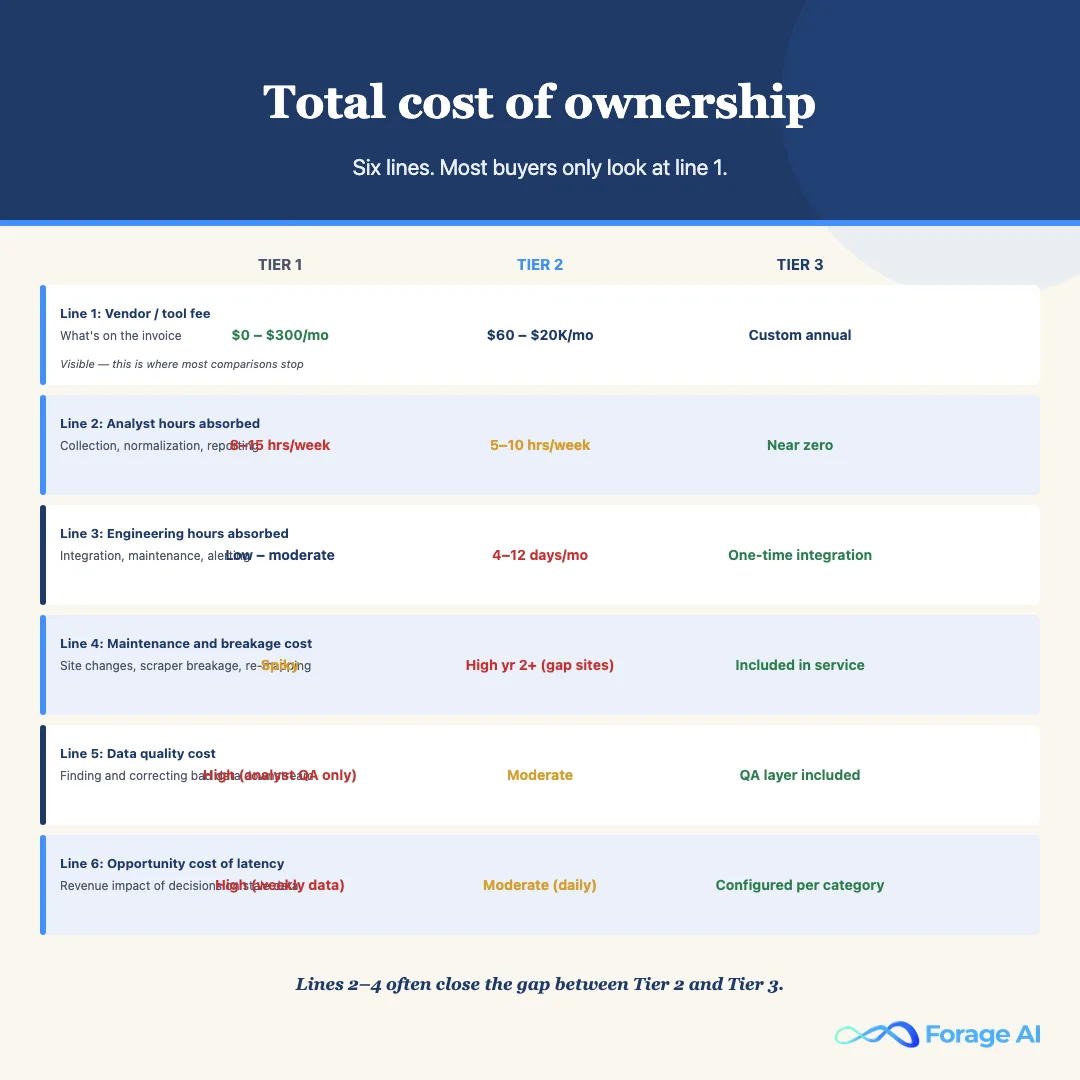
The honest TCO model has six line items per tier.
Line 1: Direct vendor or tool fee
The number on the invoice. Tier 1: zero to low. Tier 2: hundreds to low thousands per month, scaling with SKU count and feature tier. Tier 3: low five-figure to high six-figure annually, depending on volume, site count, schema complexity, and cadence.
Line 2: Analyst hours absorbed
- Tier 1: all of it. For a few hundred SKUs across ten sites, a typical analyst spends 8 to 15 hours per week on collection and normalization alone.
- Tier 2: the long-tail sites the tool does not officially support, the normalization edge cases the tool handles badly, and the cross-referencing the dashboard does not produce. For a typical mid-market deployment, this lands around 5 to 10 analyst hours per week per major gap.
- Tier 3: near zero for extraction and normalization. The analyst hours move from collection to analysis, which is the work the business actually wanted from the team.
Line 3: Engineering hours absorbed
- Tier 1: building spreadsheet templates, report automation, alerting on top of a manual feed. Modest but real.
- Tier 2: the integration layer to land tool output into your pricing engine, the translation layer for the tool’s schema versus your schema, in-house tracking for sites the tool does not support, and silent-failure detection that the tool does not provide. For a typical deployment, this is 4 to 12 engineer-days per month, often more in the first year.
- Tier 3: one-time integration engineering to land the vendor feed in your environment. Ongoing only when your downstream system changes.
Line 4: Maintenance and breakage cost
- Tier 1: low on average, but spiky. Each competitor site update that breaks an ImportXML formula or a WebScraper sitemap is an unplanned analyst hour.
- Tier 2: covered for supported sites, not covered for the gaps. This cost is invisible in the TCO until you have run the tool for six months and noticed how many hours go to the unofficial sites.
- Tier 3: built into the service. At Forage AI specifically, the three-layer QA model (structural, content, and trend-anomaly checks) and ongoing maintenance against competitor site changes are included in every engagement, not an add-on.
Line 5: Data quality cost
The time and analyst energy spent discovering and correcting bad data after it has been delivered. In Tier 1 and Tier 2, this is a real and recurring cost: stale cached prices, mismatched products, misread promotions, and structural scrape failures that return a “success” status but deliver garbage data. In Tier 3, this is what the managed service SLA and QA layer are supposed to prevent.
Line 6: Opportunity cost of latency
The revenue impact of making pricing decisions on stale data. In fast-moving e-commerce categories, daily or near-real-time pricing decisions have measurable revenue impact. A Tier 1 or Tier 2 tool that delivers daily data in a category that moves hourly is not just slower: it is producing a decision disadvantage that compounds over time.
Which Tier Fits Your Team?
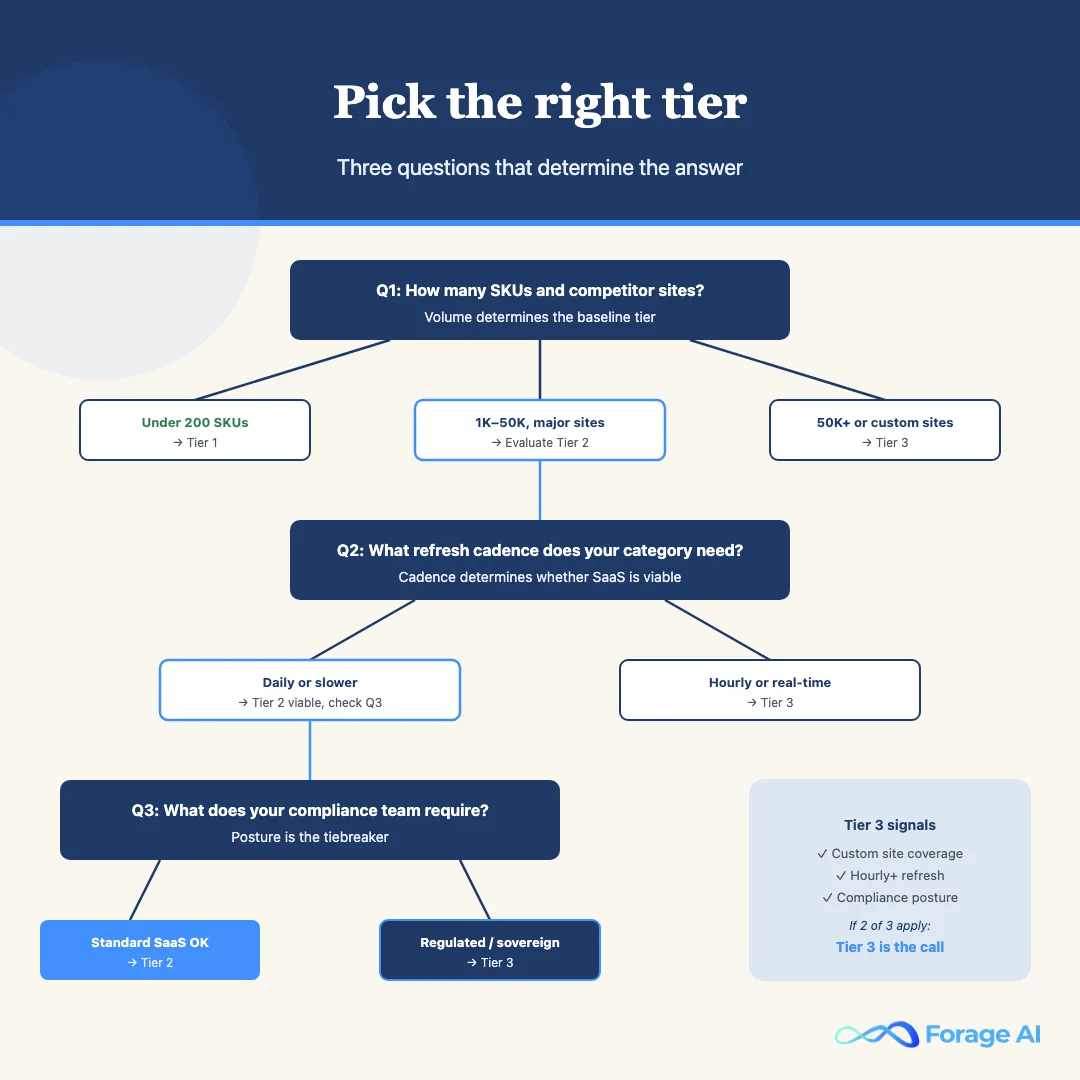
The tier choice is not a function of budget alone. It is a function of the size of the workload, the reliability requirements, the freshness requirements, and the compliance posture of the business. Three questions cut to it quickly.
How many SKUs are you tracking, and across how many competitor sites?
Under 200 SKUs across fewer than 10 sites: Tier 1. The setup cost of a Tier 2 tool is not recovered at this volume, and the analyst work fits in one person’s week.
200 to 50,000 SKUs on a defined set of major sites: Tier 2. The analyst-hour problem is real, the tool’s site coverage matches the workload, and the SaaS pricing model delivers positive ROI.
50,000-plus SKUs, or any workload with meaningful coverage outside the Tier 2 tool’s officially supported site list: Tier 3. The coverage gap and the maintenance burden of the unofficial sites tip the TCO toward managed services.
What refresh cadence does your category actually require?
Weekly or slower: Tier 1 or Tier 2 both handle this. Daily: the floor for most retail categories; Tier 2 handles this reliably for supported sites. Hourly or near-real-time: this is a Tier 3 workload. Most Tier 2 tools cap at four to six refreshes per day, and even that ceiling is inconsistent across the full site list.
What does your compliance team require?
Standard SaaS acceptable: Tier 2 works. Regulated industry, strict data lineage required, or sovereign deployment needed: Tier 3 with a managed service that provides per-record audit trail, an architecture that satisfies your regulator’s requirements, and sovereign deployment options.
Moving From One Tier to the Next
The migration from Tier 1 to Tier 2 is operationally simple. You have a spreadsheet with a list of competitor URLs and a manual mapping table. The Tier 2 tool ingests that mapping table, begins tracking, and you decommission the spreadsheet once the tool’s data is running cleanly. Most Tier 2 onboarding takes two to four weeks to reach that point.
The migration from Tier 2 to Tier 3 is operationally more complex. The Tier 2 tool has accumulated a set of matched products, a historical baseline, and an integration with a downstream pricing engine. A Tier 3 managed engagement starts from a specification, not an existing feed. The right migration approach is to run both in parallel for four to eight weeks: the Tier 2 tool continues to run the official site list while the Tier 3 engagement builds out the custom coverage. The Tier 2 tool is decommissioned only after the Tier 3 pipeline has demonstrated parity.
The thing that should not be migrated is the historical data itself. Tier 2 tools store price history in their own schemas; Tier 3 pipelines deliver into yours. The historical data from the Tier 2 tool needs to be exported and stored in your environment before the tool is decommissioned, not after. A lost price history cannot be reconstructed from public retail and product datasets, which are static snapshots with their own collection windows. Every team that has failed this migration step has had the same experience: six months of price history locked in a tool they are no longer paying for, with an export fee and a support ticket standing between them and their own data. Export before you cancel.
What “Top” Tools Get Wrong in Marketing
A note on how this category is marketed versus how it actually works.
Most “top competitor price tracking tools” lists are written by tools, for tools. A Tier 2 SaaS company that writes a listicle of “best price tracking tools” includes itself, includes a few obvious competitors it knows buyers will compare it to, and omits the managed services category entirely. The result is a list that is useful for comparing within Tier 2 but useless for deciding whether Tier 2 is the right tier at all. For a cross-category view that spans every tier, see our roundup of the top ecommerce data providers.
The other marketing pattern worth naming is the feature table that lists capabilities without listing their limits. A tool that “supports all major retail sites” supports the twenty sites on its official list. A tool that “refreshes daily” refreshes once per day. A tool that “provides product matching” uses URL matching, which fails for private-label and multi-pack products. Reading the feature marketing of this category requires translating from marketing English to operational English.
The best signal for evaluating a Tier 2 tool: ask for the list of officially supported sites, ask for the refresh cadence per plan tier in concrete terms, and ask what happens when a product on your list does not match automatically. The answers to those three questions will tell you more about whether the tool fits your workload than any feature comparison table.
FAQ
This article is for informational purposes only and does not constitute legal advice. Consult a qualified attorney for legal guidance specific to your situation.
What is competitor price tracking, exactly? The systematic monitoring of prices, promotions, availability, and pricing signals from competitor sites, at a defined cadence, for a defined set of SKUs, in a structured format that a pricing engine or merchandising team can use to drive decisions. The full workflow includes site identification, SKU mapping, extraction, normalization, refresh, QA, and delivery.
How often should we track competitor prices? Cadence should match the price volatility of your category. For most retail categories, a daily refresh is the floor; a weekly refresh is too slow for any competitive market. Marketplace categories, fast-moving consumer goods, and seasonally peaked categories often need hourly or near-real-time refresh.
What tools are most commonly used for competitor price tracking? The market splits into three tiers: manual processes (spreadsheets and DIY tools), off-the-shelf SaaS price intelligence platforms, and fully managed data services. Each tier has a place. The mistake is comparing within a tier without first determining which tier is appropriate for the workload.
How accurate is automated competitor price tracking? At the structural level, accuracy is typically very high in well-built systems. The harder accuracy question is whether the price returned is the right comparison price after promotions, pack sizes, regional differences, and marketplace seller-type are taken into account. That accuracy depends on the QA layer, not the scraping layer. Tier 1 has analyst QA. Tier 3 has built-in multi-layer QA. Tier 2 typically has neither.
What is the best price tracking tool for small e-commerce businesses? For catalogs under 500 SKUs on major retail sites, Prisync or Price2Spy give the fastest time-to-value in Tier 2. Prisync fits better if you are Shopify-native. Price2Spy if you have a larger or more complex catalog and need higher refresh frequency.
When does a managed data service make more sense than a SaaS price tracking tool? Three signals: you need coverage on sites the SaaS tool does not support, you need a refresh cadence the SaaS tool cannot hit, or your compliance team will not accept the SaaS tool’s data handling posture. Managed services like Forage AI handle all three, at the cost of longer setup time and a higher minimum spend. The calculation tips clearly toward managed services once any two of those three signals are present in your workload.
What does Forage AI specifically deliver for competitor price tracking? A managed engagement that includes pipeline build, infrastructure (proxies, headless browsers, retries, queues), three-layer QA, ongoing maintenance against competitor site changes, and delivery of clean structured price data into the buyer’s environment, feed, API, or warehouse drop. Schemas are custom to the buyer’s pricing engine. Site coverage is built to the engagement scope, including long-tail competitors and marketplace sites.
Conclusion
The three tiers are not a hierarchy of quality. They are a hierarchy of problem scope. Tier 1 is right for the problem it is designed for: low-volume, exploratory, analyst-driven price monitoring where the volume has not yet justified a tool. Tier 2 is right for mid-volume workloads on defined site lists where the SaaS model delivers positive ROI before the maintenance costs compound. Tier 3 is right when the workload has grown past what a configurable SaaS tool can reliably handle, or when the compliance requirements of the business require a different architecture.
The mistake that most teams make is not choosing the wrong tier; it is staying in a tier past the point where it stopped fitting. The signal is recognizable: the analyst who is spending more time managing the tool than using the data, the engineering team that is on call for scraper maintenance as a background tax on every sprint, the pricing team that has learned to distrust the numbers they are working from. That signal is not a reason to fix the tool. It is a reason to move up the tier.
Forage AI deliberately runs in Tier 3. We do not compete on dashboard features against price monitoring tools; we compete on whether the data shows up reliably, in the schema your pricing engine actually consumes, against the sites your buyers actually look at, at the cadence your category actually requires, without your team being on the hook when a competitor redesigns their product page. If that is the conversation you are ready to have, talk to our team about your price tracking requirements.
Related Articles
- Ecommerce Data Scraping: How Brands Extract Competitor Prices, Reviews, and Catalog Data, The extraction layer covered in more depth.
- Automated Data Collection: How Enterprise Teams Build Reliable Extraction Pipelines, The infrastructure decisions that underlie reliable price tracking at scale.
- Web Data Extraction: Build vs. Buy Decision Guide, The broader build-vs-buy framework that price tracking sits inside.
Sai is a data infrastructure enthusiast who has spent the past two to three years following the AI space closely, from the infrastructure layer to the fast-growing world of data for AI. He is genuinely curious about how modern data pipelines get built and where the data industry is heading, and he writes insightful pieces on the core topics that shape this niche.